.avif)
Freevisuals

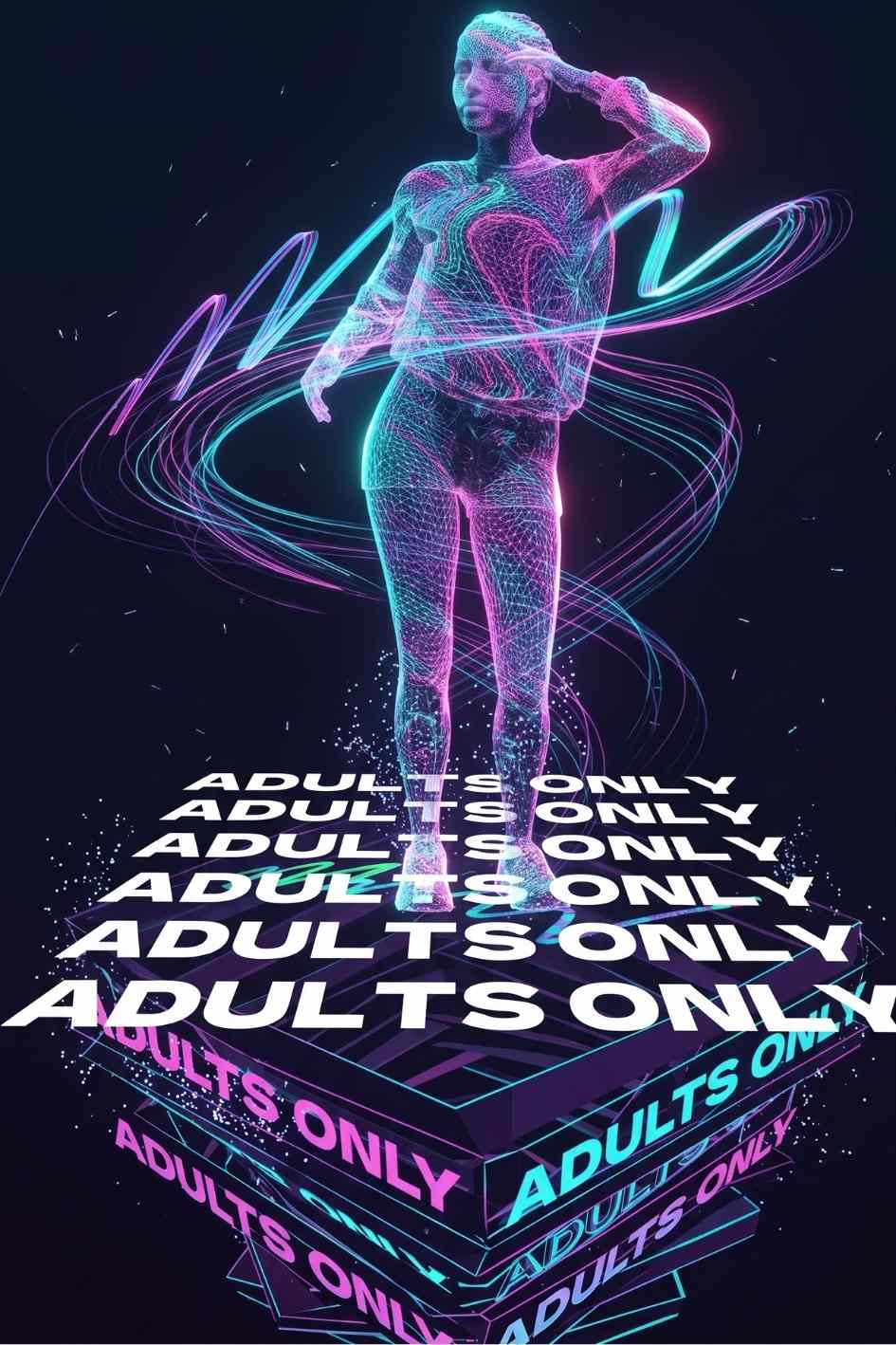
Night Club & Dance Holographic Intro is a holographic style After Effects opener built for DJs, festivals, and party promos.
Download FREEGo Pro To DownloadDownload NOW!If you're producing content for DJs, nightclubs, dance events, or music festivals, your opener needs to do one job well: make the room feel like it's already moving before the first beat drops. Night Club & Dance Holographic Intro is an After Effects template built around exactly that, dynamic holographic and iridescent effects layered over dancing silhouettes, paired with bold, fast-paced typography that's ready to promote your next event, artist, or venue.
This is a genre-specific template rather than a generic opener, which matters if you're producing content regularly for the nightlife or events space. If you want more options in the same category, our After Effects templates library and our guide to customizing Envato Elements video templates are both worth a look, and if music is the missing piece for your finished edit, Artlist and Epidemic Sound both carry large royalty free electronic and dance music libraries that pair naturally with this kind of opener.
If you'd rather have unlimited access to templates in this style instead of buying individual items, Envato Elements runs a subscription model covering thousands of similar openers, which can work out cheaper if you produce event or promo content on a regular basis.
This template is built around a holographic, iridescent visual treatment applied to dancing silhouettes and bold typographic elements, designed specifically to open content for night clubs, parties, and music events. The vibrant, shifting color textures give the animation a modern, high-energy feel that reads instantly as nightlife content, while the fast-paced text animations give you space to promote a specific artist, venue, date, or event.
Because the core visual language here (holographic shimmer, dancing figures, neon and iridescent color shifts) is so tightly matched to the events and nightlife niche, this template does a lot of the creative heavy lifting for you. Rather than building a custom animated opener from scratch for every event promo, you're customizing text and timing on a design that's already proven to fit the genre.
One thing worth flagging directly: because this exact template name is used by more than one creator across different marketplaces, exact specs like file size, After Effects version compatibility, and placeholder count can vary slightly between listings. Always check the specific attributes panel on the Motion Elements product page before purchasing, particularly your minimum After Effects version requirement.
DJs and music artists promoting upcoming shows. A holographic, high-energy opener gives your show announcement or ticket link post the same energy as the event itself, which matters when you're competing for attention in a crowded social feed.
Nightclubs and venues. If you're producing recurring content, weekly event promos, resident DJ announcements, ticket release videos, having a consistent, on-brand opener template saves significant production time across a busy content calendar.
Music festival and event organizers. Festival lineup announcements, artist reveal videos, and countdown content all benefit from an opener that signals "event energy" immediately, which this style of holographic, dance-forward animation does well.
Videographers and editors working nightlife or event clients. If you regularly edit aftermovies, promo reels, or social content for clients in the events and nightlife space, having a reliable, on-genre opener template in your kit means less time spent building a custom animated intro for every new client brief.
Radio stations and DJ mix channels. The same holographic dance aesthetic works well as a recurring intro for a DJ mix series or radio show upload, giving a consistent visual identity across episodes.
Step 1: Download and unzip the project files.
After downloading from Motion Elements, extract the zipped folder to a dedicated project directory, ideally not your downloads folder, since After Effects links to associated files by their saved path.
Step 2: Confirm your After Effects version meets the requirement.
Check the specific version requirement listed on the product page before opening the project. If you need to update Adobe After Effects, do that through Creative Cloud first. If you're weighing up your Adobe subscription options, our After Effects plugins guide also links out to relevant trial and subscription information.
Step 3: Open the .aep project file.
Double click the project file inside your extracted folder, or open it through After Effects via File > Open Project. Give the project a moment to load and cache its compositions, particularly on the first open.
Step 4: Review the project's help file or documentation.
Most professionally built templates on Envato-distributed marketplaces (which Motion Elements draws from) include a help file explaining the composition structure, which layers are editable, and any required fonts. Reading this before editing avoids accidentally adjusting a locked animation layer.
Step 5: Locate and edit the text layers.
Find the composition holding your event's promotional text (artist name, event date, venue, or tagline). Double click into the text layer with the Type tool active, then replace the placeholder copy with your own event details.
Step 6: Adjust colors if your brand calls for it.
Depending on how the project is structured, color adjustments are typically handled through either a dedicated color controller layer or by editing the color of individual shape and fill layers. This is where you can shift the holographic palette toward your venue or event's specific branding, or leave it as-is if the default iridescent look already fits.
Step 7: Swap in any additional media, if applicable.
If your version of the template includes media placeholders for footage or images (in addition to the dancing silhouettes already built into the design), replace these following the same logic as the text layers, locate the labeled placeholder composition, then drag your own file in.
Step 8: Preview before rendering.
Use RAM preview to confirm your text is legible for its full on-screen duration and that any color adjustments read correctly against the holographic background. This is also the point to confirm timing feels right for your intended platform, a fast cut for Instagram Reels or TikTok, or a slightly longer build for a YouTube aftermovie intro.
Step 9: Consider pairing with music before final export.
Since this template is built for music and event content, adding a temporary music track while previewing (even if you'll swap it for licensed audio later) helps confirm your text timing feels musical rather than arbitrary. Artlist is a solid source for royalty free electronic and dance tracks if you need something specifically built for this kind of content.
Step 10: Render and export.
Use File > Export > Add to Render Queue, or Adobe Media Encoder depending on your After Effects version. Export at the template's native resolution in H.264 for broad platform compatibility across YouTube, Instagram, and TikTok.
The holographic, iridescent visual style used in this template isn't a random aesthetic choice, it directly mirrors the physical experience of nightlife and dance culture. Holographic and iridescent surfaces (foil, sequins, laser-cut fabrics, shifting light on glass and metal) are already a core part of club and festival fashion and lighting design. When a video opener borrows that same shifting, color-changing quality, it visually reinforces what the viewer already associates with the event experience itself, movement, light, and color that never sits still.
This matters more than it might seem for short-form promotional content specifically. On platforms like Instagram and TikTok, viewers decide whether content is relevant to them within a second or two. A holographic, high-energy opener signals "nightlife event" almost instantly, before a single word of text has even been read, which reduces the chance of a scroll-past from someone who would have been interested in the actual event.
There's also a practical reason this style works well as a template rather than something built from scratch for every promo. Because the holographic effect is inherently dynamic and shifting, it's forgiving of minor color or timing imperfections in a way a flat, minimal design wouldn't be. A slightly off color grade still reads as "holographic," where the same imperfection on a clean corporate style opener would read as a mistake. That makes this style a genuinely lower risk choice for creators without a dedicated motion design background.
Overloading the text with information. It's tempting to include the full event lineup, ticket link, venue address, and sponsor names in one intro. Fast, holographic style openers work best with minimal text, artist and date is usually enough, save the rest for a caption or a secondary graphic.
Ignoring platform-specific export requirements. A template built and previewed at 1920 by 1080 will need reframing or a vertical version for Stories and TikTok. Don't assume a horizontal export will work as-is across every platform your event promo is going out on.
Skipping a test render before finalizing. Preview quality inside After Effects can look different from a compressed, exported file once it's uploaded to social media. Always do a test export and check how it looks once compressed by the platform you're posting to.
Reusing the exact same intro for every event without variation. While the template itself is reusable, swapping in fresh artist names, dates, and occasionally adjusting the color palette between events keeps your content feeling current rather than like a copy-paste repeat of last month's promo.
Not licensing the music used in your final export. If you're adding a soundtrack to your finished promo for public posting, make sure it's properly licensed. Royalty free libraries like Artlist exist specifically to avoid the copyright strikes that come from using unlicensed commercial tracks in promotional content.
These tutorials cover the underlying techniques this template is built around, useful if you want to understand how the holographic effect works or need a refresher on editing Envato-distributed After Effects templates generally:
Do I need any plugins to use this template?
No, based on every listing of this template we reviewed, it's built to run on native After Effects effects without third party plugins. Always confirm this against the specific attributes panel on the exact listing you purchase from.
What resolution does this template deliver?
Full HD, 1920 by 1080, across the versions of this template we found. This is suitable for most social platforms and YouTube delivery.
Can I use this for a paid event or ticketed show promo?
Licensing depends on which license tier you select at checkout. Always review the specific license terms on the product page to confirm it covers your intended commercial use case before purchasing.
Is there a free version of this template?
Not that we've been able to confirm at the time of writing. If you're specifically after free event or nightlife style openers, our After Effects templates page includes free options alongside premium picks like this one.
Can I change the color of the holographic effect?
In most templates built this way, yes, typically through a dedicated color controller or by adjusting the color of individual shape and fill layers. Check the project's help documentation for the specific method used in this version.
Affiliate Disclosure: This post may contain affiliate links. If you make a purchase through one of these links, FreeVisuals may earn a commission at no extra cost to you. We only recommend products and platforms we genuinely believe in. Read our full disclosure policy.

Download free video templates, LUTs, and presets for Premiere Pro, After Effects, DaVinci Resolve, CapCut, and Final Cut Pro.









