.avif)
Freevisuals

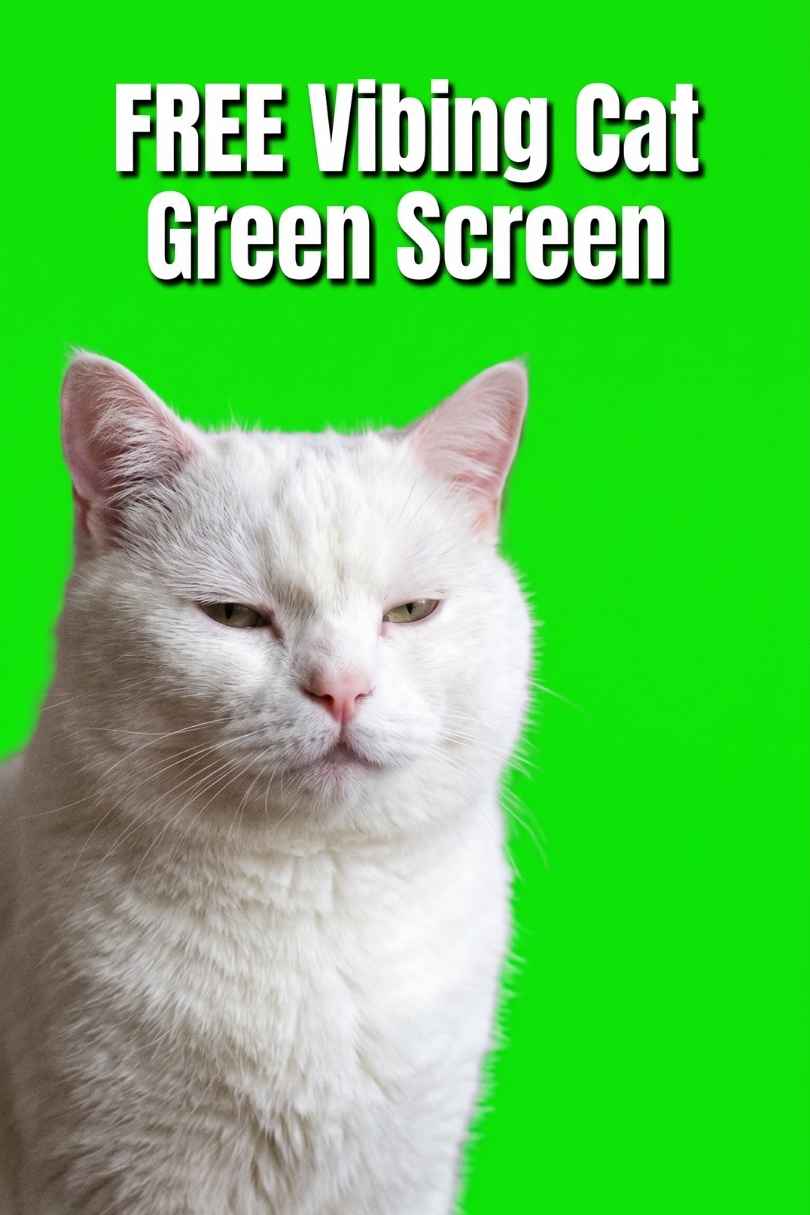
Download the free Cat Vibing Green Screen video and add the iconic vibing cat meme to your videos. Works in Premiere Pro, After Effects, CapCut, DaVinci
Download FREEGo Pro To DownloadDownload NOW!If you've spent more than five minutes on TikTok, YouTube Shorts, or Instagram Reels in the last few years, you already know the cat. That chubby, deadpan white cat bobbing its head slowly and rhythmically to the beat, completely unbothered, seemingly vibing to whatever music happens to be playing. It's one of the most recognisable and enduring memes on the internet, and it has been used in thousands of viral videos across every platform imaginable.
Now you can add it to your own videos for free. We've made the Cat Vibing Green Screen Video available to download at FreeVisuals.net with the background fully keyed out and replaced with a bright green screen so you can drop it straight into your edit using chroma key in any major editing software.
This post covers everything you need to know: what the asset is, why it works so well, how to use it, what software supports it, and how to build seriously funny and creative videos by pairing it with other assets from Envatoand Artlist.
The original clip comes from a viral TikTok and YouTube video titled "cat vibing greenscreen perfect loop," a short looping clip of a white cat slowly nodding its head side to side in perfect rhythm. The original video took off because of how perfectly timed the head movement is to virtually any piece of music you put underneath it. Editors discovered early on that you could sync it to almost anything: orchestral music, trap beats, lo-fi hip hop, film scores, and the cat would look like it was genuinely feeling every single one of them.
The version available here has had the background professionally keyed out and replaced with a solid bright green screen, which means you can import it into your video editing software, apply a chroma key or ultra key effect, and the green disappears, leaving just the cat floating on whatever background you choose.
It's not a high-resolution asset, and that's actually part of the charm. The lo-fi, slightly grainy quality of the clip makes it feel more authentic and more inherently meme-like. As anyone who has spent time making comedy content knows, the lower the quality, the funnier it tends to be. It fits the internet aesthetic perfectly.
Memes come and go at an extraordinary pace online. Most have a shelf life of a few weeks before they feel dated and overused. The vibing cat has been an exception to this rule in a remarkable way, remaining a consistent reference point in internet culture for years and continuing to resurface in new contexts whenever the right piece of music comes along.
There are a few reasons for this unusual staying power. First, the loop is genuinely perfect. The cat's head motion is smooth, rhythmic, and symmetrical, which means it syncs to a huge range of musical tempos without feeling forced. Second, the cat's expression is completely neutral and communicates nothing specific, which means the viewer projects the emotion of the music onto it entirely. Third, and perhaps most importantly, it has been used by creators across so many genres and niches that it carries a kind of universal recognition. Whether your audience is into gaming, music production, film, or lifestyle content, there's a good chance they've already seen and appreciated the vibing cat in some form.
For creators, this is powerful. Using a meme that your audience already has a positive emotional association with is a shortcut to engagement. It signals that you're plugged into internet culture, that you don't take yourself too seriously, and that you understand the language of the platform you're posting on.
Getting the cat into your video is straightforward regardless of which software you use. Here's the basic workflow across the most popular editors.
Adobe Premiere Pro: Import the green screen clip into your project and place it on a track above your background footage. Go to Effects, search for Ultra Key, and drag it onto the clip. In the Effect Controls panel, use the eyedropper to sample the green background colour. Premiere will remove it instantly, leaving just the cat. Scale and position it wherever you want it in the frame.
Adobe After Effects: Import the clip as a layer in your composition, apply the Keylight effect, and use the Screen Colour picker to sample the green. After Effects gives you more control over the matte edges if you need to clean up the key.
CapCut: This is probably the fastest option for social media creators. Import your background clip, add the green screen clip as an overlay, tap the overlay, select Chroma Key, and pick the green. Done in about thirty seconds.
DaVinci Resolve: Place the clip on a track above your background in the Edit page. Head to the Color page, select the clip, and use the Qualifier tool to pick the green screen colour. Refine with the matte controls as needed.
Final Cut Pro: Import the clip, place it above your background, and apply the Keyer effect from the Effects browser. Final Cut will automatically attempt to remove the green, and you can fine-tune from there.
Once the green is keyed out, you're free to scale the cat up, position it in any corner or centre of frame, animate it moving across the screen, or composite it into elaborate scenes. The loop is seamless, so you can extend the clip as long as you need without any visible cut.
This is where it gets genuinely fun. The vibing cat is one of those assets that rewards creative thinking. Here are some of the best ways creators use it.
Reaction overlay: Place the cat in the corner of the screen while something dramatic, unexpected, or emotional is happening in your main footage. The contrast between the cat's total calm and whatever chaos is unfolding in the background is a reliable comedy formula that works every time.
Music video cameo: Editing a music video or lyric video? Drop the cat into the scene as a recurring visual joke that appears on certain beats or during certain sections. It never stops being funny when it's timed well.
Gaming content: Gaming creators have embraced the vibing cat enthusiastically. Use it as a reaction in the corner during satisfying moments like landing a perfect shot, completing a difficult challenge, or watching an enemy fall. It says everything without saying anything.
Podcast and commentary videos: If you're producing talking-head style content or commentary videos, the cat works brilliantly as a visual gag during music transitions between sections. It gives the audience a moment to breathe and smile without breaking the flow of your content.
Tutorial humour: Educational creators and tutorial makers often use it to break up long explanatory segments and keep the energy light. Dropping the vibing cat in at a moment of unexpected relevance, say while discussing a particularly smooth workflow, earns a smile from the audience without derailing the content.
Brand and social media content: Social media managers for brands with a lighter tone have used the vibing cat in promotional content to great effect. It communicates that the brand has a pulse and understands the cultural moment, which is exactly what younger audiences respond to.
The vibing cat is a great starting point but the real magic happens when you pair it with quality assets that elevate the overall production. Envato has an enormous library of video templates, overlays, sound effects and motion graphics that work brilliantly alongside this clip.
Animated Meme Stickers and Emoji Packs: Envato's library includes animated character sticker packs and emoji overlays that sit naturally alongside the vibing cat. Layer a few animated reaction emojis around the cat to amplify the comedic effect, like a pair of musical notes bouncing in time, some star bursts, or a clapping hands loop.
Lower Third Templates: If you're using the cat as part of a branded video or YouTube content, Envato has hundreds of lower third templates that let you put a comedic caption underneath the cat. Something like "me at 2am listening to my playlist" sitting below the vibing cat is exactly the kind of social content that gets shared. Browse the full Envato library here.
Glitch and VHS Overlays: Pair the cat with a VHS-style broadcast glitch overlay for a lo-fi retro aesthetic that matches the inherently grainy quality of the original clip. The distortion and scan lines give the whole composite a deliberately rough internet-video feel that suits the meme perfectly.
Meme Sound Effects Packs: Envato's audio library includes dedicated meme and comedy sound effect packs covering bruh sounds, airhorns, cartoon boings, dramatic strings, and record scratches. These can be timed to the cat's head bobs for an extra layer of comedy that hits harder than music alone.
Particle and Confetti Overlays: Want to make the cat feel like it's at a party? Envato has numerous confetti, sparkle, and particle overlay packs that composite beautifully over the cat and background to create a celebratory scene.
The vibing cat lives or dies by the music underneath it. Get the music wrong and it's just a cat nodding. Get it right and it becomes a moment. Artlist is one of the best royalty-free music platforms available right now, and their catalogue has some perfect options for this kind of content.
Funny and Upbeat Tracks: Artlist's Funny music category is full of bouncy, playful instrumental tracks with the kind of tempo that syncs perfectly to the cat's head bob. Light jazz, quirky ukulele-driven pieces, and punchy brass arrangements all work well. The key is finding something with a clear, consistent beat that the cat can bob to convincingly.
Lo-Fi Hip Hop: The vibing cat was practically born for lo-fi hip hop. The relaxed tempo, the mellow chord progressions, the satisfying snare on the beat all line up with the cat's energy in an almost uncanny way. Artlist has a solid lo-fi catalogue that covers everything from mellow study beats to slightly more energetic lo-fi with a hip hop edge.
Dramatic Orchestral for Contrast Comedy: One of the funniest things you can do with the vibing cat is put something completely unexpected underneath it. A sweeping orchestral piece, a dramatic film score, or an intense operatic number creates a brilliant contrast between the grandeur of the music and the total nonchalance of the cat. It's a comedy formula that never gets old and Artlist has a well-stocked film score section that's perfect for this.
Pop and Electronic Bangers: If you're creating content for a younger audience on TikTok or Reels, pairing the cat with an upbeat pop or electronic track from Artlist gives you something energetic, shareable, and on-brand for the platform. The cat bobs convincingly to almost any tempo between 90 and 140 BPM.
What makes Artlist particularly valuable for this kind of content is the licensing. Everything on the platform is cleared for commercial use across all platforms including YouTube, TikTok, Instagram, Facebook, and client work, with no per-video fees or complicated licensing terms. You pay once for a subscription and everything you download is yours to use without worrying about copyright strikes or monetisation blocks. For creators making regular social content, that peace of mind is genuinely worth the investment.
Let's put this all together and walk through what a full creative bundle for a meme-style video actually looks like using the free cat asset alongside paid resources from Envato and Artlist.
The concept is a comedy reaction video for YouTube or TikTok where the vibing cat appears in the corner reacting to a series of increasingly absurd or dramatic moments, each one scored to a different piece of music.
Your free base asset is the Cat Vibing Green Screen Video from FreeVisuals.net.
From Envato you'd pull in a lower thirds caption pack to put funny text underneath the cat for each moment, a particle confetti overlay for the big climactic moment, and a VHS glitch overlay to bookend the video with a lo-fi intro and outro.
From Artlist you'd build a rotating playlist of three or four tracks across different moods and tempos: something lo-fi for the calm opening, an upbeat pop track for a mid-video energy burst, and a sweeping orchestral piece for the dramatic comedic finale.
The result is a fully produced, multi-section meme video with polished graphics, licensed music, and a universally recognisable cultural reference at the heart of it, built almost entirely around a single free asset.
A few practical things worth knowing before you start editing.
Keep the cat at a natural scale relative to your background. One of the most common mistakes creators make is sizing the overlay too large, which pushes it into uncanny territory. The cat works best as a supporting element in the corner or lower portion of the frame rather than as the dominant visual.
If the keyed edges look rough in your editor, try adding a very slight Gaussian blur of around 0.5 to 1 pixel to the edges of the matte. This softens the hard line between the cat and the background and makes the composite look considerably more natural.
Because the original clip is not high resolution, avoid placing it against very clean, sharp, high-resolution backgrounds. It actually composites better over footage that has some grain or texture to it, since the imperfections of the cat clip blend more naturally with imperfect backgrounds than they do against pristine 4K footage.
Loop the clip to whatever length your sequence requires. The loop point is seamless, so there's no visible cut or jump when it repeats.
The Cat Vibing Green Screen Video is available to download right now, completely free, at FreeVisuals.net. No sign-up required, no watermark, no strings attached. Download it, drop it in your edit, and make something great.
While you're there, explore the rest of the free asset library where you'll find hundreds of free Premiere Pro templates, After Effects projects, overlays, transitions, LUTs, and music tracks available for download. And if you're ready to take your content to the next level, Envato and Artlist are the two platforms we consistently recommend for premium assets and licensed music that work seamlessly alongside everything available here for free.
The cat is waiting. Go make something.
Download free video templates, LUTs, and presets for Premiere Pro, After Effects, DaVinci Resolve, CapCut, and Final Cut Pro.













