.avif)
Freevisuals
A full review of the Dynamic Glitch Logo Reveal with Digital Particle Effects After Effects template on Envato Elements. Covers what makes the particle and
Download FREEGo Pro To DownloadDownload NOW!Your logo reveal is the first five seconds of your brand's visual voice. It sets the tone for everything that follows - the colour grade, the edit style, the audio design, the overall production value the audience assigns to your channel or company before a single word of your content has landed. Most creators either skip a proper logo reveal entirely or use the same free template everyone else is using. This Envato template gives you a genuinely professional third option.
The Dynamic Glitch Logo Reveal with Digital Particle Effects is available through Envato Elements and delivers exactly what its name promises - a high-energy, particle-driven logo animation with glitch and digital distortion effects baked into the reveal. The template is built for After Effects CC, requires no third-party plugins, and is designed for creators who want a logo intro that positions their brand in the technology, gaming, esports, or contemporary digital content space without spending hours building custom motion graphics from scratch.
I have seen a lot of glitch logo reveals over the years, and the vast majority of them fall into one of two failure modes. The first is the over-complex reveal that takes eight seconds and involves so many particle systems, lens flares, and camera moves that by the time the logo actually appears the audience has lost interest. The second is the generic, paint-by-numbers glitch effect that looks identical to a dozen other channels and communicates nothing distinctive about the brand it is supposed to introduce. This template avoids both failure modes by combining the particle build with the glitch reveal in a way that feels purposeful rather than busy, and distinctive rather than generic.
.jpg)
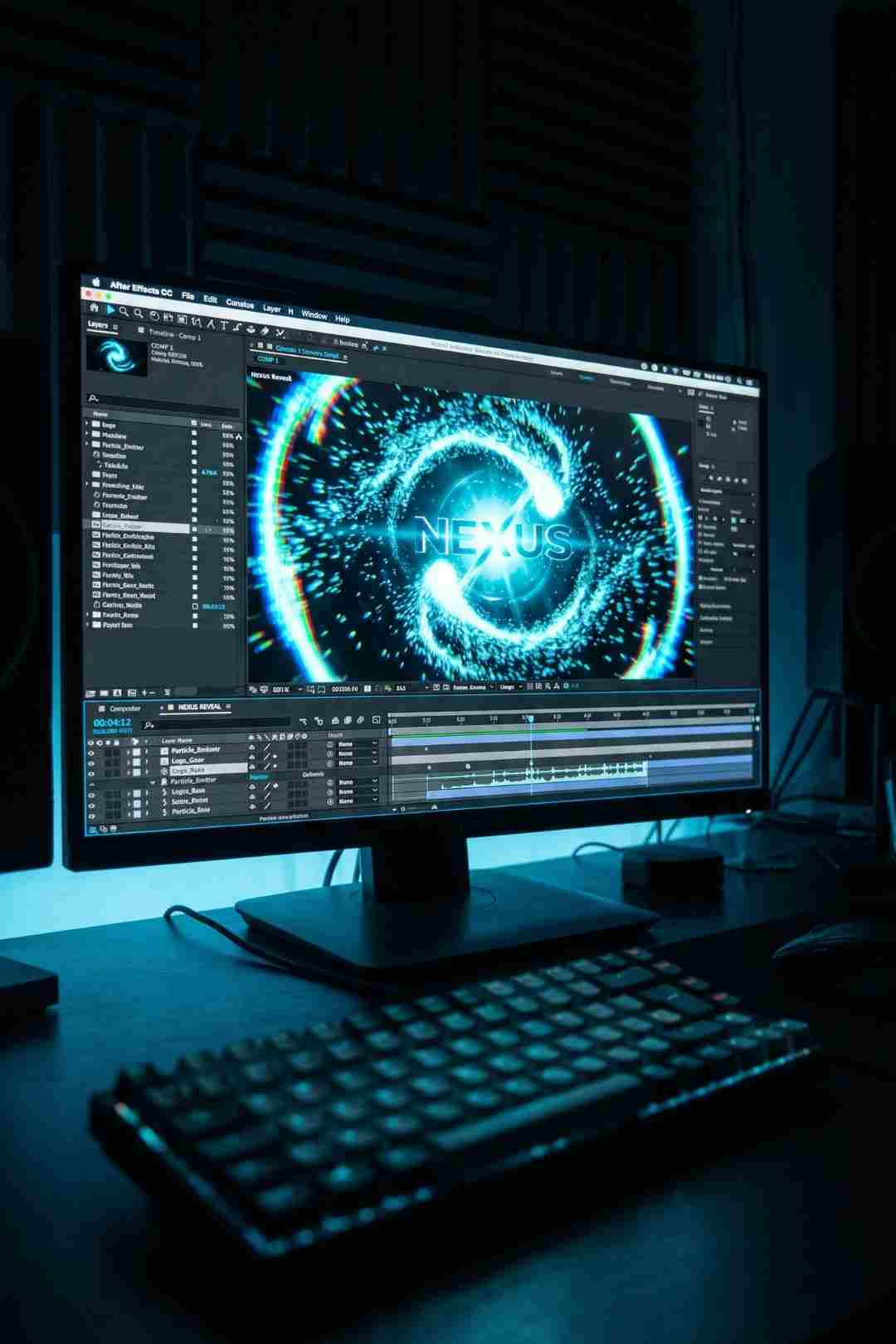
The Dynamic Glitch Logo Reveal with Digital Particle Effects is an After Effects CC template that opens with a field of digital particles which build, swirl and coalesce before the logo is revealed through a combination of glitch distortion, RGB separation, and digital fragmenting effects. The particles are not a decorative backdrop - they are the mechanism of the reveal itself, which gives the animation a sense of internal logic that the best logo reveals always have.
The glitch effects applied at the moment of logo reveal include the core digital distortion toolkit: chromatic aberration separating the colour channels, pixel block fragmentation, horizontal line interference, and a sharp, clean resolution into the final logo state. The transition from particle chaos to clean logo presentation happens with enough speed to feel energetic but enough clarity to ensure the logo is fully legible and impactful when it lands.
The template ships with clearly organised compositions in After Effects, making the customisation process accessible to editors who are comfortable in After Effects but are not dedicated motion designers. You replace the logo artwork, adjust the colour of the particles and glow effects to match your brand palette, and the template does the heavy lifting on the motion design.
No plugins are required. The entire animation runs on standard After Effects CC effects, which means no additional purchases, no version conflicts, and no Trapcode or Video Copilot dependencies to navigate. For editors working across multiple machines or with clients who need to be able to open and adjust the project file themselves, plugin-free is always the right answer.
A logo reveal is not decoration. It is a handshake between your brand and your audience. Make it memorable, make it fast, and make it unmistakably yours.
The workflow for getting this template into your project is clean and fast. Here is the full process from download to finished render.
If you are cutting your main project in Premiere Pro, Adobe Dynamic Link is your friend here. Rather than rendering an intermediate file from After Effects, Dynamic Link lets you drop the After Effects composition directly into your Premiere timeline as a live link. Any changes you make in After Effects update immediately in Premiere without requiring a re-render. For deadline work this is a significant advantage over the traditional round-trip workflow.
Here is a good tutorial covering how to build a particle-based logo and text animation in After Effects from scratch. Understanding the underlying mechanics of particle logo reveals gives you the knowledge to confidently customise and extend the Envato template beyond its defaults, adjusting particle density, speed, colour and timing to match your specific brand requirements.
The logo reveal category on Envato Elements is one of the most populated in the entire template library. There are hundreds of options, and most of them are technically competent. What separates this one from the pack is the relationship between the particle system and the glitch effect. In most particle logo reveals, the particles are atmospheric - they fill the frame while the logo does something else. Here, the particles are the reveal mechanism. They gather, concentrate, and then shatter into the glitch distortion that resolves into the logo. That cause-and-effect relationship gives the animation a sense of visual storytelling that lifts it well above the category average.
The glitch effect quality at the moment of reveal is also worth highlighting specifically. RGB separation in After Effects is easy to apply badly and quite difficult to apply well. When it is done without care it looks like a colour fringing artifact. When it is done with intention it looks like a deliberate, high-energy visual event. This template falls clearly in the second category. The channel separation timing, the pixel block fragmentation, and the resolution into the clean logo state are all timed and scaled in a way that makes the effect feel designed rather than applied.
The overall duration of the reveal is well-judged. Coming in at a tight, energetic length, it does not overstay its welcome. The best logo reveals know when to get out of the way of the content that follows them, and this one does.
This is the primary audience and the template serves it perfectly. Tech review channels, gaming channels, esports organisations, and software tutorial creators all need a logo reveal that communicates digital credibility in the first few seconds. The particle and glitch aesthetic does exactly that. It is the visual equivalent of saying "we understand the medium we are working in" before the content has even started.
Twitch and YouTube streamers building a recognisable brand identity need a logo reveal that works as an intro, as a scene transition stinger, and as a subscribe or follow prompt overlay. The tight duration and high-impact design of this template make it adaptable across all three use cases without modification. Pair it with the Dynamic Glitch Lower Thirds we reviewed to build a complete branded motion graphics system for your stream or channel.
Brand films, pitch decks, and promotional videos for tech-focused companies benefit from a logo reveal that positions the brand in the contemporary digital space. The particle and glitch aesthetic signals innovation, speed, and technical competence - all brand values that technology companies want to communicate. This template delivers those signals in five seconds or less, which is exactly the efficiency a good logo sting demands.
The growing market for video podcast content has created strong demand for channel branding that feels professional and contemporary. A glitch particle logo reveal used consistently across every episode builds visual identity over time and signals to the audience that this channel takes its production seriously. Pair it with the Premium Fluid Neon Glow Lower Thirds for a complete intro and title system that works across multiple episode types.
Electronic music producers, DJs, and music-focused content creators often have strong visual brand identities that lean into the digital and futuristic aesthetic. A glitch particle logo reveal is a natural companion to that visual language and gives music content a professional intro that matches the production value of the audio.
A logo reveal does not exist in isolation. It is the opening statement of a complete visual identity system, and the assets you pair it with determine whether that system feels cohesive or assembled from unrelated parts. Here is how I build a complete branded visual system around this template.
For lower thirds and title cards, the Dynamic Glitch Text Animations and Modern Lower Thirds pack from vcgmotion is the most natural companion. Both share the same core glitch and digital distortion aesthetic, which means using them together in the same project creates a coherent visual system rather than a collection of borrowed assets. The glitch lower thirds handle name and title cards throughout the content while this logo reveal handles the intro and outro.
For transitions between sections, the Dramatic Film Reel Transitions pack sits at the opposite aesthetic end of the spectrum - analog, dramatic, monochrome - which makes it a strong choice for projects that want visual contrast between a contemporary digital brand identity and more cinematic content moments. Using the glitch logo reveal as the brand wrapper and the noir transitions for internal scene changes creates an interesting tonal dynamic in documentary or true crime content.
For music and sound design, Epidemic Sound has the strongest catalogue for the specific sonic requirements of a glitch particle logo reveal. You need a logo sting - a short, punchy sound design piece that lands simultaneously with the logo reveal moment and gives it audio weight. Their Interface and Futuristic SFX categories have exactly the right digital hits, electronic stingers, and glitch audio events for this purpose. For the music beds that follow the reveal, their Electronic and Cyberpunk mood categories are directly relevant.
Artlist is a strong alternative for the music that follows the reveal, particularly their Technology and Energy categories which have high-quality electronic and cinematic tracks suited to tech and gaming content. Their stock footage library also carries strong technology and urban B-roll for creators who need supplementary footage alongside their main camera work.
For background footage and B-roll, Shutterstock carries an excellent library of technology-focused stock video including server rooms, data visualisations, circuit board close-ups, and urban technology environments that sit naturally in the same visual world as a digital particle logo reveal.
Prepare your logo correctly before you open the template. A high-resolution PNG with a transparent background is the cleanest input. If your logo uses gradients or complex colour relationships, test how they interact with the particle and glitch effects before committing to a colour scheme - sometimes simpler logo artwork with a clear single accent colour produces a more impactful reveal than a complex multi-colour version.
Match the reveal colour to your brand but do not be afraid to push the saturation higher than you normally would on static brand materials. The particle and glow effects benefit from vibrant, saturated colour. A slightly more intense version of your brand colour will read better in the animation than a literal reproduction of your standard brand hex code.
Use a dark background or a very dark grade on any footage that follows immediately after the reveal. The particle and glow effects are designed to work in a dark environment. Cutting directly from the logo reveal into bright, fully saturated footage creates a jarring contrast that undermines the impact of the intro. Either use a fade through dark, a cut to black, or ensure the first shot of your main content is graded to a similar luminance level as the reveal.
Build the audio before you lock the timing. A glitch particle logo reveal without a tight sound design is running at about sixty percent of its potential impact. Find your logo sting first - a one to two second electronic hit or glitch sound event from Epidemic Sound's Interface SFX category - and cut the visual to land with the audio peak rather than the other way around. The audio is the anchor that makes the visual hit feel physical rather than decorative.
Keep it short. The template's built-in duration is well-judged, and the temptation to extend the particle build or slow down the reveal to make it feel more epic almost always makes it feel slower rather than more impactful. Trust the original timing and resist the urge to stretch it.
The most effective use of a logo reveal template is not as a standalone asset but as the cornerstone of a complete branded motion graphics system. Here is what that looks like in practice for a YouTube channel or video podcast series.
The logo reveal handles the channel intro - a five-second branded moment at the start of every video that establishes visual identity and production value before the content begins. The Glitch Lower Thirds handle name and title cards throughout the video, maintaining the same digital aesthetic for every guest introduction, location card, or chapter title. The Neon Glow Lower Thirds provide a warmer, more atmospheric alternative for moments where you want energy without the sharp digital edge of the glitch effect. And a consistent end card built in the same visual language as the intro rounds out the episode with a branded call to action.
All three template packs are available under a single Envato Elements subscription at $16.50 per month, which means building this complete system costs the same as one month of subscription access rather than three separate template purchases.
Add music from Epidemic Sound or Artlist, B-roll from Shutterstock, and you have a complete production pipeline that covers every asset category a professional channel needs - all from platforms with clean commercial licensing that protects your YouTube channel from Content ID issues.
No. The Dynamic Glitch Logo Reveal with Digital Particle Effects works natively in After Effects CC with no third-party plugins required. All effects are part of the standard After Effects installation, which means no additional cost, no version conflicts, and no dependency issues when sharing the project file with clients or collaborators.
Yes, via two methods. You can render the finished composition from After Effects as a ProRes or PNG sequence and import it into Premiere Pro as a standard clip. Alternatively, if both applications are installed on the same system, you can use Adobe Dynamic Link to bring the After Effects composition directly into your Premiere timeline as a live, editable link that updates in real time when you make changes in After Effects.
Open the project in After Effects, locate the logo placeholder composition in the Project panel, and replace the placeholder artwork with your own logo file using the Replace Footage option. A PNG with a transparent background is the cleanest format to use. The particle and glow effects will automatically interact with your logo's shape and dimensions.
PNG with a transparent background is recommended for most logos. For logos with complex vector paths or very fine detail, an EPS or AI file may preserve more quality at the render stage. Avoid JPEG files as the compression artefacts will be visible in the particle and glow effects.
Yes. Well-built Envato templates expose colour controls at the top level of the project through a dedicated control layer. Adjust the colour pickers in the Effect Controls panel to match your brand palette. Pushing the saturation slightly higher than your standard brand colours often produces a more visually impactful result in the context of the animation.
Not in isolation. The value of an Envato Elements subscription is in the breadth of the library. At $16.50 per month you get unlimited downloads from over 27 million assets including After Effects templates, Premiere Pro templates, stock footage, LUTs, fonts, and more under a lifetime commercial licence. For a working video creator producing consistent output, the subscription pays for itself quickly.
A short, punchy electronic hit or glitch stinger timed to land at the exact moment the logo resolves from the particle and glitch animation gives the reveal its maximum impact. Epidemic Sound's Interface and Futuristic SFX categories have a strong range of one to two second digital hits, data sounds, and electronic stingers designed for exactly this use case. Keep the sound design piece at full level for the reveal moment, then cut to your main music bed immediately after.
The Dynamic Glitch Logo Reveal with Digital Particle Effects is one of the better logo reveal templates in the Envato Elements library because it solves the right problem in the right way. The problem it solves is giving creators in the technology, gaming, and digital content space a logo intro that communicates production credibility and brand sophistication without requiring custom motion design work. The way it solves it is by combining particle systems and glitch effects in a relationship that has internal logic - the particles are not decoration, they are the mechanism - and executing that logic with timing and quality that feel premium rather than templated.
No plugins, clean project organisation, accessible customisation, and a visual result that stands clearly above the free alternatives available elsewhere. That combination earns a straightforward recommendation for any creator whose brand identity lives in the digital, technology, or contemporary content space.
Download it, prepare your logo correctly, find your audio sting on Epidemic Sound, build the audio before you lock the timing, and you will have a logo reveal that serves your brand for the next few years of content production without ever feeling dated.
If you are building out a complete motion graphics system around this reveal, our reviews of the Glitch Lower Thirds, the Neon Glow Lower Thirds and the Dramatic Film Reel Transitions cover the complementary assets that complete the toolkit.
Get the template here: Dynamic Glitch Logo Reveal with Digital Particle Effects on Envato Elements.

Download free video templates, LUTs, and presets for Premiere Pro, After Effects, DaVinci Resolve, CapCut, and Final Cut Pro.