.avif)
Freevisuals
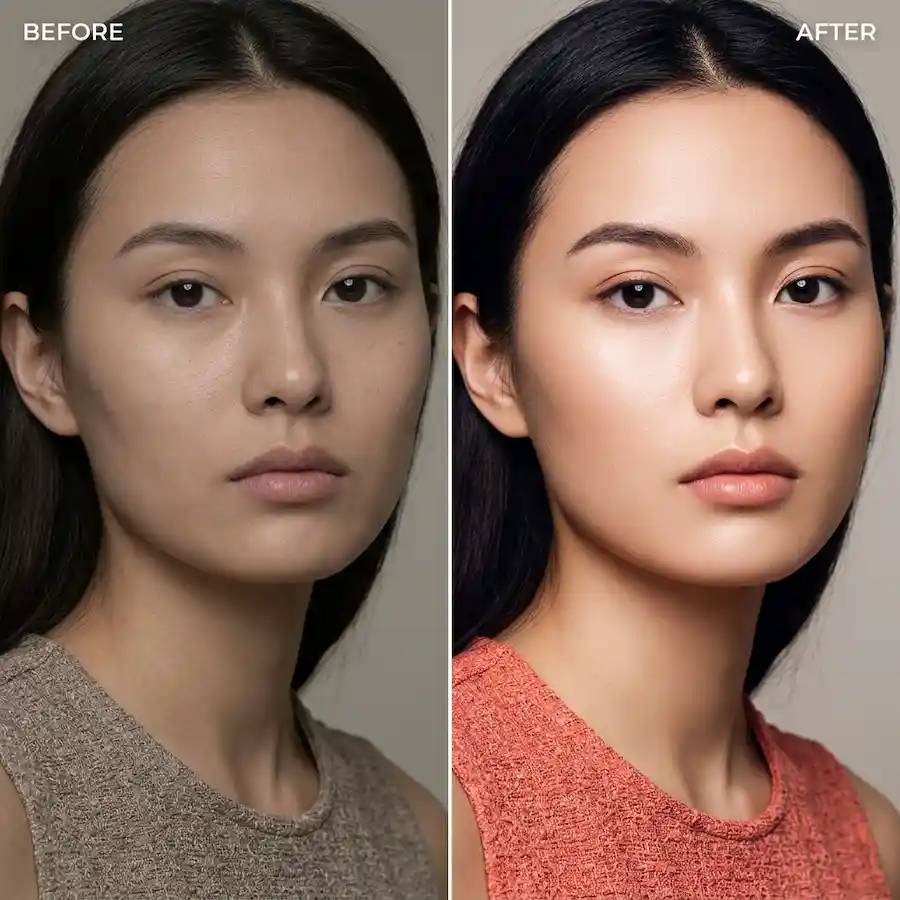
50 fashion and beauty editorial .cube LUTs across 5 styles for Premiere, Resolve, FCP and CapCut. Freevisuals Pro pack.
Go Pro To DownloadQuick Answer: Download 50 professional .cube LUTs built for fashion film and beauty content, across 5 styles from glossy studio looks to soft skin glow, ready for Premiere Pro, DaVinci Resolve, Final Cut Pro and CapCut.
Fashion and beauty grading needs to do two things at once: make the clothing, set and lighting look bold and intentional, while keeping skin looking clean and flattering. Those two goals often pull against each other, which is why every LUT in this pack includes a skin tone protection step that holds warm midtones back from the stronger stylization applied to the rest of the frame.
The collection covers 5 sub styles, each with 10 intensity variants numbered 01 through 10, subtle through strong.
The included preview sheet compares all 5 sub styles against the same base footage, useful for seeing how much further Runway Bold pushes saturation and contrast compared with Soft Skin Glow. As with any beauty focused grade, test against a genuine close up shot of skin before committing to a strength for a full edit, since skin tone response is the detail that matters most in this genre.
A clear grounding in Resolve's color tools, useful for understanding how to isolate and protect skin tones on top of a creative LUT for fashion and beauty footage specifically.
Watch on YouTube: Colour Grading for Beginners (DaVinci Resolve Tutorial)
Covers Lumetri fundamentals including secondary color correction, directly useful for fine tuning skin tone protection further on top of any of these 5 sub styles.
Watch on YouTube: The Ultimate Guide to Color Grading in Premiere Pro
Fashion and beauty content depends heavily on strong stock imagery and footage to supplement original shoots. Shutterstock carries an extensive fashion and beauty stock library that pairs well with this grade for brand and social content. For editorial and campaign style music, Artlist has strong modern and electronic categories suited to Runway Bold and High Fashion Contrast specifically. For fashion brand title templates and lower thirds, Envato carries a wide range of editorial and lookbook style templates worth browsing.
For a brand producing a series of campaign videos, picking one sub style as the brand signature and reserving the others for specific content types, such as Soft Skin Glow for behind the scenes beauty content and Runway Bold for the main campaign film, keeps a consistent identity across a full content calendar rather than a different look on every upload.
This collection is aimed at fashion and beauty content creators, brand videographers and small studio teams producing lookbooks, campaign films and social content who need a fast, consistent editorial look without hiring a dedicated colorist for every shoot. It also suits beauty and skincare brands specifically, since Soft Skin Glow was built with that audience in mind, prioritizing flattering skin over heavy stylization.
The most common mistake in fashion grading is pushing contrast and saturation as far as the footage will allow without checking the effect on skin tone specifically. A grade that makes fabric and background colors look striking can simultaneously make skin look flat, orange or unnaturally cool if you are not watching skin tone as you increase intensity. Always check a close up of the model's face at your chosen variant before finalizing a strength for the full edit.
A second mistake is applying the same strong stylized grade across an entire campaign video including behind the scenes and interview segments. Reserve the boldest variants of High Fashion Contrast and Runway Bold for the main visual moments of a campaign, and use a lighter touch or switch to Matte Editorial for any dialogue heavy or behind the scenes content within the same project.
Finally, be cautious mixing footage from multiple shoot days or lighting setups without correcting each clip individually first. Fashion and beauty audiences tend to notice inconsistent skin tone across cuts more readily than inconsistencies in background or product color, so skin tone matching between clips deserves extra attention before the creative LUT goes on top.
This pack is covered by the FreeVisuals Pro license, which allows use in unlimited personal and commercial video projects, including brand campaigns and monetized content, for as long as your Pro access remains active or for a one off purchase of this pack specifically. Reselling or redistributing the raw .cube files themselves outside a finished video project is not permitted.
Fashion and beauty brands producing varied content beyond studio work may also find these packs useful. Cyberpunk Neon Nights suits bold, nightlife or club adjacent fashion content that wants a completely different color language from a clean studio look. Golden Hour and Cozy Warmth works well for lifestyle and outdoor fashion shoots where a softer, warmer palette fits the setting better than a studio editorial grade.
Why do some of these LUTs mention skin tone protection specifically?
Fashion and beauty grading often pushes contrast and saturation harder than other genres, which can shift skin tone in unwanted directions. Each sub style in this pack includes a built in skin tone protection step that pulls warm midtones back toward neutral before the stronger stylization is applied, so the clothing and background can be stylized without the model's skin looking off.
Which style works best for beauty and skincare content specifically?
Soft Skin Glow is built for beauty and skincare content, with the strongest skin tone protection in the pack and a gentle, flattering glow rather than heavy contrast.
Can I use High Fashion Contrast or Runway Bold on interview or talking head content?
You can, but both are built for short form, visually driven fashion content rather than extended dialogue. For interview segments within a fashion brand video, Matte Editorial or a lighter variant of Glossy Studio tends to hold up better over longer takes.
Do these LUTs work on footage shot with continuous LED lighting as well as strobes?
Yes, the LUTs respond to the color values in your footage regardless of lighting source. That said, footage shot with clean, well balanced continuous or strobe lighting will always respond more predictably than footage with mixed or uncorrected color temperatures.
Which variant number should I start with for a first pass on new footage?
Start around variant 05 or 06 in whichever sub style fits your shoot, then adjust up for a bolder editorial look or down for something more natural, rather than starting at either extreme of the range.
Download free video templates, LUTs, and presets for Premiere Pro, After Effects, DaVinci Resolve, CapCut, and Final Cut Pro.









