.avif)
Freevisuals
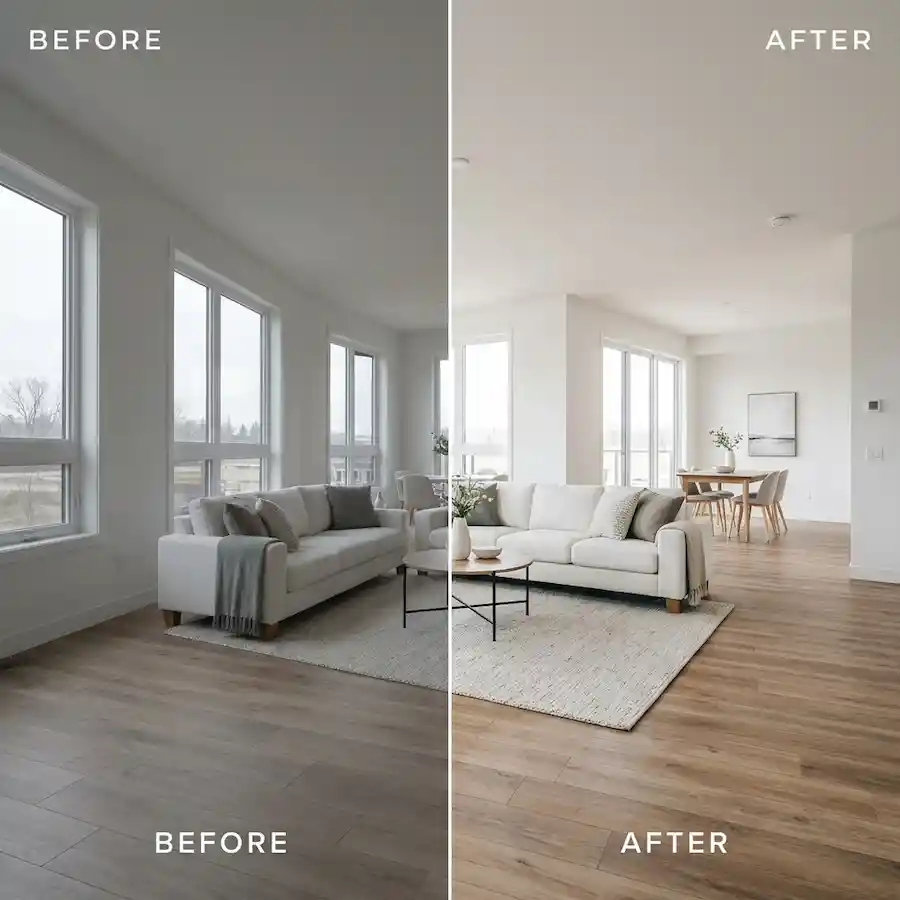
50 real estate and architecture .cube LUTs across 5 styles for Premiere, Resolve, FCP and CapCut. Freevisuals Pro color grade pack.
Go Pro To DownloadQuick Answer: Download 50 professional .cube LUTs built for real estate and architecture video, across 5 styles from bright interiors to blue sky exteriors, ready for Premiere Pro, DaVinci Resolve, Final Cut Pro and CapCut.
Real estate video has a narrower margin for error than most other genres. A grade that looks stylish on a cinematic short film can make a kitchen look dim or a sky look fake to a buyer scrolling through listings. This pack is built around clarity and accuracy first, with saturation and warmth used carefully rather than pushed hard.
The collection covers 5 sub styles, each with 10 intensity variants numbered 01 through 10, subtle through strong.
Because real estate walkthroughs often mix footage from a gimbal, a drone and a phone across one property, applying the same LUT on an adjustment layer above every clip is the fastest way to keep the whole video looking consistent, even when the underlying footage varies in white balance from room to room.
The included preview sheet shows the same base footage across all 5 sub styles, useful for comparing how differently Blue Sky Boost and Modern Minimal Grey treat the same scene. As with any real estate LUT, test on a short clip from the actual property first since lighting conditions vary enormously between listings.
A full grounding in Lumetri Color fundamentals, useful background for fine tuning any of these 5 sub styles on a room by room basis rather than applying one setting across an entire property.
Watch on YouTube: The Ultimate Guide to Color Grading in Premiere Pro
Covers a full start to finish grading workflow that applies well to mixed lighting walkthrough footage, which is one of the more common challenges in real estate video.
Watch on YouTube: How to Color Grade ANY TYPE of Video in Premiere Pro (Start to Finish)
If you need supplementary property or interior stock imagery to round out a listing video, iStock has a strong library of architecture and interior stock photography and footage. For aerial and drone stock footage to supplement your own property shots, Artlist carries aerial and lifestyle clips that cut well against this pack. For listing video title templates and lower thirds showing price, square footage and agent details, Motion Array has a dedicated real estate template category worth browsing.
For agents and videographers producing a series of listings, picking one sub style as a signature look and reusing it across every property video builds brand recognition for the agency, in the same way a consistent photography style does for a real estate brand.
This collection suits real estate videographers and agencies producing a high volume of listing videos who need a fast, repeatable grading workflow rather than a custom color pass on every property. It also suits architecture and interior design studios producing showcase reels where accurate, clean color matters more than heavy stylization, and drone operators who need their aerial footage to match ground level footage shot on a different camera within the same video.
The most common mistake in real estate grading is applying a strong creative LUT without first correcting exposure and white balance on each clip. Real estate footage is often shot across multiple rooms with very different lighting conditions in a single walkthrough, and a LUT applied on top of inconsistent white balance will amplify those inconsistencies rather than fix them. Always get exposure and white balance close to correct on a clip by clip basis first, then apply the same LUT across all clips for a consistent final look.
A second mistake is over saturating exterior sky shots to the point where the sky looks artificial. Buyers and agents generally respond better to a sky that looks vivid but believable rather than one that looks obviously enhanced, so when in doubt with Blue Sky Boost, choose a lighter variant than your first instinct suggests.
Finally, avoid switching sub styles between videos for the same agency or property series without a clear reason. Buyers browsing multiple listings from the same agent benefit from a consistent visual identity across videos, in the same way consistent photography style builds trust in a listing portfolio.
This pack is covered by the FreeVisuals Pro license, which allows use in unlimited personal and commercial video projects, including client listing videos and agency marketing content, for as long as your Pro access remains active or for a one off purchase of this pack specifically. Reselling or redistributing the raw .cube files themselves outside a finished video project is not permitted.
If your work extends beyond listing videos into broader lifestyle or brand content, a couple of other FreeVisuals Pro packs are worth a look. Golden Hour and Cozy Warmth suits lifestyle content shot around a property, such as a day in the life video for a short term rental listing. Cinematic Teal and Orange is a strong choice for a more dramatic architecture showcase reel where accuracy matters less than visual impact.
Will Blue Sky Boost affect interior footage where there is no sky visible?
Blue Sky Boost is built to react to blue tones in bright areas of the frame, so interior shots with little or no sky in view will show a much smaller shift than exterior or window heavy shots. For interior only footage, Bright Bloom Interior or Modern Minimal Grey are usually a better starting point.
Which style should I use for a twilight or dusk exterior shoot?
Twilight Exterior is built specifically for that lighting, balancing the warm glow of interior lights against a cooler evening sky, which is the classic look used in high end listing photography and video.
Can I apply these LUTs to drone footage as well as ground level footage?
Yes. All 50 LUTs work on any Rec.709 footage regardless of camera type. Blue Sky Boost and Twilight Exterior in particular are popular choices for drone exteriors since both are built around sky and horizon tones.
Will a strong grade make the property look inaccurate to buyers?
For real estate specifically we recommend staying in the lighter to middle range of each style, roughly variants 03 to 06, since agents and buyers generally expect color that looks true to the property rather than heavily stylized. Save stronger variants for architecture showcase reels rather than listing videos.
Do these LUTs work well with mixed lighting, such as a room with both window light and interior lamps?
Yes, though mixed lighting is one of the harder situations for any single LUT to handle perfectly. We recommend white balancing your footage as close to neutral as possible before applying the LUT, then using the Intensity or Mix slider in your software to fine tune the result for that specific room.
Download free video templates, LUTs, and presets for Premiere Pro, After Effects, DaVinci Resolve, CapCut, and Final Cut Pro.









