.avif)
Freevisuals
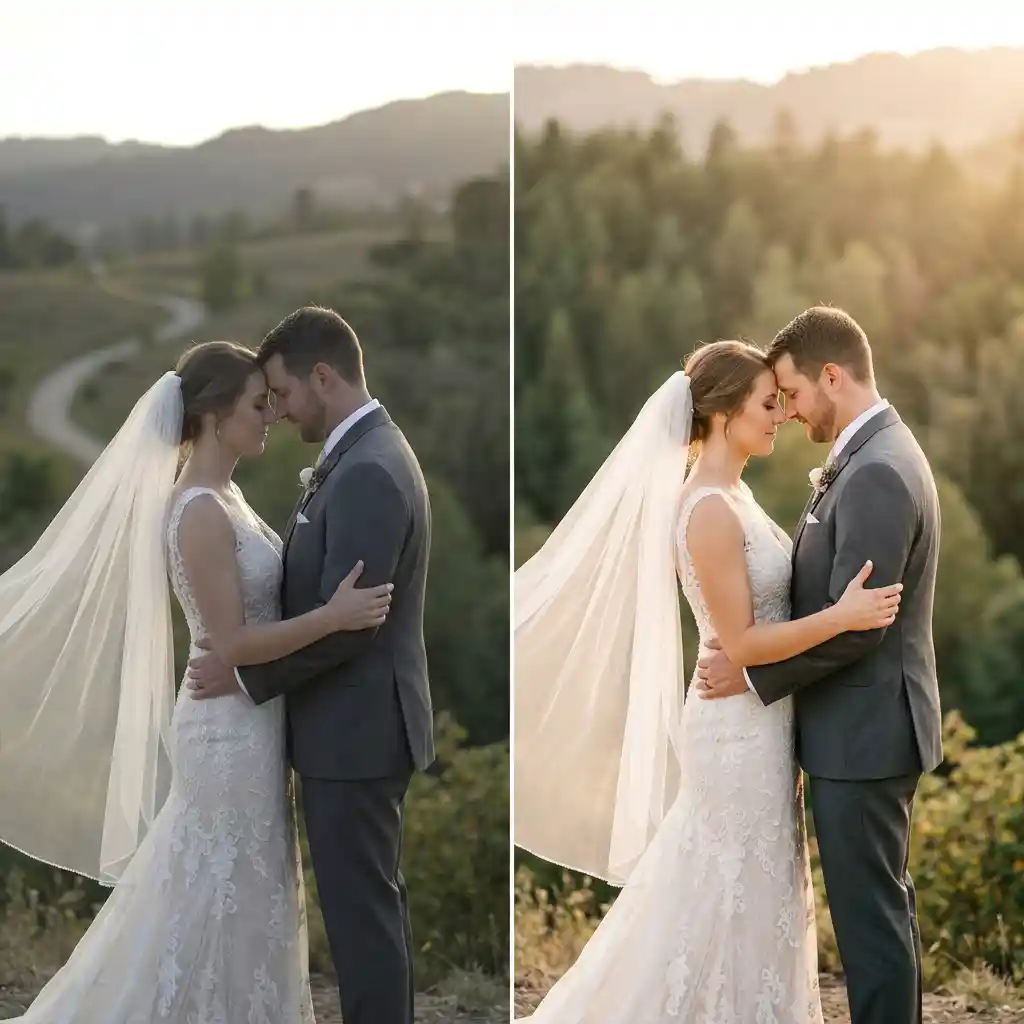
50 romantic wedding .cube LUTs across 5 styles for Premiere, Resolve, FCP and CapCut. Freevisuals Pro color grade pack.
Go Pro To DownloadQuick Answer: Download 50 professional .cube LUTs built for wedding videography and romantic cinematic looks, across 5 styles from soft glowing warmth to vintage love story tones, ready for Premiere Pro, DaVinci Resolve, Final Cut Pro and CapCut.

SpecDetailQuantity50 LUTs, .CUBE files, 33x33x33 resolutionCompatible SoftwareAdobe Premiere Pro, DaVinci Resolve, Final Cut Pro, CapCut, After EffectsSupported Color SpacesRec.709 creative grade, apply after log conversion if shooting S-Log2/3, C-Log or V-LogFile Format.CUBE, 3D LUTsColor Profile StyleSoft, romantic, warm skin tone forwardBest Used ForWedding films, engagement videos, romantic short films, bridal contentLicense TierFreeVisuals Pro License, commercial project use
Wedding footage lives or dies on skin tone. A LUT built for action or product work will often push skin toward orange or crush shadows in ways that look harsh on a bride's dress or a groom's suit. This pack was built the other way around, starting from skin tone protection and softness first, then layering in warmth and glow on top.
The collection covers 5 sub styles, each with 10 intensity variants numbered 01 through 10, subtle through strong.
Each style runs from a barely there variant at 01 up to a strong, stylized variant at 10. Start in the middle of the range around 04 to 06 for most footage, then move up or down once you see it against your actual venue lighting.
A practical tip for wedding editors specifically: apply the LUT on an adjustment layer above your footage rather than directly on each clip. This lets you turn the grade on or off instantly while you are still color correcting exposure and white balance clip by clip, which is a much faster workflow across a full ceremony timeline.
The preview sheet included with this pack shows the same base footage graded across all 5 sub styles side by side, so you can compare Soft Romance Glow against Golden Ballroom before committing to one for your edit. We recommend testing a short clip from your actual wedding footage rather than relying on the preview alone, since venue lighting varies enormously from wedding to wedding.
For the warmer end of this pack, specifically Golden Ballroom and Blush Garden Light, this walkthrough covers the manual technique behind a golden, glowing grade in Premiere Pro, useful if you want to fine tune on top of a LUT.
Watch on YouTube: Golden Look Color Grading in Adobe Premiere Pro
If you are new to grading wedding footage in Resolve specifically, this full start to finish walkthrough covers node structure and skin tone protection, both directly relevant to getting the most out of this pack.
Watch on YouTube: DaVinci Resolve Colour Grading Tutorial (Start to Finish for Beginners)
Wedding films also depend heavily on music and b-roll, not just color. If you need a broader stock footage or music library to round out a full wedding edit, Artlist has a strong catalog of romantic, acoustic and orchestral tracks that pair well with this grade, and Epidemic Sound is worth checking for licensed reception and dance floor music specifically. For wedding title templates and lower thirds to match a soft, romantic grade, Motion Array carries a range of elegant, script style title packs.
Once you have picked a sub style for a wedding, stick with it across the full film rather than switching styles scene to scene. Consistency across ceremony, portraits and reception is what makes a wedding video feel professionally graded rather than assembled from mismatched clips.
This collection is aimed at wedding videographers running a full season of bookings who need a consistent, reliable look they can apply quickly across many different venues and lighting setups, rather than building a grade from scratch for every wedding. It also suits couples and hobbyist filmmakers editing their own wedding footage who want a professional finish without learning manual color grading from the ground up. Content creators making engagement announcement videos or wedding related social content will find Blush Garden Light and Ivory Elegance particularly useful for short form, portrait heavy clips.
The most common mistake with wedding color grading is applying the same strong variant to every scene regardless of lighting. A ceremony shot in bright midday sun and a reception shot under warm tungsten lighting need different starting points, even within the same sub style. Rather than picking one variant number and using it for the whole wedding, treat each major lighting change, ceremony, portraits, reception, as its own decision point and reselect a variant that suits that specific light.
A second common issue is applying a warm LUT on top of footage that already has a strong color cast from venue lighting, such as a reception lit with colored uplighting. In that situation, correct the white balance back toward neutral first, then apply the LUT, rather than letting the two warm shifts stack on top of each other and push skin tones too far.
Finally, resist the temptation to use the strongest variant available simply because it looks striking on a single still frame. Wedding films are watched in full, often more than once by the couple and their families for years afterward, and a grade that feels overwhelming across 45 minutes of footage will age worse than a more restrained choice that holds up on repeated viewing.
This pack is covered by the FreeVisuals Pro license, which allows use in unlimited personal and commercial video projects, including client wedding films and monetized social content, for as long as your Pro access remains active or for a one off purchase of this pack specifically. Reselling or redistributing the raw .cube files themselves outside a finished video project is not permitted.
If you shoot more than wedding content, a few other FreeVisuals Pro packs are worth exploring. Golden Hour and Cozy Warmth shares a similar warm palette and suits lifestyle or engagement content that sits outside a wedding day itself. Cinematic Teal and Orange is a strong option for any highlight reel or trailer style edit of the wedding day that wants more drama and contrast than a purely romantic grade provides.
Will these LUTs work on footage shot in log?
Convert log footage to Rec.709 first using your camera manufacturer's conversion LUT, then apply one of these 50 LUTs as your creative grade on top. Applying a creative LUT directly to flat log footage produces muted, unpredictable results.
Which sub style is best for a full length wedding film?
Soft Romance Glow and Blush Garden Light are the most versatile for a full ceremony to reception edit, since both are built to be gentle on skin tones across long stretches of footage.
Can I use a stronger variant for the first dance or key emotional moments?
Yes. A common approach is to keep the ceremony and speeches on a lighter variant, then move to a stronger Golden Ballroom or Vintage Love Story variant for the reception and dancing to add warmth and energy.
Do these LUTs protect skin tones on darker skin as well as lighter skin?
The shadow, midtone and highlight tinting in this pack is built around luminance rather than a single skin tone target, so it holds up across a range of skin tones. As with any LUT, check a few seconds of your actual footage before committing to a strength for the whole film.
Can I use these LUTs for engagement and pre wedding shoots as well?
Yes, all 50 LUTs work equally well on engagement shoots, bridal portraits and pre wedding films. Ivory Elegance and Blush Garden Light are popular choices for outdoor engagement sessions specifically.
Download free video templates, LUTs, and presets for Premiere Pro, After Effects, DaVinci Resolve, CapCut, and Final Cut Pro.









