.avif)
Freevisuals
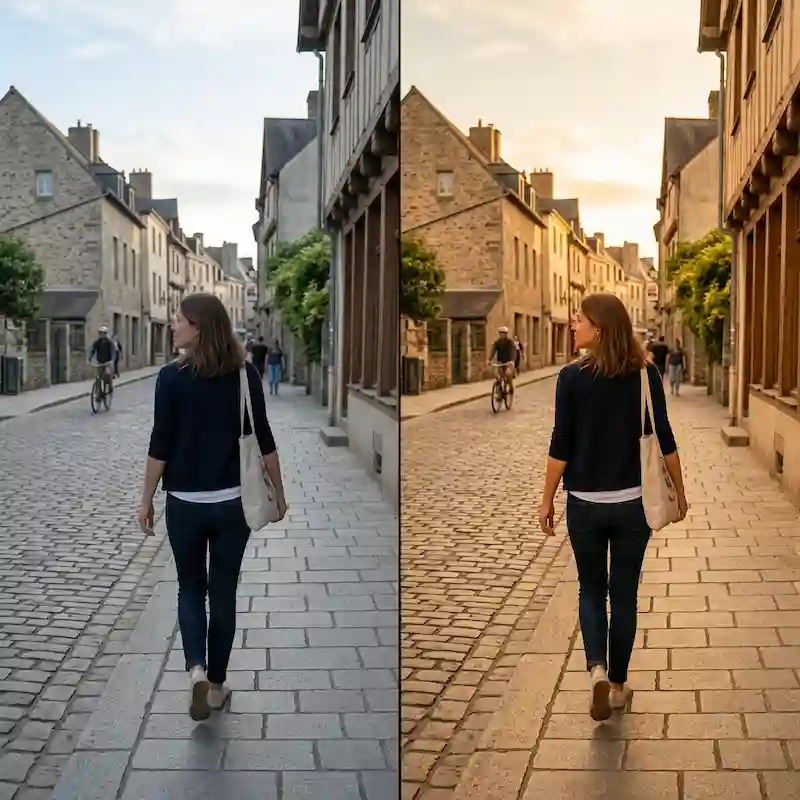
Free .cube LUT for golden hour outdoor vlogs and travel. Warm mids, soft contrast. Works in Premiere, Resolve, Final Cut and CapCut.
Download FREEFree single .cube LUT for golden hour outdoor vlogs, travel walks and lifestyle exteriors. Warm midtones. Soft contrast. Mild blue pull. Light shadow lift. Built as a Rec.709 creative grade for Premiere Pro, DaVinci Resolve, Final Cut Pro and CapCut.
Golden hour footage is easy to crush or over-warm. Phone auto white balance often cools the scene. A heavy cinematic LUT can push skin orange and kill the natural late-day light. This free LUT is built for the opposite job. It warms the mids and highlights just enough to read as golden hour, keeps contrast soft so faces stay open, and holds enough neutrality that a host under late sun still looks human.
One free .cube file. Apply after you convert log footage to Rec.709. Use full strength on outdoor golden hour and late-day walks. Dial intensity down under mixed LED or pure blue hour. Works in Premiere, Resolve, Final Cut and CapCut.
The grade starts with a soft contrast curve so outdoor faces do not crush. Midtones and highlights pick up a warm bias so the scene reads as late day rather than flat noon. Blue in the shadows and sky is pulled back a little so the frame does not stay cool after phone auto white balance.
Shadows get a mild lift so underexposed phone and mirrorless outdoor shots stay open. It is still a golden hour look. It is not a daylight recovery tool for deep shade.
Highlights roll off gently so bright sky and reflective pavement do not clip into pure white as fast. The result is a practical everyday outdoor grade for vlogs, travel and lifestyle channels.
It is not a full teal and orange film look. It is not a heavy cinnamon aesthetic. It is a milder warm outdoor grade built for talking-head walks and city strolls at the end of the day.
Open Lumetri Color. Go to Creative. Click Browse under Look and select the .cube file. Use the Intensity slider if skin under strong late sun goes too warm. For log footage, convert in Basic Correction first, then park this LUT in Creative.
Premiere Lumetri overview: Premiere Pro Color Grading 2024 | Full Walkthrough.
Copy the .cube into your LUT folder. Refresh. Apply on the Color page after any technical conversion node. Keep exposure and white balance honest before the creative LUT. A soft power window on a face can hold skin without changing the street or park behind the host.
Useful Resolve grounding: How to Color Grade in DaVinci Resolve for Beginners.
Apply the Custom LUT effect. Load the file in the Inspector. Use Mix to control strength per shot.
Adjust, Filter, Custom. Import the .cube. Useful for fast outdoor Shorts and Reels that still need a warm late-day mood.
Use this LUT when the main subject is outdoor golden hour or late-day light. City walks. Travel vlogs. Park and waterfront lifestyle. Street food at sunset. Rooftop interviews before dark. Outdoor product demos in warm light.
Skip it when the hero is a night street, a studio talking head under LED, a clean real estate interior, or a full teal cinematic short. Those jobs need different free or Pro packs on Free LUTs and Premium LUTs.
Balance exposure and white balance first. A LUT on crushed underexposed outdoor footage will look muddy. Convert S-Log, C-Log or V-Log to a Rec.709 base, then add this file as the creative step.
Check a wide outdoor shot and a medium shot of a person facing the sun. Full strength usually works on the wide. On the medium, drop intensity if the face goes too orange.
Match shots in the same outdoor sequence before you judge the LUT. A phone shot under pure sun and a mirrorless shot in open shade will still need a balance pass. The LUT will not fix mixed colour temperature on its own.
Real golden hour and late-day sun work best. Low sun from the side or behind the camera gives the warmth something to ride. Hard noon overhead light will still warm, but the frame can feel forced.
If you shoot with a strong on-camera light on a face, expose for the face and let the background fall a little. The mild shadow lift will open the scene without turning it into day.
Cloud cover is fine. Soft overcast late day still takes the warm midtone bias. The grade just reads a bit flatter than a clear sunset.
The same .cube works on 9:16 timelines. Faces sit larger in frame on Shorts, so warm skin shows faster. Start at 70 to 80 percent intensity on vertical close-ups under strong sun. Full strength is often better on a wide 16:9 outdoor walk.
Platform compression on YouTube Shorts and Reels can crush subtle warmth in the midtones. Export a test Short and view it on a phone before you lock a series grade. If the street goes flat after upload, raise midtone contrast slightly in the NLE after the LUT rather than stacking a second LUT.
This is one free file. Pro packs on FreeVisuals are larger sets with multiple styles and strengths. Travel Documentary, Fashion and Beauty Editorial, Real Estate Architecture and the Food and Cafe Mega pack live on Pro assets and on the Premium LUTs hub. Those unlock with Single Pass, Monthly or Yearly.
Use this free LUT for everyday outdoor golden hour work. Step up to a Pro pack when a series needs a stronger, consistent look across many travel episodes or mixed day and night content.
Outdoor grades sit under titles and end cards. Free YouTube Nameplate and Pro Vertical Stories Titles both work after this grade. Apply the LUT on the picture track, then drop titles above.
Music under an outdoor walk: Artlist or Epidemic Sound. Keep beds low under speech if there is a host on camera.
Need a wider creative library after this free file: Envato, Motion Array or MotionVFX. Those are affiliate. This free download does not unlock them.
Store the ZIP once on your drive. Do not re-download a new copy every upload. Convert log, balance the hero frame, apply the LUT, then copy the grade across the outdoor clips. Change only exposure per shot if the host walks from open sun into shade.
Batch one outdoor walk. Grade a wide and a medium once. Reuse the same node or Lumetri instance for the next episode so the channel does not change outdoor mood every week.
If you later add a Pro travel pack for stylised documentaries, keep this free LUT on the everyday vlog outdoor walks. Different jobs. Different grades.
Do not use it as a night city grade. Do not use it as a studio interview grade under cool LED. Do not use it as a full teal and orange film look. Those needs sit on other free files or on Pro packs.
If your channel is mostly indoor talking heads with a short outdoor outro, grade the indoor with a clean talking head LUT and grade the outdoor outro with this file. One LUT across both will make either the indoor or the outdoor compromise.
FreeVisuals Free. Personal and commercial use, including monetised YouTube, client work and paid social. No attribution. Do not resell the .cube file. Do not upload it to another stock site. Terms: Terms of Service.
This free LUT does not require a Pro plan. Larger Pro LUT packs unlock on Pro assets.
Yes. FreeVisuals Free licence. Download from this page. No Single Pass required.
Convert log to a Rec.709 base first. Then apply this LUT as the creative grade.
Yes. Import the .cube under custom filters.
Yes. Personal and commercial use are allowed. Do not resell the file.
No. Teal and orange packs push stronger stylisation. This is a milder warm outdoor grade for vlogs and travel walks.
Lower intensity. Or add a soft power window on the face in Resolve and cool that window slightly without changing the street.
You can, but results get unpredictable. Use one creative LUT per shot as the default.
Yes. Soft overcast still takes the warm midtone bias. The grade just reads a bit flatter than clear sunset.
Download once. Apply after technical conversion. Keep intensity honest on faces under strong low sun. Use the same grade across an outdoor series so the channel looks consistent.
When you need multi-style packs for travel, fashion or full cinematic looks, move up to the Pro LUT library on Pro assets and Premium LUTs.
Search terms this page should earn: free golden hour LUT, free outdoor vlog LUT, free sunset color grade, free travel vlog LUT, free late day LUT. That is why the H1 stays on golden hour outdoor vlog and free.
Related: Free LUTs, Premium LUTs, FreeVisuals Pro.
Affiliate Disclosure: Some links on this page may be affiliate links. If you make a purchase through one of these links, FreeVisuals may earn a commission at no extra cost to you. We only recommend products and platforms we genuinely believe in. Read our full disclosure policy.
Download free video templates, LUTs, and presets for Premiere Pro, After Effects, DaVinci Resolve, CapCut, and Final Cut Pro.









