.avif)
Freevisuals
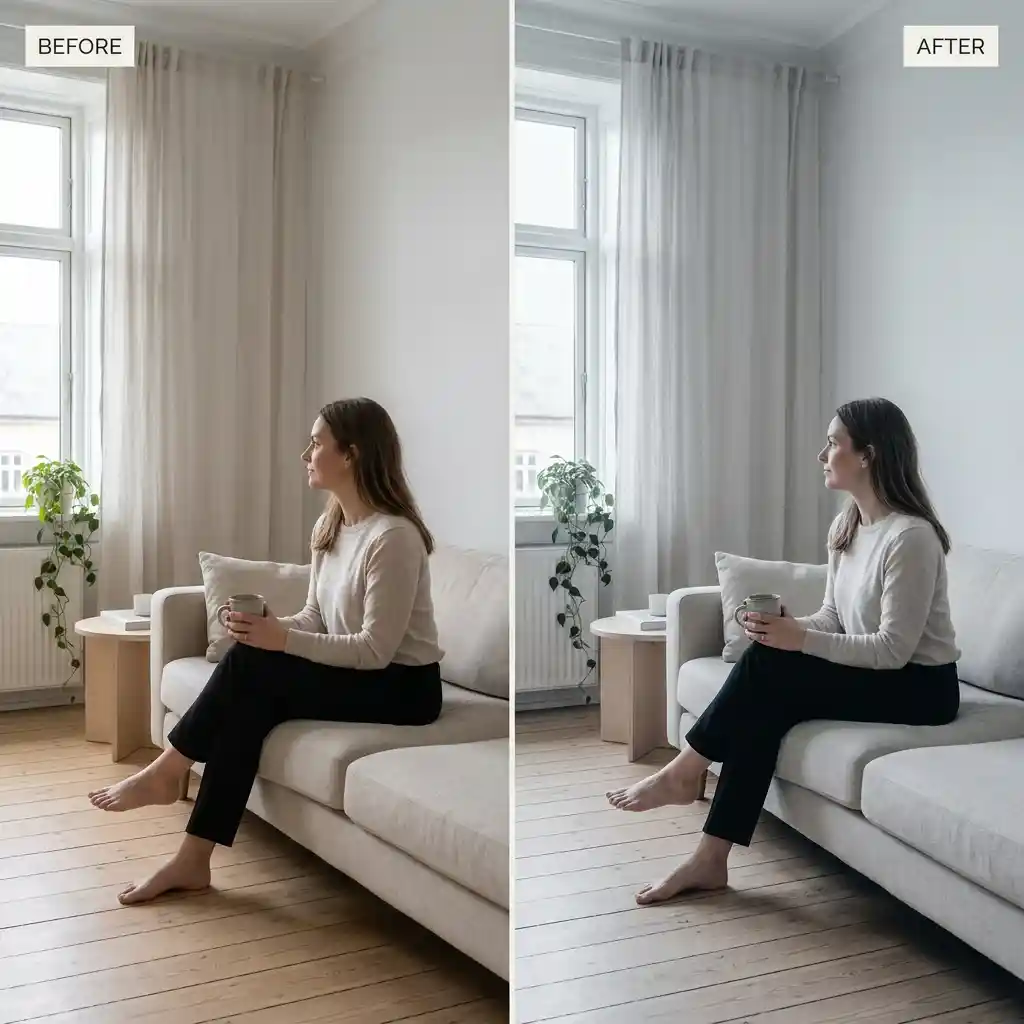
Free Scandinavian minimal .cube LUT for Premiere Pro, DaVinci Resolve, Final Cut Pro and CapCut.
Download FREEDownload a free Northern Scandinavian Minimal .cube LUT built to soften harsh contrast and mute heavy reds and yellows for Nordic aesthetic creators, fashion videographers, and minimal lifestyle editors, and apply it in Premiere Pro, DaVinci Resolve, Final Cut Pro or CapCut as an adjustment layer or node on top of standard Rec.709 footage.
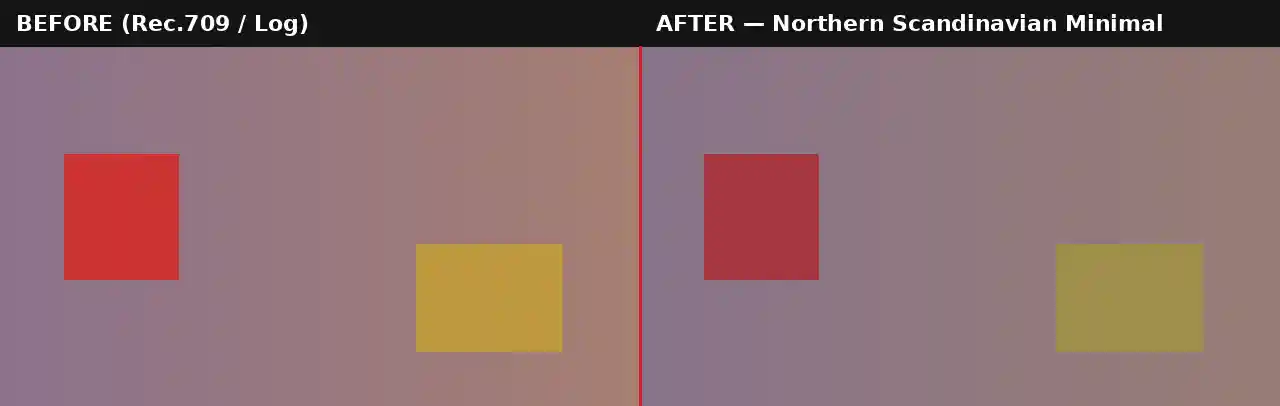
The Scandinavian minimal aesthetic that has become closely associated with Nordic design, fashion, and lifestyle content is built on restraint rather than intensity. Where most cinematic grades push saturation and contrast up to create drama, this LUT does close to the opposite, pulling saturation down specifically in the red and yellow range while softening the overall contrast curve, so the image reads as calm, considered, and quietly premium rather than punchy or dramatic.
The specific choice to target reds and yellows rather than muting saturation evenly across the whole color wheel matters here. Warm tones, skin, wood, warm-toned fabric, are usually the most visually loud elements in a frame, and pulling them back specifically is what produces the clean, almost monochromatic feel associated with Nordic interiors and fashion editorial work, while still leaving blues and neutral tones with enough presence to keep the image from looking completely flat.
This look is genuinely different from a generic desaturated or moody grade. Moody grades typically crush shadows and push overall darkness for drama, while this LUT keeps the image bright and airy, softening contrast rather than deepening it, which is the visual language of clean minimal design rather than cinematic tension. This distinction matters more than it might first appear, since a client or brand asking for a "minimal" look and a client asking for a "moody" look are usually after visually opposite results despite both sometimes being described with similar vague language during a creative brief. This restraint also carries a practical advantage when footage is destined for social platforms rather than a controlled broadcast environment. Instagram, TikTok and YouTube all apply their own compression on upload, and a softer, lower-contrast grade like this one tends to hold up more predictably through that compression than a high-contrast, heavily saturated look, which can develop banding or color blocking once compressed. For a brand publishing consistently to social feeds, that reliability across platforms matters as much as the aesthetic itself.
Pale blues and neutral grays are left largely untouched by this grade rather than muted alongside the warm tones, which is a deliberate choice. Scandinavian design famously leans on cool, muted blues and grays as its core palette, so preserving those tones while pulling back the warmer end of the spectrum is what produces the specific, recognizable Nordic feel rather than a generically flat or desaturated result.
This .CUBE file works natively across Adobe Premiere Pro (Lumetri Color), DaVinci Resolve, Final Cut Pro (FCPX), and CapCut Desktop.
A practical tip specific to this look: because this LUT specifically targets warm hues, footage shot under warm tungsten or golden-hour lighting will show a stronger transformation than footage already shot under cool or neutral daylight, since there is simply more warm color for the grade to act on.
This LUT is built as a creative grade for standard Rec.709 footage, not as a technical conversion tool. If shooting on a camera set to a log profile such as Sony S-Log2/3, Canon Log, or Blackmagic Gen 5, the footage needs a technical LUT applied first to bring it into a normal Rec.709 viewing space before this minimal grade goes on top. Applying it directly to unconverted log footage will generally undercorrect and produce a flat, low-contrast result rather than the intended clean, soft minimalism, since the LUT's subtle contrast adjustments are calibrated against a standard Rec.709 tonal range rather than a much flatter log curve.
Most camera manufacturers provide free technical conversion LUTs for their specific log profiles on their support websites. Once that conversion is applied as a first step, either on its own node or adjustment layer beneath this one, the Northern Scandinavian Minimal LUT will behave exactly as expected on footage originally shot in a log format.
Consider a fashion videographer shooting a lookbook video that mixes warm indoor studio shots with cooler outdoor daylight footage. The indoor studio shots, likely lit with warmer practical or tungsten light, will typically show this LUT's muting effect most strongly, pulling any warm-toned background or wood flooring toward a calmer neutral. The outdoor daylight shots, already closer to neutral, may need less correction and could take a slightly lower opacity setting to avoid an unnecessarily flat look on footage that did not need much desaturation to begin with. Reviewing indoor and outdoor segments separately, rather than applying one uniform setting across the whole edit, produces a more consistent minimal aesthetic throughout. A quick test on a short representative clip from each lighting setup, before committing the grade to a full day of filming, is worth the extra few minutes to confirm the balance between warm-tone muting and overall image brightness lands where intended.
The most frequent issue is applying this LUT at full strength to footage that already has fairly neutral, cool-toned lighting, which can push the final result toward looking washed out rather than intentionally minimal, since there is little warm color left for the grade to meaningfully act on. A second common mistake is applying this LUT to footage with an important warm brand color, a red logo, a specific product color, without masking that element out first, since the LUT's targeted red and yellow muting will affect brand-critical colors along with everything else in the frame. A third consideration worth planning for is skin tone, since this LUT will mute skin warmth along with everything else in the red-yellow range, which reads as calm and understated on most subjects but is worth reviewing carefully on close-up talking-head footage before committing to full strength across an entire video.
For Nordic and minimal lifestyle content, calm, understated instrumental or ambient tracks from Epidemic Sound suit this restrained aesthetic well. Envato carries minimal, clean title and lower third templates that pair naturally with this softer grading style rather than anything bold or heavily animated.
Watch on YouTube: Desaturated Moody Color Grading in Premiere Pro, No LUTs
A soft, minimal title template with plenty of white space suits this grading style far better than a bold, saturated template. For fashion and lifestyle content specifically, a clean fade transition pack fits the calm, unhurried pacing this look tends to be used for, keeping the overall viewing experience consistent with the restrained visual tone the color grade sets.
Beyond individual video projects, this LUT works particularly well for creators and small brands trying to establish a consistent visual identity across a long-running content series. Because the grade is subtle rather than dramatic, it tends to age better across a growing library of content than a heavily stylized trend-driven look, since restrained, minimal aesthetics generally stay visually relevant for longer than looks tied closely to a specific cinematic trend cycle. Applying this same LUT consistently across months or years of content is a reasonable way to build a recognizable, cohesive channel look without needing to revisit the grading choice on every new upload.
This LUT is free for personal and commercial use. No attribution is required. It should not be resold or redistributed as a standalone stock asset, and it should not be uploaded to a competing stock photography or LUT marketplace. Full terms are covered in the Terms of Service.
Will this LUT work on footage with warm tungsten lighting?
Yes, footage with warmer lighting will typically show a stronger, more visible transformation than footage already shot under cool or neutral daylight, since the LUT specifically targets warm reds and yellows.
Why does my brand's red logo look muted after applying this LUT?
This LUT specifically mutes red and yellow tones across the whole frame. If a brand color needs to stay vivid, mask that element out of the grade rather than applying the LUT uniformly.
Is this LUT free for commercial fashion or lifestyle projects?
Yes, this LUT is free for both personal and commercial use with no attribution required.
Which software works with this LUT?
It is a standard .CUBE file, so it works identically across Premiere Pro, DaVinci Resolve, Final Cut Pro and CapCut Desktop.
Download free video templates, LUTs, and presets for Premiere Pro, After Effects, DaVinci Resolve, CapCut, and Final Cut Pro.









