.avif)
Freevisuals
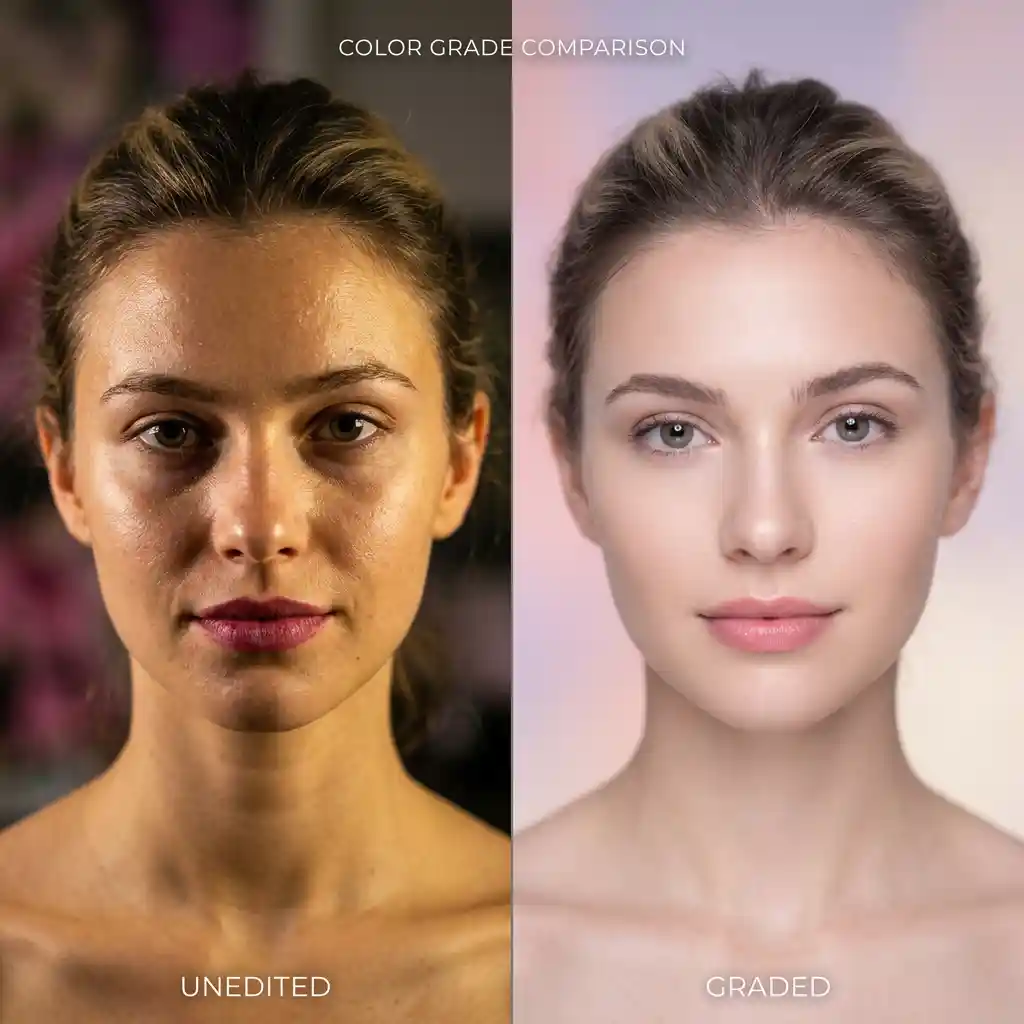
Free soft pastel portrait and beauty .cube LUT for Premiere Pro, DaVinci Resolve, Final Cut Pro and CapCut.
Download FREEDownload a free soft pastel portrait and beauty .cube LUT built to mute harsh skin tones and soften highlights for beauty vloggers, wedding filmmakers, and high-fashion social content, and apply it in Premiere Pro, DaVinci Resolve, Final Cut Pro or CapCut as an adjustment layer or node on top of your footage.
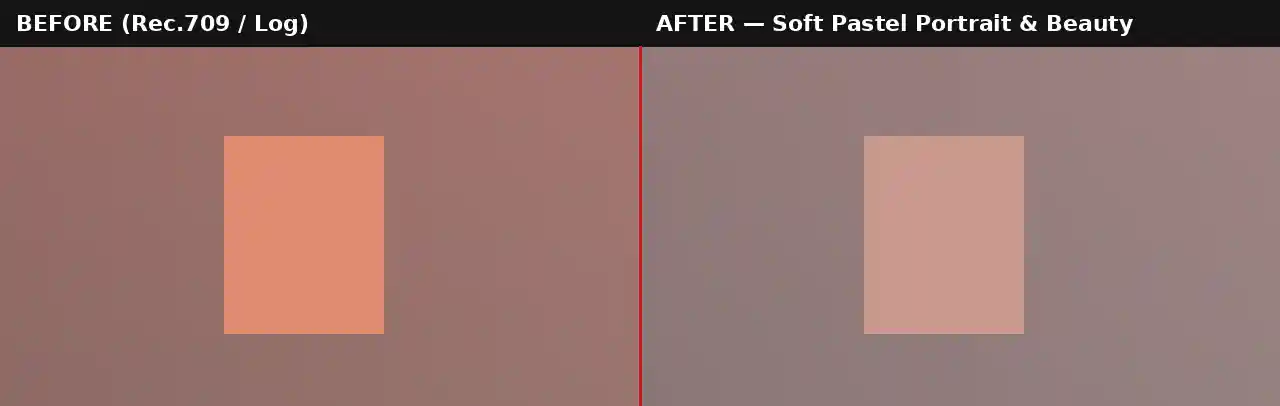
Straight out of most cameras, skin tones carry more saturation and contrast than the eye actually perceives in person, which is why unedited portrait footage often looks slightly harsher or more clinical than the subject appears to a viewer standing in the room. This LUT addresses that directly by pulling saturation back specifically in the warm, red-orange range where skin tones live, while also softening the roll-off in highlights so that bright areas of a face, cheekbones, forehead, do not carry the same hard-edged contrast as the rest of the frame.
The pastel quality of this grade comes from a deliberate lift in the shadows combined with a very slight pink and lavender tint introduced into the highlights, both of which push the overall image toward the airy, gentle aesthetic associated with high-end beauty and bridal content rather than a punchy, high-contrast commercial look. For wedding highlight reels specifically, this softness reads as romantic and timeless rather than harshly documentary, which is generally the emotional tone couples are looking for in their wedding footage.
This is a genuinely different design goal from a punchy cinematic LUT built to maximize contrast and saturation. Beauty and portrait content succeeds by flattering the subject rather than dominating the frame with a strong stylistic treatment, so this LUT is calibrated to enhance rather than compete with the person on camera. It is also worth testing this LUT specifically against a neutral gray card or a known-neutral wall in frame before committing to it across a full shoot, since it gives a fast, objective way to confirm the pastel tint is landing where intended rather than skewing the whole image slightly warmer or cooler than the preview monitor suggests, particularly when working across multiple cameras or lighting setups within the same wedding or beauty shoot.
This .CUBE file works natively across Adobe Premiere Pro (Lumetri Color), DaVinci Resolve, Final Cut Pro (FCPX), and CapCut Desktop.
A practical tip specific to this look: because the grade pulls saturation from warm tones broadly, footage with a strongly warm-toned background, wood paneling, orange-lit rooms, can lose more color than intended alongside the skin itself. Masking the LUT to the subject specifically, rather than applying it across the whole frame, gives more control when the background needs to stay vivid.
This LUT is built as a creative grade for standard Rec.709 footage, not as a technical conversion tool. If shooting on a camera set to Sony S-Log2/3, Canon Log, or Blackmagic Gen 5, the footage needs a technical LUT applied first to bring it into a normal Rec.709 viewing space before this pastel grade goes on top. Applying it directly to unconverted log footage typically produces an excessively flat, low-contrast result, since the LUT's softening effect compounds with log footage's naturally low native contrast rather than working against a properly exposed Rec.709 starting point.
Most camera manufacturers provide free technical conversion LUTs for their specific log profiles on their support websites. Once that conversion is applied as a first step, either on its own node or adjustment layer beneath this one, the Soft Pastel Portrait & Beauty LUT will behave exactly as expected on footage originally shot in any of the supported log formats.
Consider a beauty content creator filming a get-ready-with-me video under a mix of ring light and ambient room light. Close-up talking segments directly under the ring light generally take this LUT well at close to full strength, since the even, soft lighting already suits the pastel treatment. Wider shots with more ambient room light mixed in may need the LUT opacity reduced slightly, since additional colored light sources in the background can shift more visibly once saturation is pulled back across the frame. Reviewing close-up and wide shots separately rather than applying one fixed setting to the entire video typically produces a more consistent final result. Shooting with softer, more diffused light sources rather than harsh direct lighting also gives this LUT a better starting point, since much of what reads as pastel and gentle in the final graded image comes from the underlying lightness of the footage itself rather than from the color grade alone. A single large diffused light source, a window with sheer curtains, a softbox, or an overcast sky outdoors, consistently produces better results with this LUT than a small, hard light source casting sharp shadows across a subject's face. A quick test clip under the exact lighting planned for the full shoot is worth the extra few minutes before committing to a full day of filming with this LUT baked into the workflow.
The most common issue is applying this LUT at full strength to footage with already low contrast or a flat lighting setup, which can push the final result toward looking washed out rather than intentionally soft. A second frequent mistake is applying this LUT across an entire frame that includes a vividly colored background, a bold wall color, colorful decor, without masking, since the same saturation pull that flatters skin will also mute those background colors more than intended. If a vivid background needs to stay intact, isolate the LUT to the subject using a mask or Power Window rather than applying it uniformly.
For beauty and bridal content specifically, soft acoustic or ambient tracks from Epidemic Sound suit this pastel aesthetic well. Envato carries elegant, minimal title and lower third templates that complement this softer grading style better than a bold, high-contrast template would.
Watch on YouTube: How to Colour Grade Skin Tones in Premiere Pro
A soft light leak overlay at low opacity reinforces the airy, romantic quality of this grade without introducing harsh new contrast. For wedding highlight reels specifically, a minimal, elegant title template suits this pastel look better than anything bold or heavily animated.
This LUT is free for personal and commercial use. No attribution is required. It should not be resold or redistributed as a standalone stock asset, and it should not be uploaded to a competing stock photography or LUT marketplace. Full terms are covered in the Terms of Service.
Will this LUT work on all skin tones?
The LUT is built to mute saturation broadly across the warm tonal range rather than targeting one specific skin tone, though results can vary slightly depending on the original footage's exposure and white balance. Reviewing the result on a Vectorscope is the most reliable way to confirm it looks natural on any given subject.
Why does my background look less vivid after applying this LUT?
This LUT mutes saturation across the whole frame, not just on skin. If the background needs to stay vivid, isolate the LUT to the subject using a mask or Power Window instead of applying it to the full frame.
Is this LUT free for commercial projects?
Yes, this LUT is free for both personal and commercial use with no attribution required.
Which software works best with this LUT?
It is a standard .CUBE file, so it works identically across Premiere Pro, DaVinci Resolve, Final Cut Pro and CapCut Desktop.
Download free video templates, LUTs, and presets for Premiere Pro, After Effects, DaVinci Resolve, CapCut, and Final Cut Pro.









