.avif)
Freevisuals
Free 4K stock video of distressed traders watching red crash charts on a night trading floor. No real logos. Commercial use. No attribution.
Download FREEFree stock video of traders on a modern trading floor reacting to falling red charts. Night office. Multiple monitors. Hands on heads. Real commercial stress without real company logos. Built for finance explainers, news packages, fintech ads and YouTube market commentary.
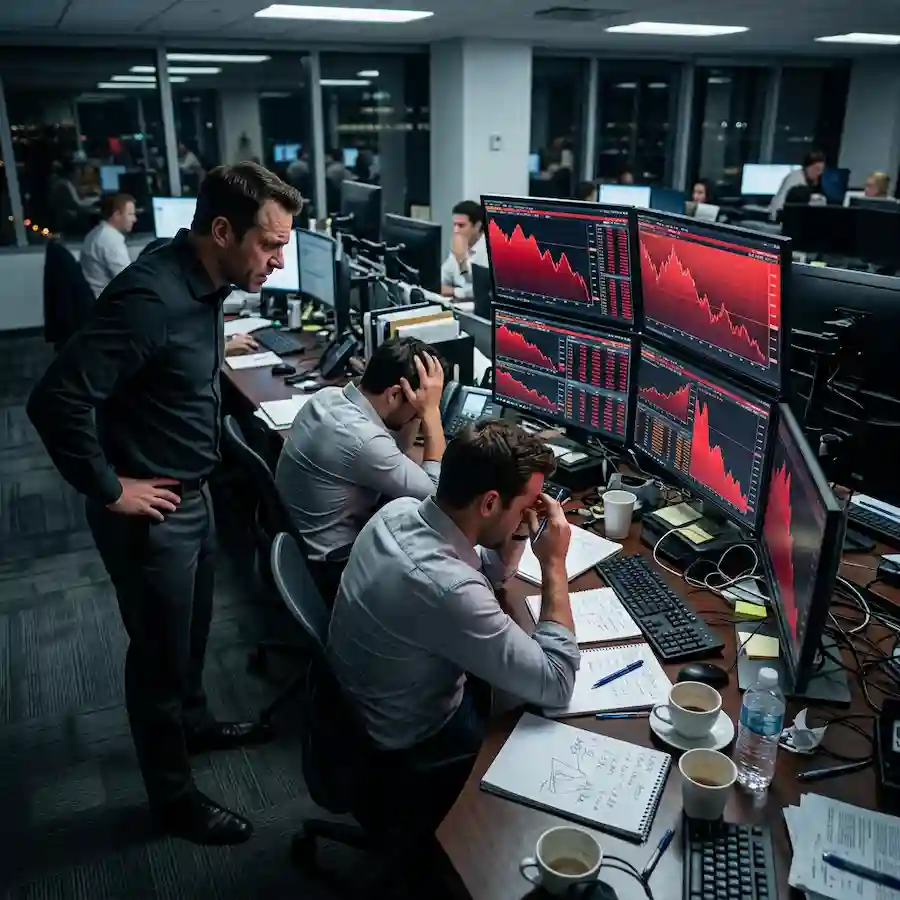
Market crash footage is easy to get wrong. Stock libraries often show generic boardrooms or abstract red arrows. This clip is a locked wide of a real-looking desk cluster at night. Four monitors run only red downward charts and generic tickers. One trader stands with hands on hips. Two sit with heads in hands. Coffee cups and notepads stay in frame so the desk feels worked, not staged.
Free 4K stock video of distressed traders watching a stock market crash on multiple screens. Night trading floor. No real company logos. Use in Premiere, Resolve, Final Cut, CapCut or After Effects. Personal and commercial use. No attribution.
One free master clip. Locked wide of a trading desk at night. Multiple monitors show only red falling charts and generic data. No readable real company logos. Three traders in the foreground show clear stress: one standing with hands on hips, two seated with heads in hands. Coffee cups, notebooks and pens sit on the desk. City lights through the glass behind the desks.
Subtle motion is enough. Charts flicker downward. A trader shifts weight. A hand moves to the forehead. The camera stays locked so the clip cuts cleanly under voiceover.
Optional 9:16 crop centres the main desk cluster for Shorts and Reels. Keep the full 16:9 for long-form YouTube and client packages.
Viewers of market videos already know the red chart language. They do not need abstract arrows. They need a human reaction that matches the tone of a crash or a sharp sell-off. This frame gives that reaction without naming a bank, a fund or a ticker that could date the clip or create clearance problems.
Night lighting sells urgency. Daytime boardrooms often look like a meeting. A dark office with blue monitor light and red screens reads as after-hours pressure. That is the tone most crash explainers and fintech ads want.
Generic tickers matter. Real logos force you to check licence and news cycle. This clip stays usable for years because the screens stay abstract red decline.
Drop the clip under a host talking about a sell-off, a rate decision or a sector drop. Hold it for three to five seconds on the first mention of losses, then cut to chart graphics or the host. Do not leave it running for the whole segment. Stress b-roll works best as a short beat.
For Shorts, use the 9:16 crop and a bold caption such as market crash or traders react. Keep the clip under five seconds so the hook stays tight.
Grade lightly. The red screens already carry the message. A heavy teal cinematic LUT can fight the red and make the room look like a music video. If you grade, protect the red channel on the monitors.
Sound design stays simple. Soft office hum, quiet keyboard clicks, a distant phone. Avoid big trailer impacts unless the package is clearly dramatic.
Download once. Store the master on your drive. Create a 5 second 16:9 preview and a 5 second 9:16 crop if you publish vertical. Keep the full length master for client and long-form work.
In Premiere or Resolve, place the clip on V2 under a VO track. Add a soft lower third for the topic. Cut away before the body language repeats.
If you run a weekly markets show, reuse the same clip as a recurring crash motif so the audience recognises the beat. Change only the caption and the host line.
Titles and lower thirds for finance packages: free and Pro Resolve and Premiere templates on DaVinci Resolve templates and Premiere Pro templates.
Night and cool grades if the rest of the package is dark: Free LUTs including Free Night City Street LUT. For larger multi-style sets see Premium LUTs and Pro assets.
Music under a markets explainer: Artlist or Epidemic Sound. Keep beds low under speech.
Need more finance or office stock after this free clip: iStock, Shutterstock or Envato. Those are affiliate. This free download does not unlock them.
Stock crash b-roll works best as a short beat under voiceover, not a long hold. Match exposure to your host shot, keep the red screens readable, and cut away before the body language repeats. A practical walkthrough on using stock as b-roll in YouTube explainers: How to use stock footage to get more views on YouTube.
It is not a real news archive of a named crash day. It is not a close-up of a single readable ticker. It is not a slow cinematic push-in with shallow focus on one face. It is a locked, clear wide for editors who need stress on a trading floor without clearance risk.
If you need pure chart animation with no people, use a motion graphics pack instead. If you need a calm bull market celebration, this is the wrong tone.
Master is 16:9 4K. Export H.264 for web and social. Keep a higher bitrate master if you deliver to broadcast or large screens. Frame rate follows the generation setting. 24fps or 30fps both cut fine under standard VO.
Screens are part of the plate. Do not expect to replace the chart graphics in post without a clean plate. The value is the human reaction plus the red context, not editable UI.
No faces of public figures. No real bank branding. Safe for monetised YouTube and most client commercial use under the FreeVisuals Free licence.
Finance YouTubers and TikTok creators covering markets. News packages that need a generic crash reaction. Fintech and trading app ads that show risk without celebrating it. Course creators explaining volatility. Documentary editors who need modern trading floor pressure without archival clearance.
It is less useful for pure comedy, for luxury brand films, or for calm corporate culture videos. Match the tone to the story.
FreeVisuals Free. Personal and commercial use, including monetised YouTube, client work and paid social. No attribution. Do not resell the raw video file. Do not upload it to another stock site as your own. Terms: Terms of Service.
This free clip does not require a Pro plan. Pro stock and larger packs unlock on Pro assets.
On 16:9 leave headroom above the standing trader and keep at least one full monitor bank readable. On 9:16 prioritise the seated traders and the nearest red screens. Avoid cutting off the standing figure at the waist if he is part of your story beat.
If you zoom in post, stay on the desk cluster. A hard punch into a single face loses the crash context that makes the clip useful.
Yes. FreeVisuals Free licence. Download from this page. No Single Pass required.
Yes. Personal and commercial use are allowed. Do not resell the file.
No. Charts and tickers are generic. That keeps the clip usable across topics and years.
Crop the 16:9 master for Shorts and Reels, or export a vertical version from the same plate if you generate one. Keep faces and main monitors in frame.
Not easily. The screens are baked into the image. Use the clip for reaction and context, then cut to your own chart graphics.
Yes as generic stress b-roll. Do not present it as documentary archive of a specific date.
Treat it as picture. Add room tone or light office ambience in post if needed.
Use a short hold under the first mention of losses. Keep the red screens readable. Protect the red if you grade. Store the master once and reuse it as a recurring crash beat if you publish regular market content.
When you need more Pro stock or multi-style LUT packs for finance and business series, browse Pro assets and Premium stock footage.
Search terms this page should earn: stock market crash stock video, distressed traders footage, free finance b-roll, trading floor red charts, free market sell-off video. That is why the H1 stays on stock market crash traders and free stock video.
Related: Premium stock footage, Free LUTs, FreeVisuals Pro.
Affiliate Disclosure: Some links on this page may be affiliate links. If you make a purchase through one of these links, FreeVisuals may earn a commission at no extra cost to you. We only recommend products and platforms we genuinely believe in. Read our full disclosure policy.