.avif)
Freevisuals
Download a 4K overhead stock photo of four meal-prep bowls on a marble counter. Pro asset from $9. For recipe videos, fitness thumbnails and food blogs.
Go Pro To DownloadDownload 4K stock assets of an overhead meal-prep bowl flat-lay with chicken, salmon, tofu and oats. Buy from $9 on Freevisuals.net.
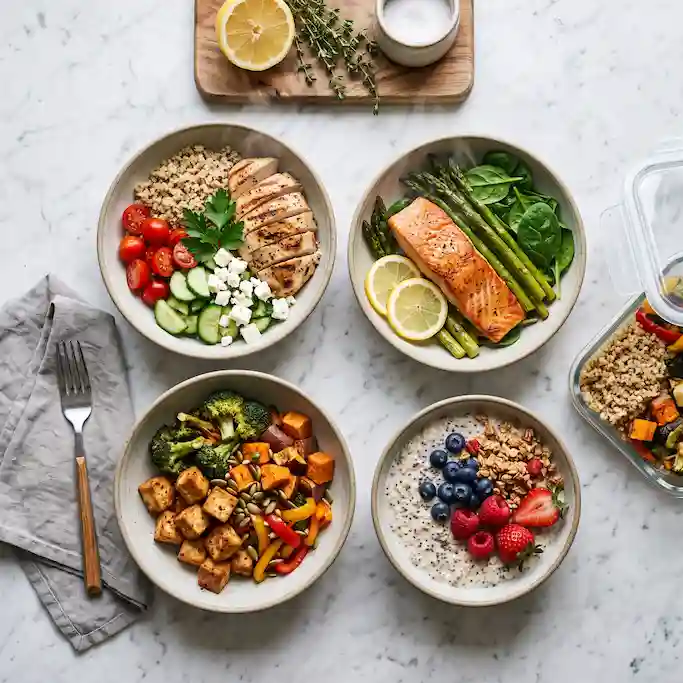
Four ceramic bowls sit in a loose grid on pale marble, shot straight down: grilled chicken and quinoa, salmon with greens, tofu and roasted vegetables, overnight oats with berries. A wooden board with lemon and herbs holds the top edge, a linen napkin and an open glass prep container sit to the side. It is the kind of image built for recipe channels, fitness meal-prep content and food brands that need a clean, appetising overhead rather than a styled restaurant plate with a white tablecloth. This image is part of the Freevisuals Pro library, available through a Single Pass, Monthly or Yearly plan.
This image is a 4K, 3:2 PNG stock photo of an overhead meal-prep flat-lay with four filled bowls, herbs, lemon and a glass prep container on marble, available for download as a Freevisuals Pro asset under a Single Pass, Monthly or Yearly plan.
The frame is built as a true overhead, not a 45-degree “almost top-down” that always looks like a phone snap. Four bowls carry four different proteins so the same file works for chicken, fish, vegetarian and breakfast content without looking like one leftover lunch. Steam sits only on the warm bowls. The cold oats stay matte. That split is what sells the shot as food rather than a texture pack.
Nothing on the marble has a brand. No nutrition label, no supermarket tray, no readable lid mark. That matters for ads and client work: you are not clearing packaging rights before you can publish.
The light is north-window daylight from one side. Highlights on the salmon skin and the glaze on the roasted vegetables stay controlled, so you can grade warmer for a comfort-food video or cooler for a clean-eating brand without blowing the marble to paper white.
The 3:2 crop still holds when you punch in for a 1:1 Instagram tile or a 16:9 video background. Keep the lemon board in frame if you crop to square. Lose the board first if you crop to vertical and need the bowls larger.
Food stills fall apart when the grade gets cinematic. Do not drop a teal-and-orange LUT on this. Push warmth a little if the channel is comfort cooking; keep it closer to Rec.709 if it is a diet or meal-prep brand. If the marble goes cyan, you have over-cooled the midtones.
In Premiere Pro or CapCut, treat this as a locked beauty plate under titles, not as a clip that needs motion. A 5–8% slow push-in over four seconds is enough. Any harder Ken Burns move starts to look like a screen saver.
Sound does more work than extra effects. A soft knife-on-board, a lid click and a quiet kitchen bed will sell the still as part of a recipe cut. Epidemic Sound has light acoustic and lo-fi kitchen beds that sit under food voiceover without fighting the dialogue.
If you add ingredient labels, place them in the gaps between bowls, not on the food. Covering the salmon or the oats is the fastest way to make a paid image look like a Canva template.
Overhead food only holds at 4K if the bowl rims, herb edges and marble veins stay sharp. The usual path is a tight text-to-image base, then a dedicated upscale that rebuilds texture instead of stretching pixels. Magnific is the tool commonly used for that pass on ceramic glaze, citrus pith and stone. If you want a different bowl layout or a second protein before you upscale, OpenArt AI is a workable starting point for controlled flat-lays.
Use the still as the title card or the “here is the week of lunches” payoff, then cut your own prep footage underneath. The Adobe food-edit walkthrough below covers colour, titles and sound on a cooking timeline in Premiere Pro.
Watch on YouTube: How to Edit Food Videos with The Fung Bros | Premiere Pro
If the whole video is vertical, this 3:2 still becomes a background plate with the bowls centred and captions in the lower third. The CapCut Shorts edit below is the faster path for that crop.
Watch on YouTube: How to Edit Food Videos for YouTube Shorts on CapCut
For a wider cooking sequence rather than one hero still, Envato carries recipe lower-thirds and ingredient-list Motion Graphics templates that drop onto this plate without building type from scratch. MotionVFX and AEJuice both have clean title packs that do not scream “gaming overlay” on food content.
If you need a plated restaurant angle, a darker moody flat-lay, or hands in frame, Shutterstock and iStock both have large food libraries for a second angle in the same video. Pair this still with a close-up pour or a chopping-board insert so the sequence does not stall on one overhead.
As a flat PNG file, this asset drops directly into any editing or design software without a plugin or specific version requirement. It has been used and tested inside the following without issue:
For quick thumbnail work built around this image, CapCut and Filmora both handle adding recipe text and a mild push-in on top of a still like this one without needing a full After Effects project.
This image is part of the Freevisuals Pro library. Once downloaded under an active Pro plan, it can be used in commercial and personal video projects, thumbnails, social content, presentation decks and marketing materials. It should not be resold or redistributed as a standalone stock asset, and it should not be uploaded to a competing stock photography marketplace. Full terms are covered in the Terms of Service.
Is this a real kitchen photo or AI-generated?
This is a fully AI-generated image, built from a detailed text prompt and passed through an upscaling process for detail and resolution. The bowls, food and marble are set dressing, not a photographed client kitchen.
Can I use this for a meal-prep or grocery brand?
Yes. That is one of the main uses. There are no readable product labels in the frame, so you are not clearing packaging rights before you run an ad.
Does this come as a video file as well as a still image?
This particular asset is a static PNG. Use a slow scale-up in Premiere Pro, CapCut or After Effects if you need motion. The tutorials on this page cover that workflow.
What plan do I need to download this?
Any active Freevisuals Pro plan, including a one-time Single Pass purchase covering this image alone, unlocks the download.
Will this crop for Shorts and Reels?
Yes. Centre the four bowls and crop to 9:16. Keep titles in the lower third so they do not sit on the salmon or the oats.
Download free video templates, LUTs, and presets for Premiere Pro, After Effects, DaVinci Resolve, CapCut, and Final Cut Pro.