.avif)
Freevisuals
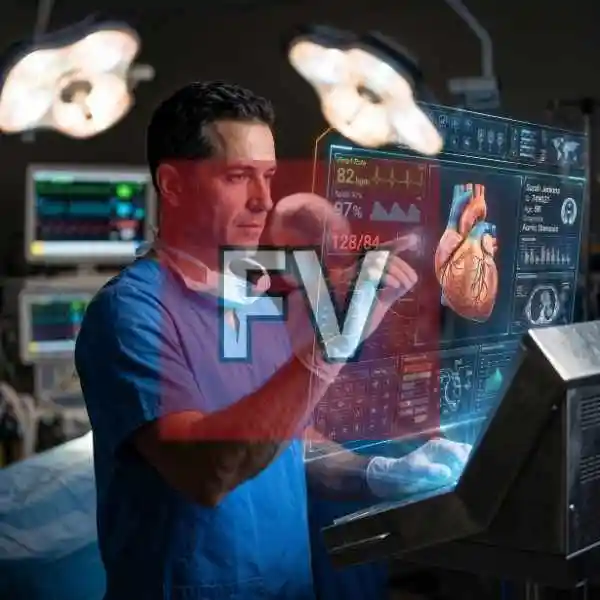
High-resolution 4K medical stock image of a male surgeon interacting with a transparent holographic heart & vitals monitor. Download from $9 on Freevisuals
Go Pro To DownloadA surgeon stands in a dimly lit operating room, one gloved hand raised toward a floating, glass-like hologram. The display hangs in the air beside him, cycling through a live-style heart rate readout, blood pressure, oxygen saturation and a fully rendered 3D heart, veins and arteries picked out in blue and red. It is the kind of image that sells a healthtech pitch deck or a medical AI thumbnail in a single glance, built at 4K resolution in a near-square 1:1 crop so it drops straight into a social feed post as easily as a hero banner. This image is part of the Freevisuals Pro library, available through a Single Pass, Monthly or Yearly plan.
This image is a 4K, 1:1 aspect ratio PNG stock photo of a surgeon viewing a holographic heart and vitals display in an operating room, available for download as a Freevisuals Pro asset under a Single Pass, Monthly or Yearly plan.
The scene centers on a surgeon standing in a dimly lit operating room, one gloved hand raised toward a floating, glass-like control panel. The hologram itself is doing most of the storytelling here. On the left side you get a live-style heart rate readout sitting at 82 bpm with a green waveform, an SpO2 reading of 97 percent, and a blood pressure figure of 128 over 84 rendered in a soft red. The center of the display holds a fully rendered 3D heart, veins and arteries picked out in blue and red, sitting next to a patient info card labeled with an ID number, age and a diagnosis field. Along the bottom edge sits a row of control icons and a smaller chart panel, the kind of dense secondary detail that sells the idea of a real, working piece of medical technology rather than a flat graphic overlay.
What makes this particular render worth pulling into a Pro library rather than treating as a throwaway generation is the physical lighting logic. The overhead surgical lamps in the background are genuinely blown out and diffused the way real OR lighting behaves, and the hologram's glow is casting believable color spill onto the surgeon's glove and the edge of his face mask. That kind of consistency between the practical light sources and the fictional holographic light source is the detail that usually breaks first in AI-generated composites, and it holds up here even at full resolution.
Because the aspect ratio sits close to 1:1, it also crops cleanly for Instagram grid posts and square video thumbnails without losing the hologram's center detail, which is often the first thing lost when a widescreen sci-fi image gets force-cropped into a square feed post.
If you are pulling this into Premiere Pro or After Effects to build it into a motion piece rather than using it as a static image, a few things are worth knowing up front. The hologram panel already carries a soft outer glow baked into the render, so if you add your own glow effect on top in post, keep the intensity low or you will get a double-halo look around the display edges. The color grade leans hard into teal and cyan already, so this pairs naturally with a complementary orange-and-teal grade on any surrounding footage if you are compositing the surgeon into a wider scene.
For anyone building a full motion sequence around a still like this, layering in actual sound design (a soft electronic hum under the hologram, subtle beeps synced to the heart rate readout) does more to sell the shot than any additional visual effect. Epidemic Sound has a solid catalog of sci-fi and medical ambience tracks that work well under this kind of visual, and it is worth checking before reaching for a generic stock hum.
Images at this level of detail typically start life at a lower base resolution from an AI image generator, then go through a dedicated upscaling and detail pass to reach a clean 4K output without the plastic, over-smoothed look that a lot of raw AI renders have straight out of the box. If you want to recreate a similar level of surface texture and lighting realism in your own AI-generated visuals, an upscaler built specifically for adding convincing detail rather than just enlarging pixels makes a real difference. Magnific is the tool most commonly used for exactly this kind of pass, taking a rougher base render and rebuilding skin texture, fabric weave and reflective glass surfaces at high resolution.
The video below walks through the actual upscaling workflow if you want to see the process rather than just take the result on faith.
Watch on YouTube: The #1 AI Image Upscaler, Magnific Tutorial
If you would rather generate your own base image from scratch before running it through an upscaler, OpenArt AI is a solid starting point for prompt-based scenes like this one, particularly for anyone wanting more control over composition before the detail pass.
A static image like this one is a strong starting point, but a lot of creators want to push it further by animating a similar hologram effect over their own live-action footage rather than using the AI render as-is. If that is the direction you are heading, the tutorial below covers building a comparable holographic display effect directly in Premiere Pro and After Effects using layered glow, chromatic aberration and scan line passes.
Watch on YouTube: Easy Hologram Effect Tutorial in Premiere Pro and After Effects
Once you have a hologram-style overlay built this way, dropping in Free Visuals overlay assets on top (light leaks, dust particles, subtle lens dirt) helps ground the sci-fi element back into a photographed scene rather than letting it sit as an obviously separate layer.
If this particular composition is not quite the angle or mood you need, both Shutterstock and iStock carry large libraries of both traditional medical photography and AI-assisted futuristic healthcare imagery, useful if you need a wider set of angles, a different ethnicity or gender for the surgeon, or a horizontal crop for a website hero banner rather than the square format offered here. For broader creative assets, templates and additional AI generation tools beyond stock photography, Envato is also worth a look if you are assembling a full project rather than a single hero image.
As a flat PNG file, this asset drops directly into any editing or design software without a plugin or specific version requirement. It has been used and tested inside the following without issue:
If you are building thumbnails specifically, CapCut and Filmora both handle quick text and motion overlays on top of a still like this one well, without needing a full After Effects setup for a simple animated thumbnail.
This image is part of the Freevisuals Pro library. Once downloaded under an active Pro plan, it can be used in commercial and personal video projects, thumbnails, social content, presentation decks and marketing materials. It should not be resold or redistributed as a standalone stock asset, and it should not be uploaded to a competing stock photography marketplace. Full terms are covered in the Terms of Service.
Is this a real photograph or AI-generated?
This is a fully AI-generated image, built from a detailed text prompt and passed through an upscaling process for detail and resolution. No real patient, hospital or medical professional is depicted, and any names or ID numbers visible in the hologram display are fictional placeholder data.
Can I use this for a medical or healthcare business's marketing?
Yes, this is one of the more common uses for this style of image. Since it is AI-generated and depicts no real person, it avoids the licensing complications that come with photographing real patients or real medical staff for commercial use.
Does this come as a video file as well as a still image?
This particular asset is a static PNG. If you want a moving version, the After Effects hologram tutorial linked above will get you close to a similar animated look using this still as a base layer or reference.
What plan do I need to download this?
Any active Pro plan, including a one-time Single Pass purchase covering this image alone, unlocks the download.
Download free video templates, LUTs, and presets for Premiere Pro, After Effects, DaVinci Resolve, CapCut, and Final Cut Pro.
%20Profile%20Pic.jpg)








