Freevisuals
Download a 4K remote-work stock photo of a woman on a sofa with a laptop and left-side copy space. Freevisuals Pro from $9.
Go Pro To DownloadAffiliate Disclosure: Some links on this page may be affiliate links. If you make a purchase through one of these links, FreeVisuals may earn a commission at no extra cost to you. We only recommend products and platforms we genuinely believe in. Read our full disclosure policy.
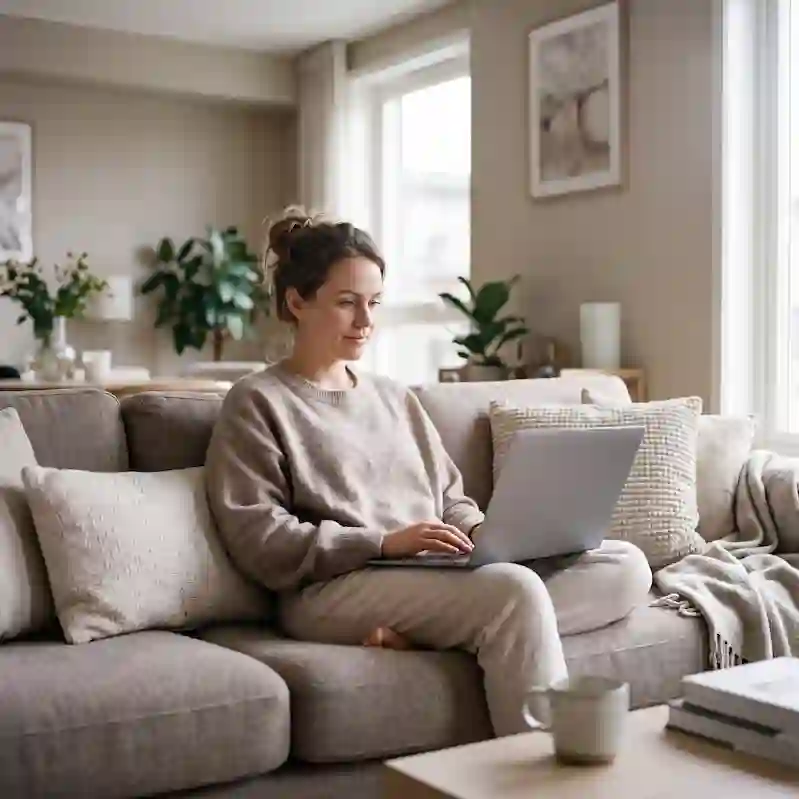
Woman on a linen sofa with a laptop, mug, plant and window, copy space on the left third. Photorealistic lifestyle, 35mm eye-level, shallow depth of field, Rec.709-honest colour. It is built for remote-work videos, freelancer thumbnails, saas landing pages, productivity blogs, not for a generic handshake or neon HUD. This image is part of the Freevisuals Pro library, available through a Single Pass, Monthly or Yearly plan.
Quick Answer
This image is a 4K PNG stock photo (16:9 landscape) of woman on a linen sofa with a laptop, mug, plant and window, copy space on the left third, available for download as a Freevisuals Pro asset under a Single Pass, Monthly or Yearly plan.
The woman sits in the right half of a 16:9 frame so the left third stays empty on purpose. That empty sofa, wall and window light is the product. Thumbnail designers buy this file because they can drop a title, a subscribe prompt or a course name into that gap without covering her face or the laptop. Most remote-work stock fails that test. The person is centred, the laptop lid is a sticker farm, and there is nowhere to put type.
The laptop screen is dark and unbranded. There is no operating-system chrome, no Slack screenshot, no fake analytics dashboard. That is deliberate. A readable UI becomes a rights problem and dates the file in twelve months. A dark lid reads as work without locking you to one app.
Window light is late afternoon, not a ring light. The knit jumper, jeans, mug and plant keep the room in the real-apartment register instead of a beige content-studio set. Depth of field holds her face and the keyboard, then falls off across the curtains. That falloff is what stops the file looking like a flat AI render when you punch in for a 1:1 crop.
Use this still when the video is about freelance income, a Notion setup, a course launch, or a SaaS tool that lives on a laptop. Do not use it when the story needs a standing desk, dual monitors or a co-working loft. Those are different searches and this frame will fight them.
The 16:9 master still crops to 1:1 if you keep her on the right and sacrifice some window. It does not crop cleanly to 9:16 unless you accept a tight head-and-laptop punch-in. If you need vertical, use the talking-head bedroom asset in this same Pro drop instead of forcing this frame.
Leave the grade close to Rec.709. A heavy teal-and-orange LUT turns the knit and the sofa into mud and makes the window look like a sci-fi plate. If you need more separation for a thumbnail, lift her with a soft radial and drop a dark gradient only on the left copy-space, not across her face.
Type should live in the left third. High-contrast sans serif, two or three words, not a paragraph. If the title is long, stack it. Do not put a red YouTube arrow over the laptop; it fights the dark screen and looks like every 2019 thumbnail.
A four-second 5 percent push-in is enough if this still opens a video. Pair it with a quiet acoustic or lo-fi bed from Epidemic Sound or a work-friendly track from Artlist. Keyboard clacks under the still sell the idea faster than another glow effect.
If you need a moving version of this scene, generate B-roll in Invideo or build a talking-head cut in CapCut and use this file only as the custom thumbnail. Do not stretch a 16:9 still into a 9:16 talking-head plate. The crop will take her ear off.
Lifestyle interiors only hold at 4K if fabric weave, hair edges and window highlights stay sharp. The usual path is a locked text-to-image base, then an upscale that rebuilds texture. Magnific is the common pass for knitwear and linen. Topaz is the alternative if you already work in that suite. For a different sofa colour or a second pose before you upscale, start in OpenArt AI.
Do not add logos to the laptop in post. A glowing fruit or a Windows tile turns a clean Pro file into an ad you cannot run.
Treat the still as the click surface, then cut real screen recordings or a talking head underneath. The Adobe thumbnail walkthrough below is the cleanest way to export a frame, add type and keep her face readable.
Watch on YouTube: Video Editing 101: How to Edit YouTube Thumbnails
If the video itself is a talking-head explainer, edit the A-roll in CapCut and keep this image for the custom thumbnail only.
Watch on YouTube: How To Edit Talking Head Reels from scratch in CapCut
Need lower-thirds or a course-intro pack to sit over the still? Envato and Motion Array both carry clean lifestyle title templates. AEJuice is useful if you already live in After Effects. For a voiceover that does not sound like a robot reading notes, ElevenLabs is the usual next step after the picture is locked.
If you need a standing desk, a man on a balcony, or an overhead flat-lay of a laptop and invoice, start with Shutterstock and iStock for a second angle in the same video. Browse the Freevisuals stock images and footage hub for the rest of this Pro set, including the vertical talking-head still that fills the crop this file cannot.
Free stock of this subject exists on every major site. The reason this file sits in Freevisuals Pro is the combination of an unbranded frame, a crop that matches how creators actually publish, and a page that tells you what to do with it after the download. A $9 Single Pass or a Monthly or Yearly plan is cheaper than one image on a traditional stock invoice once you are publishing weekly.
Search demand for business stills is steady rather than trendy. That is useful. A cockpit HUD is exciting in a grid and then sits unused. A business plate gets pulled into thumbnails, ads, blog headers and client decks for years. Title the CMS item with the words people type: woman sofa laptop window light, 4K, stock image, 16:9 landscape.
Pair the still with a free grade from the Freevisuals LUT library only when the footage next to it needs matching. Do not grade a finished beauty or food plate into a cinematic look that fights the subject. If you need extra stills in the same niche after this one, Shutterstock, iStock and Envato are the three affiliate libraries we already send editors to for volume. Motion templates that sit on top of the still live in Motion Array, MotionVFX and AEJuice.
File handling is simple. Download the PNG from the Pro button, upload the small watermarked preview to Webflow, keep the master on R2 at files.freevisuals.net/images/woman-sofa-laptop-window-light-4k.png. Do not host the 4K master in the Webflow Assets panel. It is public and it counts against bandwidth.
If you generate a variant for a specific client, keep Free and Pro as separate CMS items with separate slugs. Do not overwrite this Pro file with a free crop. The monetisation field on the Stock Images collection should stay Pro, Category Business, Orientation Landscape.
As a flat PNG file, this asset drops directly into any editing or design software without a plugin or specific version requirement. It has been used and tested inside the following without issue:
For quick thumbnail and Shorts work built around this image, CapCut and Filmora both handle titles, captions and a mild push-in on a still without needing a full After Effects project. Wondershare is the same family as Filmora if you already work in that suite.
This image is part of the Freevisuals Pro library. Once downloaded under an active Pro plan, it can be used in commercial and personal video projects, thumbnails, social content, presentation decks and marketing materials. It should not be resold or redistributed as a standalone stock asset, and it should not be uploaded to a competing stock photography marketplace. Full terms are covered in the Terms of Service.
Is this a real photograph or AI-generated?
This is a fully AI-generated image, built from a detailed text prompt and passed through an upscaling process for detail and resolution. Props, faces and environments are set dressing, not a documented location or identifiable private home.
Can I use this in ads and client work?
Yes. That is a primary use of Freevisuals Pro stills. There are no readable commercial logos in the frame, so you are not clearing third-party marks before you run a campaign. You still cannot resell the file as stock.
Does this come as a video file as well as a still image?
This particular asset is a static PNG. Add a slow scale-up in Premiere Pro, CapCut, Final Cut, Resolve or After Effects if you need motion. The tutorials on this page cover that workflow.
What plan do I need to download this?
Any active Freevisuals Pro plan, including a one-time Single Pass purchase covering this image alone, unlocks the download.
What is the aspect ratio and how should I crop it?
The master is 16:9 landscape. Crop toward the subject listed in the spec table. Do not stretch the file to a different ratio.
Can I add my own text, logo or product label?
Yes, in your edit. Keep type off faces, food and primary products. Do not composite a real competitor logo onto the file and publish it as if that brand shot the photo.
Download free video templates, LUTs and presets for Premiere Pro, After Effects, DaVinci Resolve, CapCut and Final Cut Pro from the Freevisuals library while you wait on a Pro download, or pair this still with a free grade from the free LUT collection.
Download free video templates, LUTs, and presets for Premiere Pro, After Effects, DaVinci Resolve, CapCut, and Final Cut Pro.