.avif)
Freevisuals
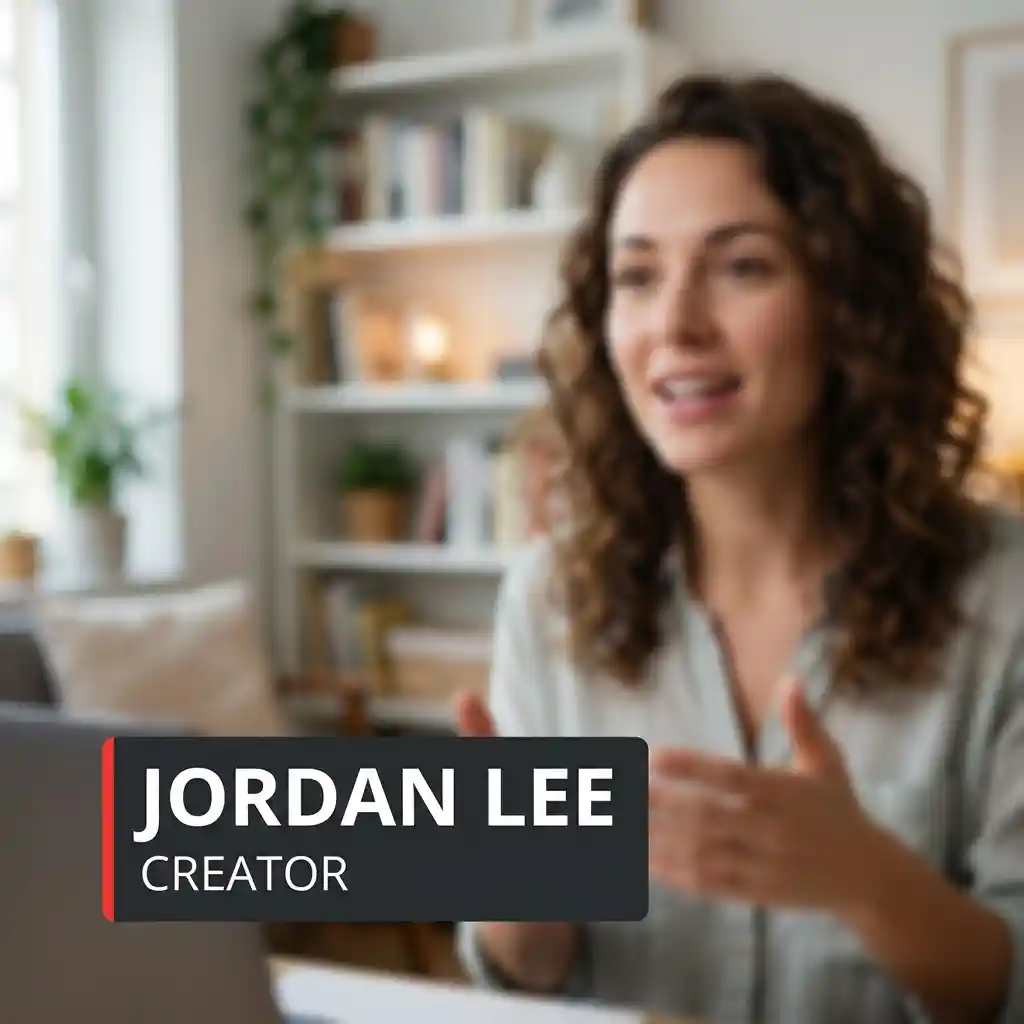
Free Fusion nameplate for DaVinci Resolve. Classic plate and minimal rule for interviews and talking heads. Resolve 18 and 19. No plugin.
Download FREEFree Fusion nameplate pack for DaVinci Resolve. Two titles for basic name and role on interviews and talking-head YouTube. Classic left plate and minimal rule. Dark plate. Thin red accent. Open Sans. No plugin. No account required for the download.
This is a free starter set. It is not the full Pro Interview Lower Thirds pack. That Pro ZIP has six titles including soft, topic tag, coming up and guest wide. This free ZIP gives you a clean nameplate and a minimal rule so you can name a guest without building Fusion from scratch.
Two .setting titles. Copy them into the Resolve Titles folder. Restart. Drag from Effects Library > Titles. Edit the words in the Inspector. Use Nameplate for seated interviews. Use Minimal when a full plate feels heavy on a busy background.
Two titles. Same design language as the Pro Resolve packs so a free nameplate can sit next to a Pro series without looking like a different brand.
Each file is a Fusion Edit title. Change the words in the Edit page Inspector. Open Fusion only if you need to rebuild the layout.
Mac: ~/Library/Application Support/Blackmagic Design/DaVinci Resolve/Fusion/Templates/Edit/Titles/
Windows: %APPDATA%\Blackmagic Design\DaVinci Resolve\Support\Fusion\Templates\Edit\Titles\
If the names do not appear, the files are in the wrong folder or Resolve was still open. Titles live under Fusion/Templates/Edit/Titles, not under Macros or Transitions.
How Fusion title templates work in Resolve: Fusion Title Templates Masterclass - Create Your Own Reusable BRANDED Assets in DaVinci Resolve. Keep the readme open while you copy the files.
Park it on a track above the interview clip. Type the guest name in Name. Type the role or channel title in Role. Keep the name under three words if you can. Long names wrap and look weak. Hold the lower third for three to five seconds after the guest starts speaking, then cut it or fade it.
Use on busy frames, bright clothes or outdoor interviews where a dark plate fights the picture. The thin rule still marks the speaker without covering half the shirt.
Fusion Edit Titles. Resolve 18 and 19. Free Resolve is enough. No OFX. No paid Fusion plugin.
Timeline size follows the project. A 1920x1080 timeline and a 1080x1920 timeline both work. On 9:16, check position. Nameplate may sit under platform UI if you leave the default. Nudge up on vertical timelines.
Default font is Open Sans. If it is missing, pick any clean sans in Font. Do not leave a missing-font box on screen.
It is not a six-style interview system. It is not a Soft centred plate, Topic Tag, Coming Up bar or Guest Wide intro. Those live in Pro Interview Lower Thirds for DaVinci Resolve on FreeVisuals Pro.
It is not a vertical Shorts hook pack. For 9:16 hooks and CTAs, use Pro Vertical Stories Titles. For tip and step cards in tutorials, use Pro Tutorial Callouts. For chapter cards, use Pro Film Chapter Kit. For soft wipes, use Pro Film Wipe Kit.
If you need MotionVFX camera moves or a large Envato opener, use the premium list on DaVinci Resolve templates. Those open on Envato, Artlist, Motion Array, Motion Elements or MotionVFX. Partner licence, not this free ZIP.
This pack is FreeVisuals Free. Personal and commercial use, including monetised YouTube. No attribution. Do not resell the .setting files.
Pro packs are larger and more specialised. Pro Interview Lower Thirds adds Soft, Minimal variants with more options, Topic Tag, Coming Up and Guest Wide. Pro Vertical Stories Titles covers 9:16 Shorts hooks and end CTAs. Pro Tutorial Callouts covers tip, warning, step and result cards. Browse those on Pro assets and on the Resolve templates hub.
A free nameplate is enough for many talking-head uploads. When you run a regular interview series and need more layouts, step up to the Pro interview pack rather than rebuilding Fusion every week.
Grade the interview before you judge the nameplate. A dark plate on an uncorrected log image looks muddy. Convert log first, balance skin, then drop the title. Free and Pro LUT packs on Premium LUTs help when the series needs one consistent grade.
Music under a long interview: Artlist or Epidemic Sound. Keep beds low under speech. A whoosh on every nameplate makes the cut sound like a trailer.
Bigger Resolve template sets after this free pack: Envato, Motion Array or MotionVFX. Those are affiliate. This free download does not unlock them.
Do not drag these .setting files into Premiere or CapCut. They are Fusion titles.
Install the two files once. Do not recopy them from the ZIP every upload. In the first project, put Nameplate on track 3 for the guest. Duplicate that project for the next episode. Change only the words.
Batch one long interview. Mark guest name and role. Apply the same Nameplate style across the full cut. Switch to Minimal only when the plate fights the frame. Channels that invent a new lower third every episode look unfinished.
If you later add the Pro Interview pack, keep the same red accent and dark plate language so free and Pro episodes still feel like one channel.
Most nameplates should leave the frame after a few seconds. Viewers need the name once. Leaving Nameplate on for twenty minutes turns a title into a permanent banner and pulls the eye off the face.
On 16:9, Nameplate sits lower left by design. On 9:16, move it up so it clears captions and platform chrome. Test a Short export before you lock a vertical series template.
Match the plate to the grade. A cold interview grade under a red accent still works because the accent is small. A neon background under Nameplate can fight the dark plate. In that case switch to Minimal.
Spell names correctly before you render. A nameplate is where typos get screenshot and shared.
The same files work on a vertical timeline. Faces sit high on Shorts, so lower thirds need more headroom than on 16:9. Nameplate may need a vertical nudge. Minimal can stay lower if the rule does not collide with captions.
Long-form can hold a nameplate longer on first introduction. A Short usually cannot. Two to three seconds on 9:16 is enough for a name, then clear the frame for captions.
FreeVisuals Free. Personal and commercial use, including monetised YouTube, client work and paid social. No attribution. Do not resell the .setting files. Do not upload them to another stock site. Terms: Terms of Service.
This free pack does not require a Pro plan. Pro packs on Pro assets unlock with Single Pass, Monthly or Yearly.
Yes. FreeVisuals Free licence. Download from this page. No Single Pass required for these two titles.
Yes. Fusion titles do not need Studio.
No.
Yes. Switch the timeline to 1080x1920 and check position. Nameplate may need a nudge so it clears Shorts UI and captions.
Wrong folder or Resolve was not restarted. Confirm the path in the readme. Titles go in Fusion/Templates/Edit/Titles.
The accent is baked into the Fusion graph. Open the title in Fusion if you need a different colour. The Inspector on the Edit page changes the words and type size.
No. Fusion .setting only.
This free pack has two titles: Nameplate and Minimal. Pro Interview Lower Thirds has six: Classic, Soft, Minimal, Topic Tag, Coming Up and Guest Wide. Same design family, more layouts on Pro.
No. Pro packs stay on Single Pass, Monthly or Yearly. See our Pro assets page for more pro downloads.
Use Nameplate as the default. Switch to Minimal when the frame is busy. Change only the words between episodes so the channel looks consistent.
Download once. Store the ZIP on your drive. When FreeVisuals revises the pack, replace the two files and keep any custom Fusion versions in a side folder.
When you need Soft, Topic Tag, Coming Up or Guest Wide, move up to Pro Interview Lower Thirds on Pro assets.
Search terms this page should earn: free DaVinci Resolve lower third, free Resolve nameplate, free YouTube title Resolve, free Fusion lower third, free interview title DaVinci. That is why the H1 stays on free YouTube nameplate and Resolve.
.
Affiliate Disclosure: Some links on this page may be affiliate links. If you make a purchase through one of these links, FreeVisuals may earn a commission at no extra cost to you. We only recommend products and platforms we genuinely believe in. Read our full disclosure policy.
Download free video templates, LUTs, and presets for Premiere Pro, After Effects, DaVinci Resolve, CapCut, and Final Cut Pro.
%20Profile%20Pic.jpg)








