.avif)
Freevisuals
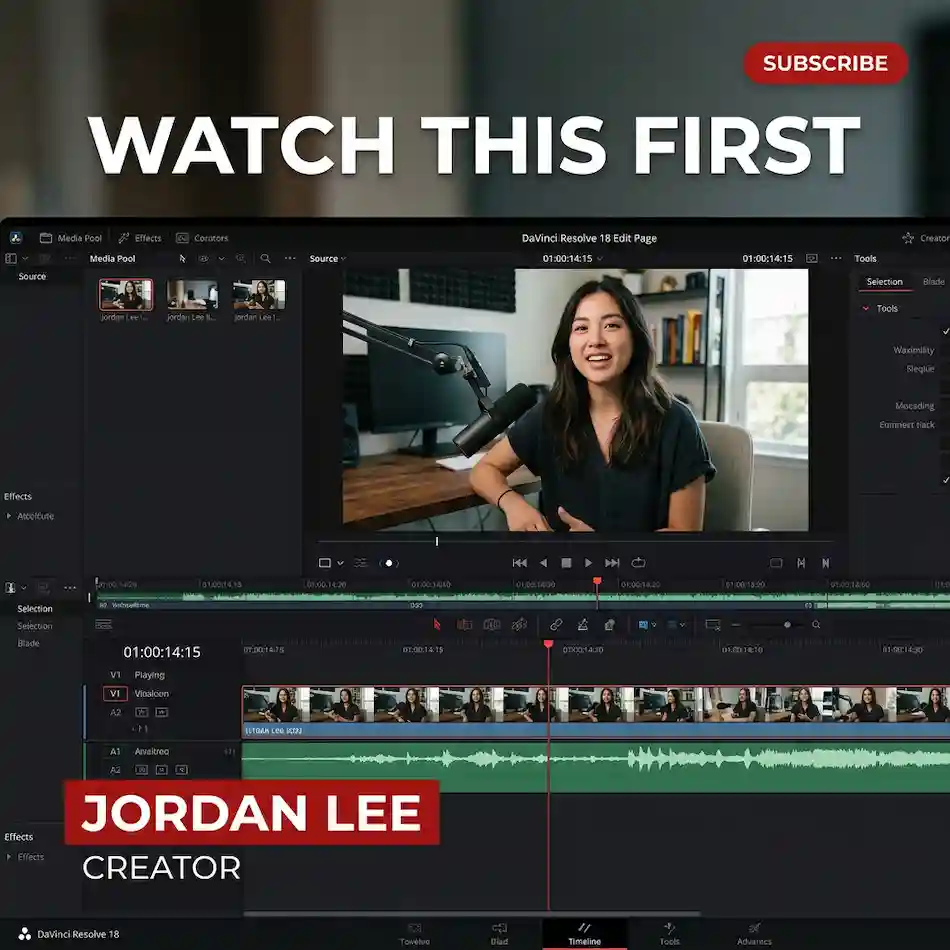
FreeVisuals Pro Fusion titles for DaVinci Resolve. Hook, lower third, end card and subscribe tag. Resolve 18 and 19. No plugin.
Go Pro To DownloadFreeVisuals Pro title pack for DaVinci Resolve. Four Fusion titles for the Edit page: hook title, lower third, end card and subscribe tag. No plugin. Resolve 18 and 19, including the free install.
This is not an Envato or Artlist file. You download the ZIP from files.freevisuals.net after a Pro Single Pass, Monthly or Yearly plan.
Four .setting titles. Copy them into the Resolve Titles folder. Restart. Drag from Effects Library > Titles. Edit text in the Inspector. Use the hook on the first two seconds. Use the lower third on talking head. Use the end card on the last five seconds. Use the subscribe tag as a small bug.
Four titles. Same family. Red bar uses the FreeVisuals red so a channel can match the site without picking a hex every time. Change Bar Color in the Inspector if you need a different brand.
Each file is a Fusion GroupOperator with published Inspector fields. You do not need to open Fusion to change the words. Open Fusion only if you want to rebuild the layout.
Mac: ~/Library/Application Support/Blackmagic Design/DaVinci Resolve/Fusion/Templates/Edit/Titles/
Windows: %APPDATA%\Blackmagic Design\DaVinci Resolve\Support\Fusion\Templates\Edit\Titles\
If the names do not appear, the files are in the wrong folder or Resolve was not restarted. Titles live under Fusion/Templates/Edit/Titles, not under Fusion/Macros and not on the desktop.
Watch a clear walkthrough of saving and using Fusion titles on the Edit page: Saving Title Templates in DaVinci Resolve via Fusion with Macros. That video is the folder path. It is not this pack.
Drop it on video track 2 for two to three seconds. Type the hook in Hook Line. Keep it under seven words. Size default is 0.09. Drop Size if the line wraps on a 9:16 timeline. Position default is high centre. Move it if it covers a face.
Name on the top line. Role on the second line. Bar Width and Bar Height resize the red plate. If a long surname clips, raise Bar Width before you shrink the type. Role Color follows the name color unless you open Fusion and split the inputs.
Park it on the last five seconds. Line 1 is the action. Line 2 is the subscribe line. Do not put a URL in Line 1. Viewers cannot click type in a video. Put the URL in the description.
Leave it on for the whole cut or only after the hook. Default sits top right. On 9:16, nudge Position down so it clears the platform UI.
Built as Fusion Edit Titles. Resolve 18 and 19. Free Resolve is enough. No OFX. No Fusion paid plugin. No Fusion page work required for a normal edit.
Timeline size follows the project. UseFrameFormatSettings is on. A 1920x1080 timeline and a 1080x1920 timeline both work. Check Position after you switch aspect.
Default font is Open Sans Bold. If that font is missing on your machine, pick any bold sans in the Font field. Do not leave a missing-font box on screen.
It is not a 200-title MotionVFX bundle. It is not a Fusion transition. It is not a LUT. It is four titles a channel can use every upload. If you need a 1500-transition kit or a 3D logo, use the premium list on DaVinci Resolve templates. Those open on Envato, Artlist, Motion Array, Motion Elements or MotionVFX. Partner licence, not this ZIP.
Grade the cut with a Pro LUT from Premium LUTs. Food and cafe channels can use the 100+ Food and Cafe Mega LUT Pack. Faceless YouTube can sit this title pack on top of the Ultimate Faceless YouTube Creator Kit files if that ZIP is already on the drive.
Need music under the end card: Artlist or Epidemic Sound. Need a bigger Resolve title or transition set after this pack: Envato, Motion Array or MotionVFX.
Premiere users who want the same job in that app: look at Pro Clean Creator Titles on the Premiere templates hub when that pack is live. Do not drag these .setting files into Premiere. They are Fusion titles.
The free row on DaVinci Resolve templates has partner and FreeVisuals titles you can try without Pro. This pack is owned. One ZIP. Same four titles every upload so the channel does not look like a template dump.
Pro Monthly and Yearly unlock this pack plus other Pro rows. Single Pass unlocks this ZIP only. Affiliate packs on the same page do not unlock with Pro.
FreeVisuals Pro. Personal and commercial use, including monetised YouTube, client work and paid social. No attribution. Do not resell the .setting files. Do not upload them to another stock site. Terms: Terms of Service.
Yes. Fusion titles do not need Studio.
No.
Yes. Switch the timeline to 1080x1920 and check Position. The subscribe tag may sit under TikTok UI if you leave the default.
Wrong folder or Resolve was not restarted. Confirm the path in the readme.
Yes. Bar Color on Lower Third and Subscribe Tag. Hook Title and End Card are type only.
No. Fusion .setting only.
DaVinci Resolve templates. This row sits in FreeVisuals Pro, not the partner list.
Keep the four files installed once. Do not re-copy them from the ZIP every upload. Make a Resolve project preset that already has the lower third on track 2 and the subscribe tag on track 3. Duplicate that project for the next video. Change only the StyledText fields.
Batch one long-form cut, pull five Shorts, and use the same hook family on all five. Change the line. Do not change the title pack mid-series. Viewers learn the bar color and the type size. That is the point of a small owned set instead of a 200-file partner dump.
If a Short needs a plate still under the hook, generate that still from your own prompt file or pull a FreeVisuals stock clip. Do not drop a random luxury-car still under a recipe hook.
Pick one hook style and one lower third and keep them for the series. Change only the words. A channel that swaps four title packs in a week looks unfinished.
Download once. Store the ZIP on your drive. When FreeVisuals revises the pack, replace the four files and keep any custom Fusion versions in a side folder.
Search terms this page should earn: DaVinci Resolve title template, Resolve lower third, Fusion title pack, Pro Resolve titles, subscribe tag Resolve. That is why the H1 stays on creator titles and Resolve, not on After Effects.
Related: DaVinci Resolve templates, Premium LUTs, free DaVinci Resolve presets.
Affiliate Disclosure: Some links on this page may be affiliate links. If you make a purchase through one of these links, FreeVisuals may earn a commission at no extra cost to you. We only recommend products and platforms we genuinely believe in. Read our full disclosure policy.
Download free video templates, LUTs, and presets for Premiere Pro, After Effects, DaVinci Resolve, CapCut, and Final Cut Pro.









