.avif)
Freevisuals
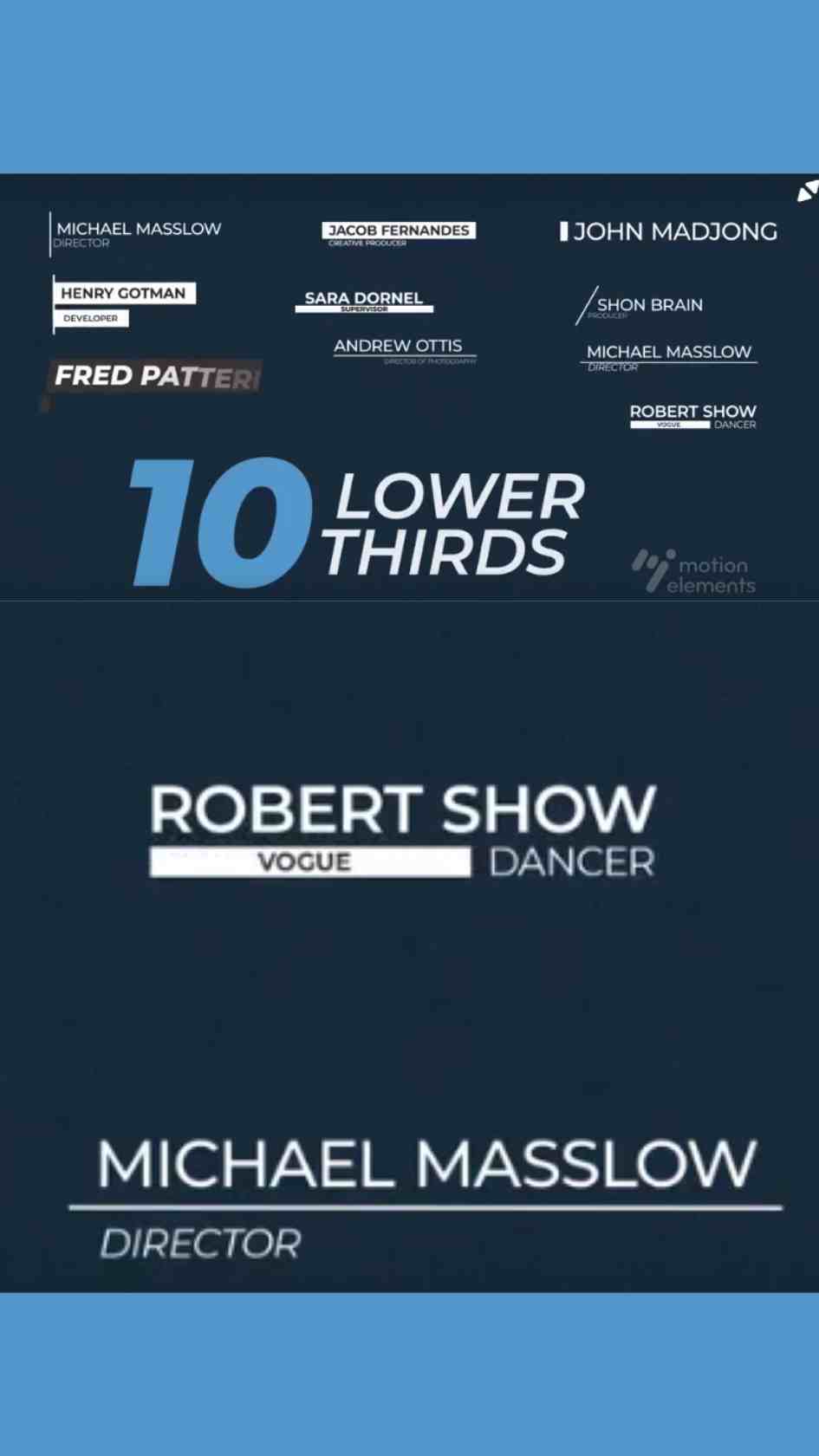
10 Free Lower Thirds Titles, a Premiere Pro MOGRT pack with ten distinct lower third styles. Download on MotionElements for variety.
Download NOW!Download On MotionElements
A single lower third style, however well designed, eventually starts to feel repetitive across a longer project or a channel publishing content regularly. 10 Lower Thirds Titles, available through MotionElements, solves this specific problem directly, a genuine variety pack bundling ten distinct lower third styles into a single Premiere Pro Motion Graphics Template, giving you real range to draw from rather than relying on one fixed design throughout.
If you're building this into a broader project needing genuine visual variety, our Premiere Pro Shortcuts guide is genuinely useful here, since efficiently navigating between multiple different graphic styles across a longer timeline benefits considerably from knowing the right keyboard shortcuts. For music with genuinely broad appeal that pairs naturally with a wide range of content types, Artlist carries a genuinely strong selection well suited to this exact use case.
Exact resolution, individual style breakdown, and file size were not independently confirmed at the time of writing since MotionElements' listing pages require JavaScript to load full specifications. Confirm these specific details directly on the live product page before finalizing a project around exact delivery requirements.
Purchasing several distinct lower third styles together, rather than one single design, solves a genuinely common problem editors run into over time, visual fatigue. Even an excellent, well designed lower third starts to feel repetitive once a viewer has seen it dozens of times across a long running series or channel, and having genuine variety to rotate through keeps content feeling fresh without requiring you to search for and evaluate entirely new templates from scratch each time you want a change. A pack like this one essentially front loads that variety into a single purchase, giving you a ready made rotation to draw from indefinitely.
Head to the MotionElements download page and grab the MOGRT file.
In Premiere Pro, go to Window, then Essential Graphics, and use the Browse tab to install your downloaded template pack.
Browse through the ten included styles and consider which specific ones suit your current project's tone before committing to a rotation.
Drag the specific lower third style you want to use directly onto your timeline, positioned above your footage at the appropriate moment.
Switch to the Edit tab within Essential Graphics and update the name and title text fields directly.
Use the Edit tab's color controls to fit your specific brand palette, ideally applying a consistent color treatment across all ten styles for genuine cohesion.
Play back your timeline to confirm your chosen lower third reads clearly before committing to a final export.
Once satisfied, export your finished sequence using your project's standard export settings.
For a genuinely useful walkthrough of working with multiple distinct lower third styles inside Premiere Pro, watch Create 3 Types Of Lower Thirds, After Effects Tutorial, which covers several distinct lower third approaches directly relevant to understanding how a genuine variety pack like this one is actually structured. This is worth watching specifically because seeing multiple distinct styles built and compared side by side clarifies how to choose the right specific style for a given moment rather than defaulting to the same one repeatedly out of habit.
Channels publishing regularly benefit enormously from having genuine variety to rotate through, avoiding the visual fatigue a single repeated style eventually creates.
Projects featuring many different speakers can assign different styles to different speaker types or segments for genuine visual variety.
Agencies benefit from having several distinct styles available to match different client brand identities without purchasing separate templates for each.
Courses with genuinely different content types, main lessons versus quick tips, for instance, can use different styles to visually distinguish between segment types.
High volume social content benefits from genuine style rotation to keep a channel's visual identity feeling fresh over time.
Rather than choosing a lower third style randomly for each new video, it's worth building a genuinely deliberate rotation strategy using this pack's ten included options. Assigning specific styles to specific recurring content types, a particular style for main narrative segments and a different one for quick tips or asides, for instance, turns this pack's raw variety into a considered visual system rather than arbitrary variation. This kind of deliberate structure helps viewers subconsciously recognize what type of content they're watching based on the specific lower third style being used, adding a genuine layer of communicative value beyond pure visual variety.
Using all ten styles interchangeably without any deliberate logic. Random variation reads as less considered than a genuine rotation strategy tied to specific content types.
Applying inconsistent colors across different styles within the same project. Genuine variety in animation still benefits from unified brand colors throughout.
Forgetting the template is a MOGRT rather than a native project file. All customization happens through Essential Graphics directly in Premiere Pro.
As with any MotionElements asset, reviewing the current license terms before using this template pack within paid client or commercial work is worth doing upfront, particularly given how frequently a genuinely versatile multi style pack like this one tends to see repeated, ongoing use.
A single style, however well designed, starts to feel repetitive across long running content. Genuine variety keeps a channel or extended project feeling visually fresh.
No, it's a Premiere Pro Motion Graphics Template, fully editable within the Essential Graphics panel.
Not necessarily, selecting a deliberate subset for a specific project maintains focus, while the full range gives you room to vary future projects.
Apply the same color palette and font choices across every style you use, genuine variety in animation still benefits from unified brand colors.
Long running YouTube channels, agencies managing multiple clients, and any project needing genuine visual variety across an extended run of content.
10 Lower Thirds Titles gives Premiere Pro editors genuine, ready made variety to draw from indefinitely, solving the visual fatigue problem a single fixed lower third style eventually creates across longer projects and recurring content. Understanding the value of a deliberate rotation strategy, rather than random style switching, and applying consistent branding across every included style, gets you the most value from this pack across long running channels, agency work, and any project needing genuine visual range.
Affiliate Disclosure: This post may contain affiliate links. If you make a purchase through one of these links, FreeVisuals may earn a commission at no extra cost to you. We only recommend products and platforms we genuinely believe in. Read our full disclosure policy.
Download free video templates, LUTs, and presets for Premiere Pro, After Effects, DaVinci Resolve, CapCut, and Final Cut Pro.
%20Profile%20Pic.jpg)








