.avif)
Freevisuals


Download Dramatic Film Noir Reel Transitions After Effects Template free for Adobe After Effects. Compatible with After Effects CC 2019 and later. Free for
Download FREEGo Pro To DownloadDownload NOW!There is a reason the great crime films of the 1940s and 1950s still hold up. It is not just the stories. It is the visual grammar , the deep shadows, the dust-covered streets, the way light cuts through venetian blinds and lands in hard, angular streaks. That aesthetic did not die. It went underground, resurfaced in neo-noir cinema, and today it sits in a template pack forAfter Effects on Envato Elements waiting to transform your next project.
The Dramatic Film Reel Transitions with Retro Noir Cinema Style pack, created by RoyalPixels and available through Envato Elements, is one of the more committed After Effects transition packs I have come across. It does not half-heartedly gesture at a retro aesthetic. It goes all in on film noir, and the results are exactly what a project in that register deserves.
If you have been looking for transitions that bring genuine dramatic weight to a documentary, short film, noir-inspired music video, or moody brand film, this pack belongs in your toolkit. Let me walk you through exactly what is in it, how to use it, what to pair it with, and whether the Envato Elements subscription that unlocks it is worth your money.
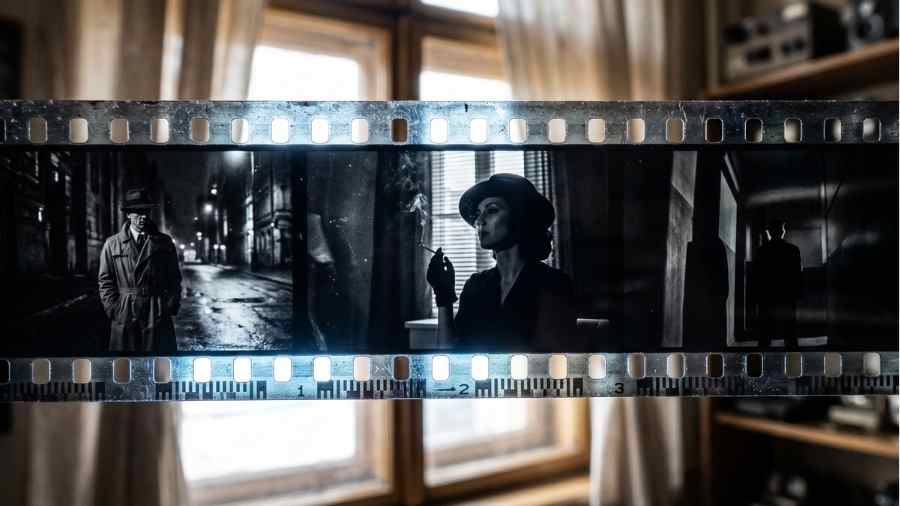
The Dramatic Film Reel Transitions pack is an After Effects CC template that requires no third-party plugins. It ships as a self-contained project file, opens directly in After Effects, and gives you a collection of dynamic film reel transition animations built around the visual language of classic film noir cinema.
Every transition in the pack is constructed around the same core aesthetic ingredients: authentic film strip borders with visible sprocket-hole details, gritty surface textures suggesting aged celluloid, cinematic light leaks in the cooler and more dramatic register of monochrome film rather than the warm amber tones of colour photography, and grain and dust overlays that sit on top of the footage in a way that reads as physical rather than digital.
The black and white treatment is central to the design. Unlike many vintage transition packs that simply desaturate footage and call it done, the grade baked into these transitions has genuine contrast depth. Shadows are crushed in the way that orthochromatic and panchromatic film stocks render them. Highlights retain just enough detail to feel filmic rather than clipped. The result is a transition that does not just move your footage from one clip to the next but actively contributes to the mood of the piece.
The file size of 76.2MB is lean for an After Effects template of this scope, which means download and project loading times are fast. The transitions work across any resolution and aspect ratio, so whether you are cutting in 1080p, 4K, vertical for social, or a cinematic 2.39:1 widescreen crop, the pack adapts without stretching or recomping.
Film noir is not just a visual style. It is a emotional state - one of dread, inevitability and shadow. The best transition templates in this genre do not just look noir. They feel it.
Before we talk about how to use these transitions in a practical edit, it is worth spending a moment on why the film noir aesthetic remains so powerful and so sought after by editors and filmmakers decades after its golden age.
Film noir emerged from a confluence of German Expressionist visual language, American crime fiction, and the particular constraints of mid-century Hollywood production. The deep shadows, the high-contrast monochrome photography, the rain-slicked streets and smoke-filled rooms were partly a matter of style and partly a matter of economics. It was cheaper to light a scene dramatically than to light it evenly. What emerged from those practical decisions became one of the most distinctive and emotionally resonant visual grammars in cinema history.
The reason it still works in 2026 is that the emotional register it taps into has not changed. Mystery, moral ambiguity, paranoia, fatalism - these are not historical feelings. They are human ones. When you apply a noir aesthetic to contemporary footage, you are not simply reaching for nostalgia. You are borrowing a visual language that has been refined over decades to communicate a very specific interior state. Audiences feel it even when they cannot name it.
For editors and content creators working in documentary, true crime, thriller, brand film, music video or cinematic short film, that is a powerful tool to have in your transition library.
The setup process for this template is more straightforward than many After Effects projects of similar visual complexity.
Because the template requires no plugins, there are no dependency issues or version conflicts to navigate. If you are running After Effects CC, the file will open cleanly. RoyalPixels have included their support email directly in the project notes if you run into any issues: royalpixelsenvato@gmail.com.
The transition market is genuinely crowded. If you search for After Effects transitions on any major stock template platform you will find hundreds of packs, many of them competent and some of them excellent. The question worth asking about any specific pack is not whether it has transitions but whether it has a point of view.
This one does. RoyalPixels have built a pack that commits completely to a single aesthetic register rather than trying to cover every possible style in one download. Every element serves the noir vision. The textures are scratched and gritty rather than clean and digital. The light leaks are cold and dramatic rather than warm and romantic. The film strip borders have the slightly uneven, mechanical quality of real celluloid rather than the perfect symmetry of a digitally generated frame.
That specificity is both the pack's greatest strength and the thing you need to be clear-eyed about before downloading. These transitions are not general-purpose tools. They are purpose-built for projects where the noir or vintage dramatic aesthetic is the brief. Used in the right context they are exceptional. Used in a bright, colourful travel vlog or a cheerful product demo they will look completely out of place.
If the brief is dark, moody, cinematic, retro, dramatic, or noir in any sense of those words, this pack is one of the strongest options available on Envato Elements at any price point, let alone as part of an unlimited subscription.
Documentary filmmakers working in the true crime, investigative journalism, or historical subject space will find these transitions immediately useful. The film reel aesthetic suggests archival material and the passage of time. The noir visual language communicates moral weight and seriousness. Placed between interview segments, archival footage, and establishing shots, these transitions give a documentary edit a cinematic coherence that plain cuts or simple dissolves cannot provide.
If you are cutting a short film with any kind of thriller, mystery, crime, or psychological drama element, these transitions are built for your timeline. They carry emotional information about tension and unease. A film reel transition between a surveillance scene and a confrontation scene does narrative work that a plain cut simply does not.
There is a significant corner of music video production that trades in exactly the moody, high-contrast, monochrome-tinged aesthetic this pack delivers. Artists working in alternative, jazz, blues, soul, ambient, or experimental genres often want visual language that references classic cinema. These transitions give a music video edit an immediate cinematic reference without requiring a full colour grade rebuild from scratch.
Not all commercial work is bright and upbeat. Luxury brands, spirits, perfume, fashion, and high-end automotive all regularly commission brand films that lean into the dramatic and the cinematic. If a client brief uses words like "timeless", "iconic", "heritage" or "classic", these transitions belong in your pitch toolkit.
Any video project dealing with historical subject matter from the mid-twentieth century or earlier benefits from the film reel and grain textures in this pack. The transitions help bridge modern production values with the visual world of archival footage, making mixed-media edits feel cohesive rather than jarring.
The Film Reel Transitions pack delivers its maximum impact when it is part of a broader creative toolkit where every element is working in the same aesthetic direction. Here is how I approach building out the full noir toolkit around this template.
Grade your footage before applying the transitions. The black and white and high-contrast visual language of these transitions will clash with ungraded or log-gamma footage. Bring your clips to their final colour and contrast first, then layer the transitions on top. If you are cutting a fully monochrome piece, apply your desaturation and contrast grade at sequence level before you start placing transitions so you can see how each one interacts with your specific footage.
Use them at meaningful edit points. The dramatic weight of a film reel transition is wasted on a cut between two visually similar shots in the same location. Reserve these for moments of genuine scene change, emotional shift, or narrative pivot. The transition carries meaning in the noir register. Use it when you want the audience to feel the change, not just see it.
Match the transition to the sound design. A noir transition cut on silence lands very differently from the same cut timed to a downbeat or a sfx hit. The film projector and tape rattle sounds available in platforms like Epidemic Sound are designed to anchor exactly this kind of visual moment. Build the audio before you lock the transition placement.
Do not fight the monochrome. If you are cutting a film with colour footage and you want to use these transitions, consider committing to the aesthetic rather than compromising it. A project that goes fully monochrome for transitional moments and returns to colour for the main footage can be striking if it is done with intention. But half-measures, colour footage with a desaturated transition dropped on top, will look like an accident rather than a choice.
Layer sparingly. As with any strong visual statement, restraint is part of the craft. Three or four film reel transitions across a five-minute short film is powerful. Eight of them is fatiguing. Trust the transitions to do their work and give them space to breathe.
This is the question worth asking honestly rather than skipping over in a rush to the download button. An Envato Elements subscription starts at $16.50 per month and gives you unlimited downloads from a library of over 27 million creative assets. That includes After Effects templates, Premiere Pro templates, Final Cut Pro templates, stock video, royalty-free music, fonts, graphic templates, photos, and more. Every download comes with a lifetime commercial licence.
For a single freelance video editor or content creator working on regular projects, the subscription pays for itself many times over within the first month. A comparable collection of individual transition packs, title templates, and LUTs purchased separately would cost several hundred dollars. The Envato Elements model is fundamentally different from per-asset purchasing, and for anyone doing this work regularly it is one of the most efficient creative subscriptions available.
If you are specifically looking for royalty-free music to sit alongside your video projects, Artlistand Epidemic Sound are purpose-built for that need with larger and more carefully curated music catalogues than Envato's audio library. For premium stock footage when your own camera work needs supplementing, Shutterstockgives you access to one of the deepest libraries available including strong historical and archival collections that pair directly with the noir aesthetic of this template.
The most effective approach for a working video professional is to run Envato Elements alongside one music-focused subscription. That combination covers virtually every asset need across templates, footage, music, and sound effects without significant redundancy.
If you have read our review of the Artlist Film Roll Transitions for Final Cut Pro, you might be wondering how these two packs compare and whether you need both.
The short answer is that they occupy adjacent but distinct spaces. The Artlist Film Roll pack is warmer, more analog in tone, and sits most naturally in the travel, lifestyle, and wedding film register. The colour palette is amber, gold and warm cream. The emotional register is nostalgic and romantic. It is the visual language of Super 8 home movies and golden hour photography.
The Envato Film Reel Noir pack is the opposite in almost every respect. It is cold, high-contrast, dramatically lit, and built around the monochrome palette of classic cinema. The emotional register is tension, shadow, and moral weight. It is the visual language of rain-soaked streets and smoke-filled interrogation rooms.
These are not competing products. They are complementary tools for different creative contexts. A well-stocked transition library in 2026 has both and knows when to reach for each one.
RoyalPixels is an Envato Elements contributor with a consistent body of work across After Effects and Premiere Pro templates. Their catalogue covers a range of visual styles, but the film and cinema aesthetic is a clear focus, and the quality of craft across their noir-oriented packs is noticeably higher than the platform average. Their direct support policy, with a named email address included in the project documentation, is a mark of a contributor who takes the product seriously beyond the initial sale.
It is an After Effects CC template created by RoyalPixels and available through Envato Elements. The pack contains a collection of dynamic film reel transition animations designed around the visual aesthetic of classic film noir cinema, featuring gritty textures, authentic film strip borders, dramatic light leaks, and dust and grain overlays for an aged, moody atmosphere.
No plugins are required. The template is fully self-contained and opens directly in After Effects CC. Everything needed to render the transitions is included in the project file.
The template is listed as compatible with After Effects CC. Any current Creative Cloud subscription running After Effects will open the project file without issues.
The pack is purpose-built for projects with a dark, dramatic, or cinematic aesthetic. It is particularly well suited to documentary and true crime content, short films and thriller projects, music videos with a cinematic or noir sensibility, luxury brand films, and any project dealing with historical or period subject matter from the mid-twentieth century or earlier.
Yes. An Envato Elements subscription includes a lifetime commercial licence for every asset you download, covering use in client projects, YouTube, social media, broadcast and more. Always verify the specific licence terms for your usage at the time of download, as terms may be updated.
You can use the transitions with colour footage. However, for the most cohesive result, applying a monochrome or desaturated colour grade to your footage before placing the transitions will give a much more unified aesthetic. Using the transitions over fully saturated colour footage without any grade adjustment will create a visual mismatch between the transition and the surrounding clips.
The two packs are complementary rather than competing. The Artlist Film Roll Transitions are warmer, more analog in tone, and suited to travel, wedding, and lifestyle content. The Envato Film Reel Noir pack is cooler, higher-contrast, dramatically lit, and built for projects with a dark or cinematic brief. A well-stocked transition library benefits from having both.
Muted trumpet, upright bass, brushed snare, smoky saxophone and low-register piano all sit naturally in the noir aesthetic. Both Artlist and Epidemic Sound have dedicated jazz, noir, and cinematic drama playlists that pair directly with the visual register of this transition pack.
If you are a visual person like me, you will prefer to have a look at some videos that use assets like this one. So have a look at the following YouTube videos to get a better understanding of how things are done.
A focused walkthrough of building the film noir look and style from scratch inside After Effects, covering the contrast treatment, shadow handling and grain layering that sits at the heart of the Envato RoyalPixels template. Watching this alongside the template gives you a solid understanding of what the pack is doing under the hood and how to customise it further for your own project.
A 2024 tutorial covering the proper way to achieve a cinematic film noi

Download free video templates, LUTs, and presets for Premiere Pro, After Effects, DaVinci Resolve, CapCut, and Final Cut Pro.












