.avif)
Freevisuals

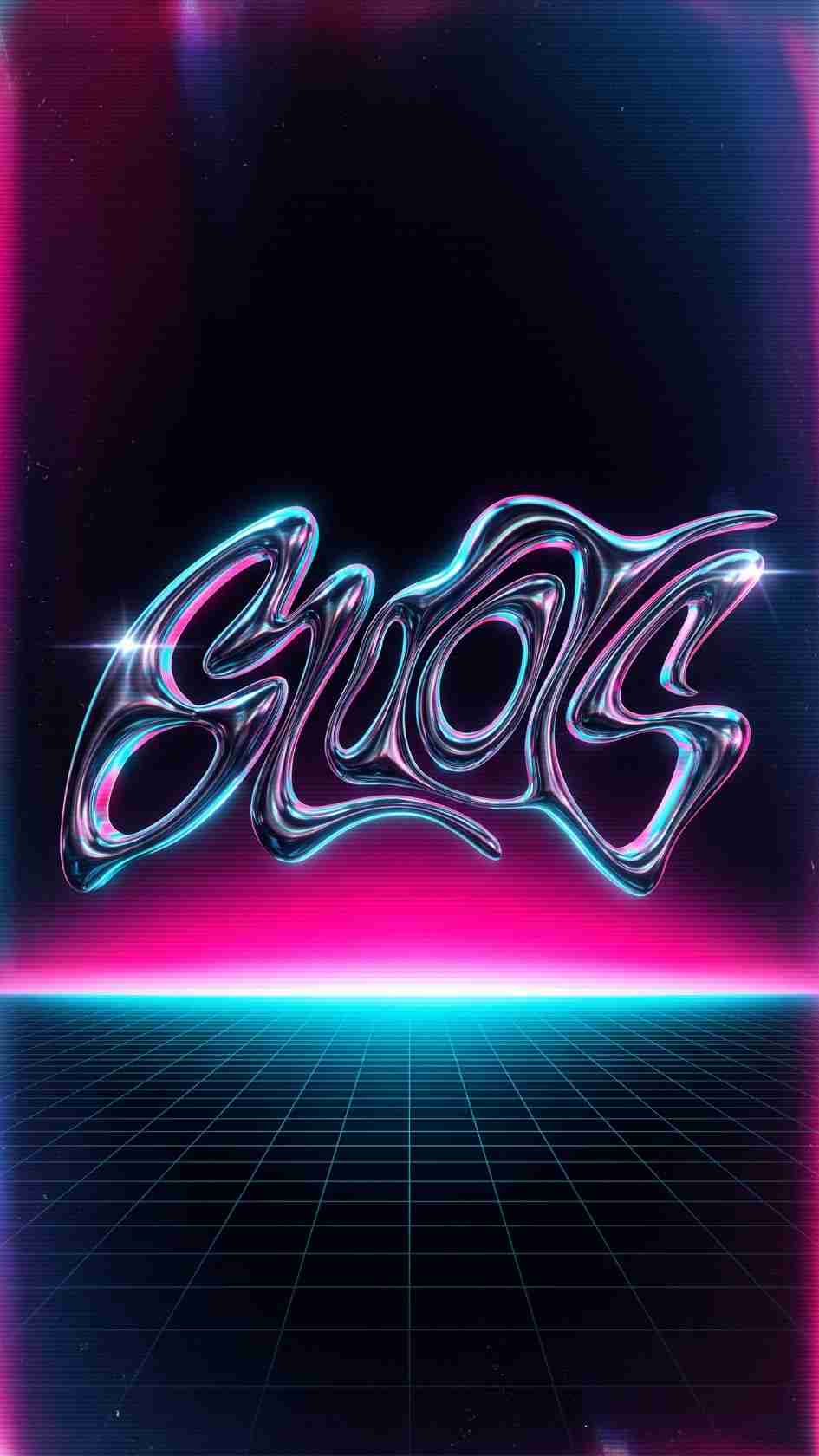
Retro Chrome Titles, a glossy 80s chrome text animation template for After Effects. Free download on MotionElements for retro content.
Download FREEGo Pro To DownloadDownload NOW!Chrome has genuinely come back around, the reflective, metallic, unmistakably 80s aesthetic that once defined arcade cabinets and synth album covers is now showing up consistently across brand campaigns, music videos, and social content wanting a specific kind of retro futuristic edge. Retro Chrome Titles, available through MotionElements, gives editors a ready made version of this exact look, glossy, reflective title animation built around the same chrome and lighting techniques that define the style.
If you're building this into a broader retro or synthwave themed project, our Text Gradient tutorial is genuinely useful here, since chrome effects rely heavily on the same gradient ramp and channel techniques covered there to achieve their distinctive metallic sheen. For music with the kind of synthwave, retro futuristic energy that pairs naturally with this template's aesthetic, Artlist carries a genuinely strong selection well suited to this exact style.
Exact resolution, precise duration, and file size were not independently confirmed at the time of writing since MotionElements' listing pages require JavaScript to load full specifications. Confirm these specific details directly on the live product page before finalizing a project around exact delivery requirements.
A convincing chrome effect depends on several layered techniques working together correctly, a carefully constructed gradient ramp simulating light reflecting across a curved metallic surface, bevel and emboss style lighting adding genuine dimensional depth to otherwise flat text, and often a subtle reflection or environment map suggesting the text is actually catching ambient light from its surroundings. Getting all of these elements to read convincingly together, rather than looking like a flat gradient simply overlaid on text, requires genuine technical understanding of how each individual layer contributes to the overall illusion.
This is exactly why a pre built chrome title template offers genuine practical value beyond simple convenience, it encodes considerable technical knowledge about lighting, gradient construction, and dimensional shading into a single ready to use asset, letting editors achieve a genuinely convincing metallic look without needing to first master the underlying technique themselves.
Head to the MotionElements download page and grab the project files.
Open the downloaded project file directly in After Effects and allow it to fully load.
Before editing, take a moment to review how the chrome effect has actually been constructed, understanding the layer structure helps you make cleaner adjustments later without accidentally breaking the underlying lighting or reflection setup.
Double click into the text layer and replace the existing copy with your own, keeping in mind that chrome effects generally read best on bold, simple typefaces with clean, thick strokes rather than delicate or highly decorative fonts.
If the template exposes adjustable lighting or reflection controls, fine tune these to match your specific project's color palette and mood.
Use RAM Preview to confirm your finished chrome title reads clearly and convincingly before committing to a final render.
Bring your finished title into your main project timeline, positioning it exactly where your content calls for it.
Once satisfied, render your finished composition using your project's standard export settings.
For a genuinely useful walkthrough of building this exact style of retro chrome text effect from scratch, watch Create Retro Chrome Type In After Effects. This is worth watching specifically because it covers the underlying gradient ramp, bevel, and lighting techniques this template's chrome effect is built around, giving you genuine understanding of what's actually happening beneath the surface, useful both for troubleshooting if something looks slightly off after customization, and for eventually building your own custom chrome variations beyond what this specific template provides.
The chrome aesthetic pairs directly with synthwave and retrowave music videos and artist branding, reinforcing the genre's distinctive visual identity.
Brands specifically leaning into 80s nostalgia for a campaign or product launch benefit from this template's authentic period accurate chrome styling.
The metallic, reflective quality suits gaming content wanting to evoke classic arcade cabinet aesthetics.
Given chrome's genuine resurgence across social platforms specifically, this template suits creators wanting to participate in this current visual trend without building the effect manually.
80s themed events, parties, and promotional content benefit from title work that immediately signals the specific era and mood being evoked.
Chrome and metallic typography's current resurgence connects to a broader cultural interest in reexamining and reinterpreting 80s visual culture, seen across fashion, music production, and design more broadly. Rather than reading as simply dated or nostalgic, chrome typography today often carries a genuinely contemporary, intentional quality specifically because it's being deployed deliberately by brands and creators who understand its specific cultural associations, rather than being a default choice from an earlier design era. This distinction matters for how you actually apply this template, leaning fully into the aesthetic's specific visual language, bold colors, dramatic lighting, genuine metallic sheen, produces a considerably more convincing, intentional result than a half committed, watered down version of the style.
It's worth understanding that chrome specifically refers to a distinct metallic quality within the broader family of metallic title effects, silver toned, high contrast, and specifically cool rather than warm in its underlying color character. This differs meaningfully from gold or bronze metallic effects, which lean warmer and often carry different cultural and stylistic associations, luxury and prestige for gold typically, versus chrome's more explicitly retro futuristic, synthetic, technological character. Understanding this distinction matters when choosing whether chrome genuinely suits your specific project's intended tone, since substituting chrome for a project actually calling for a warmer, more luxurious metallic quality can produce a tonally mismatched result despite both falling under the same broad metallic title category.
This template's specifically chrome, rather than gold or bronze, styling makes it a genuinely strong fit for projects wanting that particular cool, synthetic, retro futuristic character specifically, rather than a more universally applicable metallic option suited to a broader range of tonal needs.
Beyond the core chrome visual treatment itself, it's worth considering how your title's actual entrance and exit animation reinforces or undermines the effect's intended character. A chrome title that simply fades in and out reads considerably less convincingly than one animated with genuine mechanical, deliberate motion, a slight camera move suggesting light shifting across the reflective surface, or a reveal timed to a synth stab or bass hit within an accompanying music track. This kind of considered animation timing, working with rather than independently of the chrome effect's own visual character, produces a considerably more convincing, professionally considered final result than treating the chrome styling and the animation timing as entirely separate, unrelated decisions.
Given that visual trends genuinely cycle in and out of cultural relevance, it's worth staying reasonably attentive to whether the chrome and retro futuristic aesthetic remains genuinely current at the specific time you're planning to use this template, rather than assuming its relevance is permanently fixed. Trend driven visual styles like this one tend to move through periods of genuine cultural momentum followed by periods of relative quiet before potentially resurging again later, and content built around a trend at its actual peak of relevance tends to land considerably better with an audience than the same content released after that particular trend has already begun to feel dated again.
This doesn't mean avoiding the template entirely outside of peak trend moments, chrome and metallic typography maintains a genuine baseline presence within retro and synthwave specific niches regardless of broader mainstream trend cycles, but it is worth factoring general cultural timing into your planning for content specifically built around participating in a currently trending aesthetic moment rather than a genre specific, evergreen use case.
For creators or brands building content specifically around a sustained retro or synthwave visual identity, rather than a single isolated project, it's worth thinking about this template's specific chrome styling as one recurring element within your broader visual toolkit. Using the exact same chrome treatment consistently across your regular content, rather than a different metallic or retro effect for each individual piece, builds genuine visual recognition over time, helping your specific audience begin to associate that particular chrome styling directly with your channel or brand identity.
Using a delicate or thin typeface that doesn't hold up to the chrome effect's lighting and reflection detail. Bold, simple letterforms consistently produce more convincing results.
Pairing chrome titles with a visually inconsistent, non retro background or surrounding content. The effect reads most convincingly when the rest of your project's visual language supports the same retro futuristic aesthetic.
Applying the effect too subtly. Chrome typography specifically depends on genuinely dramatic lighting contrast and reflection detail, and an overly restrained application can undermine the effect's intended visual impact.
Ignoring how the effect reads at your actual final delivery size. Fine reflection and lighting detail can become less legible once scaled down for smaller playback contexts, confirm your title still reads clearly at your genuine intended size.
Create Retro Chrome Type In After Effects, a genuinely useful walkthrough of the gradient ramp, bevel, and lighting techniques this template's chrome effect is built around.
As with any MotionElements asset, reviewing the current license terms before using this template within paid client or commercial work is worth doing upfront, particularly for music and entertainment brand work where licensing clarity carries genuine weight. Confirming your specific intended use case is properly covered protects both your own business and gives your client real confidence in the assets underlying their finished deliverable.
Since chrome titles work best as part of a fully committed retro visual identity rather than an isolated element, it's worth pairing this template with complementary assets, period accurate color grading, synthwave inspired background elements, and matching sound design, to build a genuinely cohesive final result. Treating this template as one component within a broader considered aesthetic, rather than a standalone effect dropped into an otherwise unrelated project, produces a considerably more convincing and polished final piece.
Retro Chrome Titles gives editors direct access to one of motion graphics' more technically demanding effects to build convincingly from scratch, tapping into an aesthetic that has genuinely returned to cultural relevance across music, branding, and social content rather than remaining purely a nostalgic throwback. Understanding the underlying gradient, lighting, and reflection techniques the effect depends on, choosing typefaces and animation timing that reinforce rather than undermine the style, and committing fully to the aesthetic's specific visual language gets you the most genuine value from this template across whatever specific retro futuristic project calls for it going forward.
It's built as a standard native After Effects project file, check the live listing directly for any specific plugin requirements before downloading.
Synthwave and retrowave music content, 80s themed brand campaigns, gaming content, and social media content participating in the current chrome aesthetic trend all genuinely benefit.
Yes, text layers are editable, though keeping your replacement text on a bold, simple typeface produces the most convincing chrome effect result.
The difference typically comes down to full commitment to the aesthetic's specific visual language, bold retro color choices, dramatic lighting, and a cohesive surrounding visual style, rather than a half applied or watered down version of the effect.
Fine reflection and lighting detail can become less legible at smaller sizes, so testing your finished title at your actual intended delivery size before finalizing is worth doing.
Affiliate Disclosure: This post may contain affiliate links. If you make a purchase through one of these links, FreeVisuals may earn a commission at no extra cost to you. We only recommend products and platforms we genuinely believe in. Read our full disclosure policy.

Download free video templates, LUTs, and presets for Premiere Pro, After Effects, DaVinci Resolve, CapCut, and Final Cut Pro.












