.avif)
Freevisuals
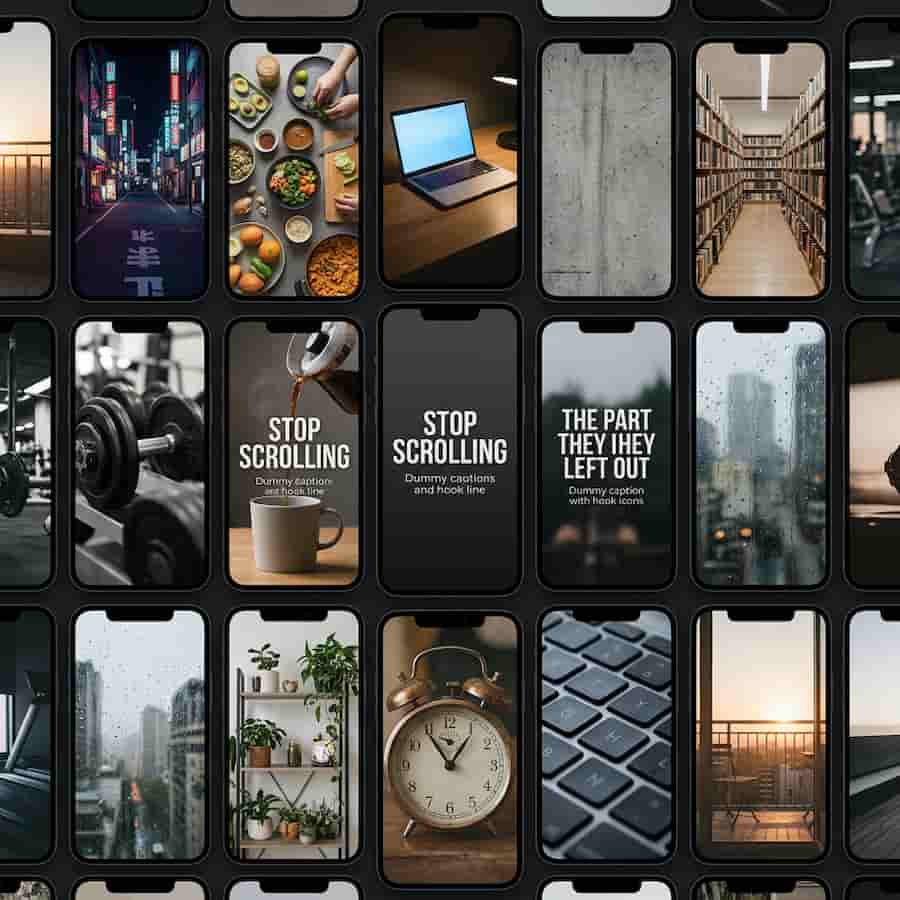
Free TikTok creator kit for CapCut: 8 captions, 10 hooks, 5 whooshes, LUT and 9:16 backgrounds. Commercial use, no attribution.
Download FREEThis kit is a downloadable ZIP for TikTok and other 9:16 edits. It is not a list of every CapCut file on FreeVisuals. The old page on this site listed every Item tagged TikTok. That made the URL look busy and still left you assembling captions, hooks and a grade from five other hubs. This version is one pack you drop on a CapCut or Premiere draft.
TikTok compresses hard and the first second is the product. Auto captions and a trending sound you do not own will get you a swipe or a claim. This kit replaces that default layer: hook title, caption style, short-form LUT, 9:16 backgrounds and whoosh SFX. Extra space is left at the bottom for TikTok UI. The same plates work on Reels and Shorts if you change the last-frame wording.
Free ZIP for TikTok with 8 caption styles, 10 hook titles, 5 whoosh SFX, one short-form LUT and four 9:16 backgrounds. CapCut first, then Premiere Pro, After Effects, DaVinci Resolve and Final Cut Pro. Commercial use, no attribution. End cards are not in this ZIP; those live in the YouTube pack. Clicks and impact hits stay on the sound effects page.
Eight caption styles as 1080×1920 PNG plates. None of them use the default CapCut yellow stack. Ten hook titles written as first-frame lines. Five whoosh SFX from the FreeVisuals Vault pack: standard, soft, heavy, snappy and digital. One LUT named shortform-creator-kit.cube — the same mild warm grade as the Faceless YouTube pack, renamed so the filename does not say YouTube inside a TikTok zip. Four 9:16 backgrounds for jump-cut cover. A readme for CapCut, Premiere and Resolve.
There are no end cards, no ticks, no partner SFX, and no CapCut project file. Full CapCut templates stay on free CapCut templates. Extra sounds stay on the free sound effects page, including partner files we do not redistribute inside a FreeVisuals pack.
v1 shares plates with the Ultimate Faceless YouTube Creator Kit so a channel that posts both platforms keeps one caption family. The YouTube ZIP adds end cards and thumbnail prompts. This ZIP drops those and leaves more room for TikTok UI.
TikTok accounts that clip talking-heads, listicles, product demos and faceless explainers. If you already pay for CapCut Pro you still need a caption style that does not look like every other export. This pack is that finish layer. The clipper finds the moment. The kit stops the moment looking like everyone else’s timeline.
It is also for editors who post the same 9:16 master to TikTok, Reels and Shorts. Change the bottom pad and the last frame. Do not hard-burn a TikTok logo if the file will also go to YouTube.
New 9:16 project, 1080×1920, 30fps unless you shot 60 and need slow motion. Clip on V1. Hook PNG on V2 for one second. Caption PNG in the lower third, above the TikTok UI. Apply shortform-creator-kit.cube at 60–80 percent if your build accepts .cube. Whoosh on the hook cut. Replace dummy words with your line. Export without a watermark.
CapCut and Filmora both take PNG plus LUT without After Effects. Turn off beauty filters on a talking-head if you also apply the LUT; two skin passes look plastic. Do not add CapCut auto captions on top of these plates.
Watch on YouTube: How To Edit Talking Head Reels from scratch in CapCut. That workflow is the closest public edit to this kit: vertical talking-head, hook, captions, export. Use our plates instead of the default type in that video.
Watch on YouTube: How to Edit Food Videos for YouTube Shorts on CapCut. Ignore the niche if you are not a cooking account. The useful part is the same 9:16 safe-area habit: type off the product, type off the bottom UI, cut dead frames.
Premiere Pro: sequence 1080×1920. Hook on V2 for one second. Caption on V3. LUT in Lumetri at 60–80 percent. Whooshes on A2. After Effects: plates as footage in a 9:16 comp. DaVinci Resolve: LUT on the Colour page, PNG on the Edit page. Final Cut Pro: LUT in the colour inspector, titles as clips.
If you outgrow PNG plates, rebuild the same words in Essential Graphics or a Motion Graphics pack from Envato, Motion Array, AEJuice or MotionVFX. Keep this LUT and these whooshes. That upgrade path costs less than a 40,000-file dump you will never search.
Do not put a random trending audio under a brand account unless commercial use is explicit. Epidemic Sound and Artlist both have beds that sit under speech without fighting captions. Keep kit whooshes on your own cuts so the only original audio is not a stolen sound.
If you do not record voice, generate it in ElevenLabs and time captions to that take. A first draft of a faceless explainer can start in Invideo; replace the generic stock the tool picks with this kit’s backgrounds and titles so the account does not look generated.
TikTok jump cuts look cheap when the background pops. Use the four 9:16 stills as cover, or generate a matching still in OpenArt AI and upscale in Magnific or Topaz. Keep generated faces off a kit that is meant to be you or your product. For volume stills, Shutterstock and iStock.
Do not mix five different rooms across five posts unless the channel is a tour. Consistency converts better than a prettier unrelated still.
It is not every CapCut template on FreeVisuals. It is not a trending-sound pack. It is not a music library. It is not a substitute for a clipper. It is not a licence to upload these files to another stock site. The landing for all TikTok packs is TikTok Creator Packs. This page is one product.
Need a second LUT family? Start in the free LUT library and stay off cinematic teal-orange for a talking-head. Need the subscribe end card? Use the YouTube pack, not this one.
Free for personal and commercial use, including TikTok Professional accounts and paid ads. No attribution required. Do not resell or redistribute the ZIP as a standalone stock product. Do not upload the files to a competing marketplace. Full terms: Terms of Service.
No. This is one ZIP. Individual CapCut templates stay on the CapCut hub. The landing that lists packs is TikTok Creator Packs.
Yes. Files are 9:16. Leave less bottom pad on Shorts than on TikTok.
Yes. PNG, .cube and MP3 are universal. Follow the readme in the ZIP.
No. This kit is free. Pro packs on Creator Packs are labelled separately.
Only five FreeVisuals whooshes are in the ZIP. More sounds are on the SFX page.
v1 shares plates on purpose. One caption family across TikTok and Shorts. Rebuild with TikTok-only dummy lines later if you want a second visual system.
Browse all packs on Creator Packs. Sister pack: Ultimate Faceless YouTube Creator Kit. More templates: CapCut, Premiere, LUTs.
Batch one long video or one shoot day. Clip five moments. Apply the same hook family and the same caption style so the account looks like one show. Change only the hook line. Accounts that mix eight caption styles in five days look like a template dump. Pick one caption style per series. Keep the other seven for a different series or a client.
Store the ZIP once on your drive. Do not re-download a new copy every upload. When FreeVisuals revises the kit, replace the folder and keep your custom hook lines in a side document so they are not overwritten.
Hashtags are not part of this ZIP. Write them per niche. The kit will not ship a stale FYP tag list.
Search terms this page should earn: TikTok creator kit, CapCut caption pack, free TikTok hooks, 9:16 whoosh pack, TikTok LUT pack. That is why the product name is Ultimate TikTok Creator Kit and the slug is ultimate-tiktok-creator-kit, not the old free-tiktok-templates-assets landing path. The landing stays at /tiktok-creator-packs. This URL is the box on the shelf.
If TikTok compresses the LUT into a muddy midtone, export a cleaner grade and let the platform crush it once. Preview on a phone, not only on the desktop timeline. High bitrate in CapCut. 1080×1920 is enough; a 4K vertical file will be crushed anyway.
Food, beauty and finance niches should not share the same hook tone. If those lines start to matter, ship a niche pack on this hub rather than stretching this kit into a recipe channel. Until then, write the hook for the niche and keep the plate.


