.avif)
Freevisuals
Faceless channels have moved from a niche curiosity to a genuinely mainstream way to build a YouTube business, and 2026 has made this considerably more accessible than it was even a year ago. AI voiceover, AI video generation, and free stock libraries now cover the majority of what used to require a camera, a studio, and a script writer. This guide covers the actual tool stack that matters, what's genuinely free versus what's worth paying for, and how to stay compliant with YouTube's current AI content policies while you build.
Starting a faceless YouTube channel in 2026 genuinely comes down to five tools working together, an AI video generator like InVideo AI, an AI voice generator like ElevenLabs, properly licensed music through Artlist or Epidemic Sound, and CapCut for final assembly and short form repurposing. This guide covers exactly how each piece fits together, current YouTube disclosure requirements for AI generated content, a full tool comparison table, and honest guidance on what's genuinely free versus where paying actually saves you time.
A faceless channel is exactly what it sounds like, a channel where the creator never appears on camera. Content gets delivered through voiceover, stock or AI generated visuals, screen recordings, and captions instead of a personality driven talking head format. This isn't a workaround or a lesser version of traditional YouTube, some of the fastest growing channels in finance, history, technology, and education operate this way specifically because the content itself, not the presenter, is what keeps people watching.
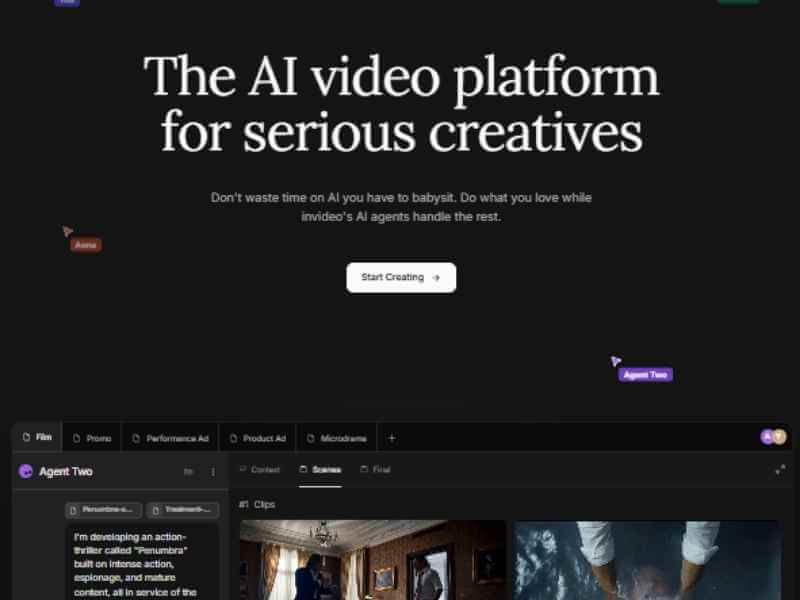
InVideo AI genuinely stands out among AI video generators specifically because it handles the entire production pipeline in one place rather than requiring you to stitch together separate tools for each step. Type a topic prompt and it writes a script, selects matching visuals from a stock library of more than 16 million assets pulled from sources like iStock and Shutterstock, generates a voiceover in your choice of more than 30 AI voices or a cloned version of your own, adds subtitles, and exports a finished, publish ready video.
What genuinely differentiates InVideo AI from a purely automated tool is its Magic Command feature, rather than manually adjusting a timeline, you type plain language instructions directly into a chat style box, change the footage in scene two, make the voiceover sound more enthusiastic, and the AI applies that specific change without you touching individual clips. This genuinely lowers the skill floor for producing a polished faceless video considerably compared to a traditional editing workflow.
It's worth being honest about real limitations too. InVideo AI runs on a credit based system rather than a flat unlimited subscription, and generation credits get consumed even when a specific output turns out poor, with no refund for a bad generation. Unused credits also don't roll over month to month, and AI selected footage can occasionally misalign with more specific or unusual niche topics, worth reviewing before publishing rather than assuming every generated clip is genuinely on topic. The free tier is watermarked and capped on weekly generation minutes, enough to test the actual workflow, but not to publish on a regular schedule.
You can start building faceless videos with InVideo AI directly through this link.
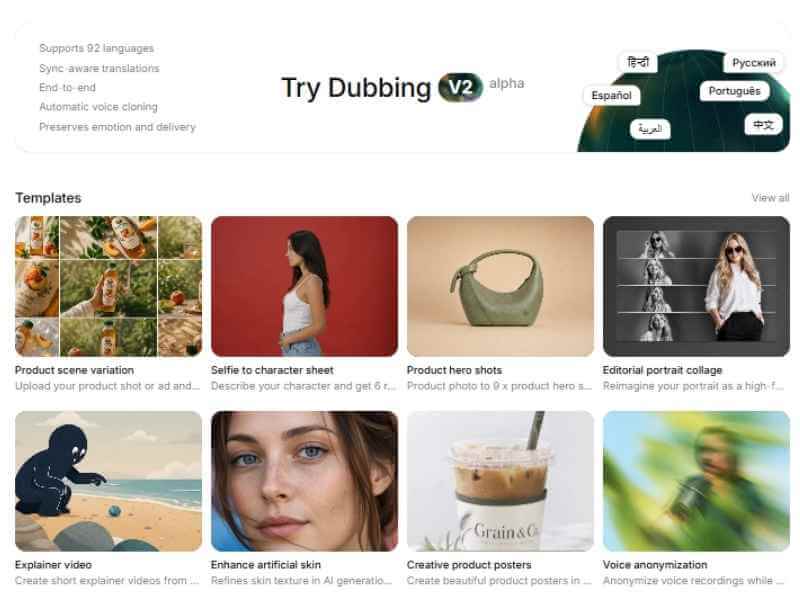
Since a faceless channel replaces on camera presence entirely with voiceover, the actual quality of that voice matters considerably more than it would in a traditional talking head format. ElevenLabs has become the closest thing to an industry standard for AI voice generation specifically, used by developers, podcasters, and video producers who need voice output that genuinely doesn't sound robotic.
The free plan offers 10,000 credits monthly, roughly enough for testing and evaluation, but it does not include commercial licensing, meaning content generated on the free tier isn't cleared for monetized publishing. The Starter plan at $5 a month is genuinely the minimum tier for any creator planning to publish or monetize content, unlocking commercial rights on generated audio. The Creator plan at $22 a month is ElevenLabs' most popular tier for good reason, 100,000 credits, roughly 100 minutes of text to speech, plus Professional Voice Cloning access, letting you build a genuinely consistent, recognizable narrator voice for your channel from a short sample recording.
Voice cloning specifically deserves a mention here, ElevenLabs' Instant Voice Cloning creates a usable voice from as little as thirty seconds of sample audio, considerably shorter than most competing platforms require, letting you build a consistent brand voice for your channel without needing extensive original recordings. For creators publishing frequently or producing longer form content specifically, the Pro tier at $99 monthly provides roughly 600 minutes of audio, a reasonable ceiling for a genuinely active publishing schedule.
Start building your channel's voice directly through ElevenLabs.
For a genuinely current, complete walkthrough of building a faceless channel from scratch, watch How To Start A Faceless YouTube Channel That Makes Money In 2026. This is worth watching specifically because it walks through the full production pipeline in sequence, niche selection through publishing, rather than covering tools in isolation the way a written guide sometimes can.
Music is where a genuinely large number of new faceless creators run into real trouble, using tracks pulled from generic royalty free sites or YouTube's audio library alone, then facing Content ID claims or demonetization once a channel starts gaining real traction. Both Artlist and Epidemic Sound solve this specifically through subscription based, genuinely unlimited use licensing while your subscription remains active, meaning every track and sound effect in their catalog is safely cleared for monetized YouTube content without per track licensing headaches.
Both platforms maintain genuinely large catalogs covering virtually every mood and pacing a faceless video might need, calm and explanatory for educational content, tense and driving for true crime or mystery niches, upbeat for lifestyle or productivity content. Building a small, consistent library of go to tracks specifically for your channel's niche, rather than searching fresh for every single video, genuinely speeds up your production workflow while keeping a recognizable audio identity across your content.
Once your AI generated visuals, voiceover, and music are ready, CapCut handles the final assembly and, critically, the repurposing work that genuinely multiplies a faceless channel's reach. A single long form upload can be cut down into several short form clips for TikTok, Reels, and YouTube Shorts, turning one piece of production effort into a full week of content across multiple formats.
CapCut's free tier exports at 1080p with no watermark, genuinely sufficient for the overwhelming majority of faceless content, and its auto captioning and auto reframe tools specifically speed up the process of converting long form footage into vertical, short form ready clips. Rather than manually cutting highlights from a longer video, our own free CapCut templates collection can speed up that repurposing workflow further with pre built transitions and timing specifically suited to short form pacing. Grab CapCut directly through this link to get started.
This is genuinely important to get right, and a section most tool focused guides skip entirely. YouTube's 2026 policy requires creators to disclose AI generated scripts, synthetic voiceovers, and AI generated visuals using the altered or synthetic content toggle inside YouTube Studio, specifically for content that could reasonably be mistaken for genuine, unaltered footage or a real person's likeness. Skipping this disclosure when required risks a genuine strike against your channel, not simply a Content ID claim, a considerably more serious consequence worth taking seriously from your very first upload.
Practically, this means every faceless video built primarily through InVideo AI or another AI video generator specifically should have this toggle enabled during upload. The disclosure requirement genuinely does not penalize AI voiceovers or AI assisted scripts themselves, YouTube's policy specifically targets realistic depictions that could mislead viewers, not the underlying use of AI tools. Using ElevenLabs for narration or InVideo AI for visuals is entirely permitted and increasingly common practice across monetized channels, the disclosure toggle is simply about transparency, not restriction.
A related, genuinely important point, YouTube has also begun actively demonetizing mass produced, low effort AI content specifically, channels publishing templated, repetitive videos with minimal genuine editorial input face real monetization risk even with proper disclosure. Human oversight, genuine script editing rather than raw AI output, and actual original value in each video are what keep a faceless channel on the right side of this policy.
Tool selection matters, but niche selection genuinely determines whether a faceless channel succeeds long term more than any individual piece of software does. A useful framework here is the Three P Rule, passion, proficiency, and profit, list topics you genuinely find interesting, narrow that list to areas where you can add real, specific knowledge rather than generic surface level content, then confirm enough viewer and advertiser demand exists to actually support a channel at that specific intersection.
Finance and investing education, AI tools and technology, and personal finance specifically tend to carry the highest advertiser CPM rates currently, meaning the same view count earns meaningfully more revenue than a lower CPM niche, though these categories are also genuinely more competitive. Education, history, and general technology tutorials remain strong middle ground options, solid CPM with somewhat less saturation than the very top tier categories.
Once your tool stack and workflow are genuinely dialed in, a realistic per video production time runs roughly 45 to 90 minutes, about 15 minutes for scripting, 5 minutes generating voiceover, 20 to 40 minutes for editing and assembly, and a further 5 minutes for thumbnail creation and upload. Your first several videos will genuinely take considerably longer than this, closer to 3 or 4 hours, while you're still learning each specific tool's interface and finding your actual workflow rhythm, this is normal and expected rather than a sign something's going wrong.
Genuinely successful faceless channels tend to converge on one specific repeatable format rather than reinventing their production approach for every new video. This might be a consistent voiceover plus stock visual structure, a consistent screen recording plus narration format for tutorial content, or a consistent AI generated visual style for storytelling content. Choosing this format early and refining it across your first several videos, rather than experimenting with a completely different approach each time, genuinely speeds up production considerably once the format itself becomes second nature, and gives your channel a recognizable, consistent identity that helps build genuine audience retention over time.
It's worth being honest about where AI tools like InVideo AI and ElevenLabs genuinely accelerate faceless channel production versus where human judgment still matters considerably more than automation. Script generation is a genuinely strong use case for AI specifically, overcoming a blank page and generating a working first draft structure in seconds rather than staring at an empty document, but the actual editorial judgment, fact checking specific claims, adding genuine personal insight, adjusting tone to match your channel's established voice, still requires real human review before publishing. Treating AI generated scripts as a starting point to refine rather than a finished product ready to publish directly is genuinely the difference between a channel that builds a real audience and one that gets flagged for the low effort content policies covered earlier in this guide.
Visual selection is a genuinely mixed case specifically, AI tools like InVideo AI handle simple, common topics well, but more specific or unusual niche subjects can result in footage that technically matches keywords without genuinely representing the actual content being discussed. Reviewing generated visuals scene by scene before publishing, rather than assuming automated selection is always accurate, catches these mismatches before they reach your audience and undermine the professional quality your channel is building toward.
Before diving into production, a few genuinely important setup steps are worth handling properly from the start rather than retrofitting later. Creating a dedicated Google account specifically for your channel, separate from any personal account, keeps your business and personal presence genuinely separate and makes adding collaborators or team members considerably easier down the line without sharing personal credentials.
Choosing a channel name that genuinely reflects your niche without being so narrowly specific that it limits future content direction matters more than it might initially seem, a channel named after one extremely specific sub topic can feel genuinely restrictive once you've built an audience and want to expand into adjacent content within the same broader niche. Setting up channel branding, profile image, banner art, and a clear channel description explaining exactly what viewers can expect, before your first upload gives new visitors genuine confidence they've found a real, established channel rather than a placeholder account still finding its identity.
Beyond standard YouTube ad revenue through the Partner Program, genuinely successful faceless channels typically build multiple, diversified income streams rather than relying on ad revenue alone. Affiliate marketing, recommending genuinely relevant products or tools within your niche content, similar to how this very guide links to the tools it actually covers, provides income that doesn't depend entirely on view count or advertiser CPM rates fluctuating.
Sponsorships become genuinely viable once a channel demonstrates consistent, engaged viewership within a specific niche, brands specifically seek out channels with established topical authority rather than purely large, generic audiences. Digital products, a genuinely popular route for faceless creators specifically, since production knowledge gained building your own channel translates directly into templates, guides, or courses other aspiring creators will pay for. Diversifying across several of these streams rather than depending on any single source genuinely protects a channel's income against algorithm changes or advertiser rate fluctuations that affect ad revenue alone considerably more directly.
Publishing consistently matters, but genuinely improving requires actually reading your analytics data and adjusting based on what it shows rather than publishing on instinct alone indefinitely. Audience retention graphs specifically reveal exactly where viewers drop off within a given video, a consistent early drop off across multiple videos often signals a genuine pacing or hook problem worth addressing directly in your next script, while a drop off at a consistent later point might indicate a specific segment that isn't landing the way you intended.
Click through rate on your thumbnails and titles genuinely determines how many potential viewers your content even reaches in the first place, regardless of how strong the video itself turns out to be, testing different thumbnail styles and title structures across similar videos and comparing actual performance data teaches you considerably more about what genuinely works for your specific audience than following generic best practice advice alone ever could.
A genuinely common and costly mistake among new faceless creators involves purchasing premium tiers across an entire tool stack, InVideo AI, ElevenLabs, a music subscription, and additional software, before actually confirming a chosen niche generates real viewer interest. Starting with free tiers specifically, InVideo AI's watermarked plan, ElevenLabs' free credits for testing, and CapCut's free export, and publishing several genuine test videos first, validates whether a specific niche and format actually resonates before committing meaningful monthly spend across multiple paid subscriptions simultaneously.
Once a specific niche and format genuinely demonstrates real traction, growing view counts, meaningful watch time, positive audience retention data, upgrading to paid tiers becomes a considerably more confident, evidence based decision rather than a hopeful bet made before any real data exists to support it.
A frequent mistake involves over investing in an expensive tool stack before genuinely validating a specific niche with real audience interest, publishing several low cost or free tier videos first to confirm actual demand exists before committing significant monthly spend to premium tiers across multiple tools is considerably more sensible. Another common issue involves publishing purely templated, minimally edited AI output without genuine human review or original insight added, directly risking the monetization consequences covered earlier in this guide.
Skipping the short form repurposing step entirely is a final common mistake, publishing only long form content and leaving considerable additional reach on the table that a few extra minutes in CapCut could have captured through repurposed clips distributed across TikTok, Reels, and Shorts simultaneously.
No, faceless channels across finance, education, history, and technology niches genuinely succeed at scale without the creator ever appearing on camera.
No, AI voiceover is fully permitted, YouTube's 2026 disclosure policy targets realistic, potentially misleading depictions specifically, not the underlying use of AI narration or scripting tools.
You can start entirely free using InVideo AI's watermarked tier, ElevenLabs' free plan for testing, and CapCut's free export, though commercial, monetized publishing genuinely requires at minimum ElevenLabs' $5 Starter plan for licensed voiceover.
Roughly 45 to 90 minutes once your workflow is established, though your first several videos will genuinely take considerably longer while you're still learning each tool.
Repurposing each long form upload into several short form clips through CapCut, turning one video into a full week of content across multiple platforms.
Starting a faceless YouTube channel in 2026 genuinely comes down to a small, well chosen tool stack working together rather than any single piece of software doing everything alone, InVideo AI for fast script to video production, ElevenLabs for a genuinely consistent, professional voice, Artlist or Epidemic Sound for properly licensed music, and CapCut for final assembly and the short form repurposing that meaningfully multiplies your actual reach. Understanding YouTube's current disclosure requirements and choosing a niche that genuinely sustains long term interest matter just as much as the tools themselves, a strong stack executed on the wrong niche, or without proper compliance, still won't build a lasting channel, but the right tools paired with a genuinely sustainable niche and a consistent, repeatable production process is exactly how faceless channels are actually built in 2026.
Affiliate Disclosure: This post may contain affiliate links. If you make a purchase through one of these links, FreeVisuals may earn a commission at no extra cost to you. We only recommend products and platforms we genuinely believe in. Read our full disclosure policy.
.avif)
.avif)
.avif)
.avif)





