.avif)
Freevisuals
OpenArt AI has positioned itself as the single browser tab covering image generation, video generation, editing, and character consistency, all under one credit pool rather than juggling separate subscriptions for each. After genuinely digging into how it actually performs, what the free plan realistically gets you, and where real users have run into trouble, here's an honest breakdown of whether it's worth your time and money in 2026. You can try OpenArt AI directly to explore its free tier yourself.
OpenArt AI is a browser based, multi model AI platform bundling more than 100 image and video models, including Stable Diffusion XL, Flux, Sora 2, and Kling, under one credit system. The free plan offers 40 one time trial credits rather than a recurring monthly allowance, genuinely enough to test the platform but not to use it seriously. This review covers real pricing, standout features like Consistent Character training, honest user complaints worth knowing before you pay, and how it compares to Leonardo AI and Midjourney specifically.
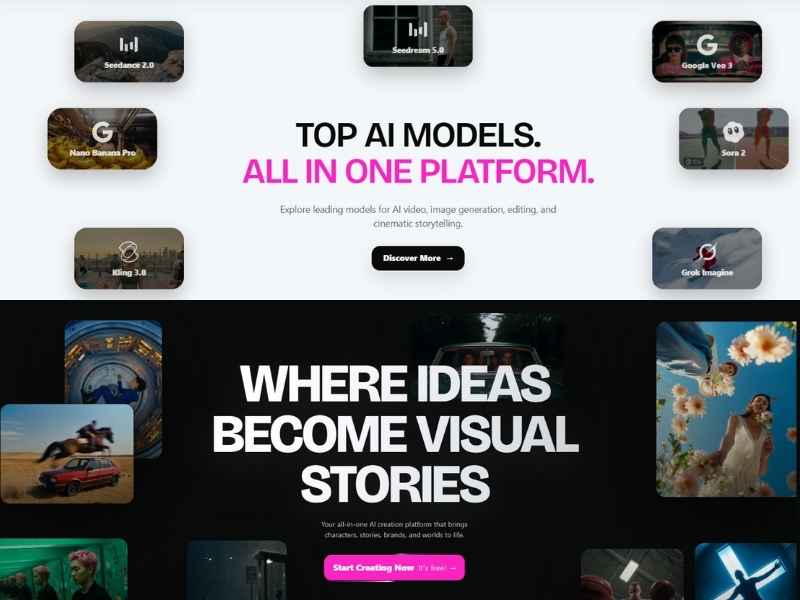
OpenArt AI is a browser based, multi model AI art and video platform founded in 2022 by former Google engineers in San Francisco. Rather than building around a single proprietary model the way Midjourney does, OpenArt's core structural difference is breadth, it bundles access to more than 100 premium models under one roof, including Stable Diffusion XL, Flux, Ideogram V3, and video generation models like Sora 2 and Kling 2.6, all drawing from a single shared credit pool rather than requiring separate subscriptions for each.
In practice, this means you can generate a still image in one model, then animate that same image using a completely different video model, all without leaving the platform or managing multiple accounts. For creators who'd otherwise be paying for several specialist tools separately, this consolidation is genuinely OpenArt's strongest selling point.
It's worth being upfront about this since it's the single most common point of confusion for new users, OpenArt's free plan is not a recurring monthly allowance the way many competing platforms structure their free tier. New signups receive 40 one time trial credits, period, with an option to earn 50 additional credits by joining OpenArt's Discord community. That's genuinely enough to generate somewhere between 10 and 20 images depending on your specific settings, sufficient to test the platform's interface and model quality, but nowhere near enough for sustained, serious creative work.
Free tier generations also come with two further limitations worth knowing before you start, all creations on the free plan are public by default, meaning anything you generate is visible to other users unless you upgrade, and you're capped at 4 parallel generations at once. For anyone wanting genuine privacy or serious generation volume, the free tier functions more as a demo than a real working plan.
Beyond raw model variety, a handful of OpenArt's features genuinely differentiate it from simpler single model competitors. The Character Builder, sometimes referred to as Consistent Character training, holds a face and style steady across dozens of separate generations, genuinely valuable for anyone producing a comic, brand mascot, or recurring social content series where visual consistency across many images matters considerably more than any single standout image.
Magic Prompt helps beginners specifically who struggle with writing effective prompts, expanding a simple idea into a more detailed, model optimized prompt automatically. Director mode extends this further into multi scene story creation, useful for anyone building a short narrative sequence rather than a single standalone image. The built in editing suite, inpainting, relighting, background swaps, and upscaling, means you can refine a generated image without exporting to a separate editing tool, and style filters modeled on recognizable aesthetics, Studio Ghibli and Pixar inspired looks specifically, give beginners an easy starting point for a particular visual style without needing to write a highly detailed prompt from scratch.
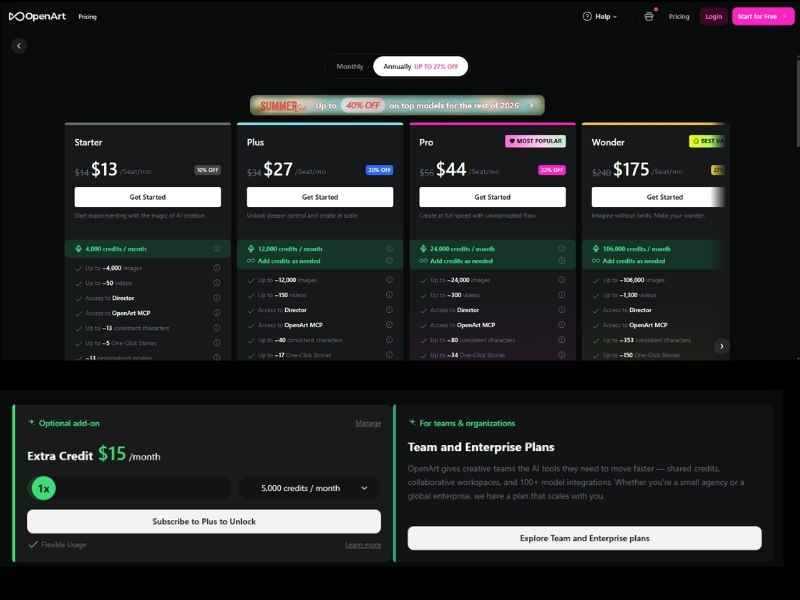
OpenArt's paid tiers in 2026 span roughly $12 to $40 or more monthly depending on credit volume and which advanced features, particularly video generation, you need access to. It's worth understanding that the actual monthly cost you'll pay depends less on which specific tier you pick and more on your actual usage behavior, video generation specifically consumes credits considerably faster than still images due to the added computational complexity, so a plan that looks sufficient based on the pricing page alone can run out faster than expected once you start experimenting with video features regularly.
Credits on paid plans generally reset monthly, though purchased top up credit packs often carry different expiration terms worth checking before buying. OpenArt does offer a substantial discount, up to 50 percent, for paying annually rather than monthly, but given the documented issues covered in the next section, starting with a monthly plan specifically until you've genuinely confirmed the platform fits your workflow is the more cautious, sensible approach.
A genuinely balanced review has to cover this section honestly rather than skipping past it. OpenArt has real, documented user frustration worth knowing about upfront, not around legitimacy, the platform is a real, established product, but around execution specifically. Independent Trustpilot and Reddit reports describe credit loss bugs following payment, considerably slow support response times measured in weeks rather than days, and a Character Creator 2.0 rollout that retroactively gated previously accessible work behind new costs, a genuinely frustrating experience for existing users who'd already built content using the earlier version.
Expiring, non rolling over credits are another frequently cited complaint, unused credits simply expire at the end of a billing cycle rather than carrying forward, meaning a lighter usage month effectively wastes paid credits you've already covered. Documented annual plan regret specifically, users committing to the roughly $700 to $800 per year top tier before fully understanding the platform's actual credit consumption patterns, reinforces the same cautious approach, monthly billing first, until you've genuinely confirmed OpenArt fits your actual workflow and usage volume.
None of this suggests OpenArt is unsafe or illegitimate specifically, you retain ownership of your generated images, and the platform doesn't use paid tier generations to train its models without explicit consent. The real risk here is financial and experiential rather than a trust or safety concern, credit related billing issues and slow support resolution are genuinely worth factoring into your decision.
Leonardo AI is genuinely the most directly comparable competitor, and its free tier is considerably more generous specifically, 150 credits daily that reset every single day, rather than OpenArt's 40 one time credits that never replenish. For anyone wanting to genuinely test an AI art platform without paying anything, Leonardo's free tier gives meaningfully more room to actually explore before hitting a wall. Where OpenArt pulls ahead specifically is at higher paid tiers, its Infinite plan offers a genuinely higher raw generation volume compared to Leonardo's equivalent pricing tier, particularly through its 32 parallel generations capability, worth considering if you're a genuinely heavy, paying user rather than someone testing the waters on a free plan.
Midjourney remains strictly paid, starting at $10 monthly with no free tier at all, and its raw image quality is still widely regarded as genuinely exceptional, arguably the benchmark other platforms are measured against. Where Midjourney genuinely struggles by comparison is workflow, it still operates primarily through Discord rather than a dedicated web interface, a real friction point for users who find that setup awkward or unintuitive. OpenArt's Consistent Character tools also offer a considerably more accessible path to character continuity across generations than Midjourney's more complex seed based workarounds, if character consistency specifically matters for your project, OpenArt genuinely offers better practical value despite Midjourney's raw quality edge.
OpenArt is a genuinely strong fit for solo creators, marketers, and small studios who value model variety and workflow flexibility over the deep, frame precise control a dedicated professional video editor offers. Its combination of broad model access, built in editing tools, and character consistency covers a genuinely complete short form creative pipeline, concept through finished image or short clip, within one platform. It's a considerably weaker fit for anyone needing offline access, since the platform is entirely browser based with no offline mode available, or for users specifically wanting Midjourney's particular raw image quality above all other considerations.
For creators specifically using OpenArt to generate images or short clips destined for a larger video project, whether that's YouTube content, social media, or a client deliverable, getting those AI generated assets into your actual editing software smoothly matters as much as the generation quality itself. If you're building faceless YouTube content specifically, pairing OpenArt's image and video output with a properly licensed music track from Artlist avoids the Content ID issues that generic royalty free music sources can create once a channel starts gaining real traction.
Our own AI prompt packs collection is also worth exploring alongside OpenArt specifically, a well structured prompt considerably improves output quality and consistency across virtually any AI image or video model, including the more than 100 models OpenArt itself bundles under one platform.
Since OpenArt's actual monthly cost depends heavily on your specific usage pattern rather than simply which tier you select, understanding roughly how credits get consumed before committing to a plan avoids an unpleasant surprise partway through your first billing cycle. Still image generation is genuinely the most credit efficient use of the platform, a single generation typically consumes a modest, predictable number of credits regardless of which specific model you're using.
Video generation is where costs escalate considerably faster, the added computational complexity of generating motion rather than a single static frame means video specifically consumes credits at a meaningfully higher rate than images, and even a short clip can consume a considerable portion of a lower tier's monthly allowance in a single generation. For creators planning to use OpenArt primarily for video specifically, sizing your plan based on genuinely realistic video generation volume, rather than assuming your credit allowance stretches as far for video as it would for still images, is a genuinely important distinction to understand before choosing a tier.
Given the free plan's genuinely limited, one time 40 credit allowance, using that trial period deliberately rather than experimenting randomly makes a real difference in whether you leave with a genuine sense of the platform's actual capabilities. Testing across a small handful of different models specifically, rather than spending all 40 credits within a single model, gives you a considerably better sense of OpenArt's actual breadth advantage, the core selling point that differentiates it from single model competitors in the first place.
Joining OpenArt's Discord community specifically to claim the additional 50 credits genuinely doubles your effective trial allowance at no cost, worth doing before you spend your initial 40 credits if you're planning to test the platform seriously before deciding whether to upgrade. Testing the Character Builder feature specifically during your trial period, even with just a handful of credits dedicated to it, is worth prioritizing if consistent character or brand content is part of your actual intended use case, since this is genuinely one of OpenArt's stronger differentiators compared to simpler single model competitors.
The headline number, more than 100 models, is easy to state but worth actually unpacking, since not every model serves the same purpose and knowing which to reach for genuinely matters. Stable Diffusion XL remains a genuinely solid general purpose choice, well suited to a broad range of styles and reliable across most everyday prompts. Flux has earned a strong reputation specifically for photorealism and detailed text rendering within images, a genuine weak point for many older diffusion models, making it a particularly strong pick for product mockups or anything requiring legible in-image text.
Ideogram V3 leans specifically into typography and logo style output, genuinely useful for creators needing clean, readable text integrated directly into a generated image rather than relying on a separate design pass afterward. On the video side, Sora 2 and Kling 2.6 represent genuinely current, capable text to video generation, letting you animate a still concept or generate motion directly from a prompt without needing a separate specialized video tool. Having all of these accessible from one shared credit pool, rather than juggling separate subscriptions and separate learning curves for each, is genuinely where OpenArt's breadth advantage becomes most obvious in practice rather than just a marketing bullet point.
For anyone deciding whether to actually sign up, understanding the real first-session experience helps set genuine expectations. Signup itself is genuinely fast, an email or social login gets you into the dashboard within a minute or two, with your 40 trial credits available immediately. The main generation interface presents a prompt box alongside a model selector, letting you pick a specific model before generating rather than the platform choosing one for you automatically, a genuinely important distinction from simpler single model tools where that choice doesn't exist.
Magic Prompt sits directly alongside the main prompt box specifically for beginners, expanding a short, simple idea into a more detailed, model tuned prompt with a single click before you generate. Once a generation completes, the built in editing tools, inpainting for regenerating a specific region, background swap, and upscaling, are all accessible directly from the same results screen without navigating to a separate tool or exporting first. For anyone testing the platform seriously during the free trial, spending your first several credits specifically exploring this editing toolkit, rather than purely generating fresh images repeatedly, gives a genuinely more complete sense of what a paid plan actually unlocks in daily use.
Different creators genuinely get different value out of OpenArt depending on what they're actually building, worth considering honestly before choosing a plan. Solo YouTube and social content creators specifically benefit most from the Character Builder and Director mode combination, letting a single creator maintain visual consistency across a whole series of thumbnails or short video content without hiring a dedicated illustrator or motion designer. Marketers and small agencies producing client work genuinely benefit from the model breadth itself, being able to match a specific model's strengths, Flux for photorealistic product shots, Ideogram for typography heavy social graphics, to each individual client brief within one subscription rather than paying for several specialist tools separately.
Hobbyist and casual creators experimenting without a specific commercial goal are genuinely the group best served by starting on the free trial and staying there as long as possible, given the free tier's real limitations covered earlier, upgrading only once a specific, recurring need for volume or privacy actually emerges rather than paying upfront speculatively. Developers and technical users building AI generation into their own applications specifically should also know OpenArt offers API access, letting the same model library and credit system power a custom application rather than only the platform's own web interface.
Beyond the two most directly comparable competitors already covered in detail, a few other platforms are worth knowing about depending on your specific priorities. Higgsfield leans specifically toward video creators and offers a genuinely capable generation pipeline, though its credit allocation system requires a steeper initial learning curve than OpenArt's more approachable model. Adobe Firefly is genuinely worth considering specifically for creators already paying for Creative Cloud, since Firefly generation credits come bundled directly into existing Photoshop and Illustrator subscriptions, avoiding an entirely separate tool and subscription if your workflow already lives inside Adobe's existing lineup of apps.
APOB AI and Akool both compete more narrowly in specific niches, avatar and talking head generation specifically, rather than OpenArt's broader general purpose image and video breadth, worth knowing about if your actual need is narrower than what OpenArt is built to cover broadly. For most creators specifically wanting one flexible platform covering a wide range of image and video needs under a single credit pool, OpenArt and Leonardo remain the two most directly comparable, well rounded options actually worth weighing against each other seriously.
A handful of practical habits genuinely improve output quality regardless of which specific model you're using within OpenArt. Being specific about lighting, camera angle, and mood in your prompt, rather than describing only the subject itself, consistently produces considerably more polished, intentional looking results than a bare, minimal prompt. Testing the same prompt across two or three different models specifically, rather than committing your full generation budget to just one, is a genuinely worthwhile habit during any trial or early paid usage specifically, since output quality and style can vary meaningfully between models even for an identical prompt.
For anyone using the Character Builder specifically, providing several varied reference angles rather than a single reference image genuinely improves how consistently that character holds up across many subsequent generations. And for video generation specifically, keeping initial prompts simpler and shorter than you might for a still image, then refining through follow up edits rather than trying to specify every detail in one long initial prompt, tends to produce more reliable, coherent motion given video generation's genuinely higher complexity and cost per generation.
Generating a strong image or short clip through OpenArt is genuinely only the first half of most real projects, getting that raw output into a finished, polished video is where the actual production work happens. For creators specifically building short form social content around OpenArt generated visuals, pairing them with CapCut gives you a genuinely fast path to assembly, dropping generated clips and images directly into a template, adding captions, and exporting without needing separate specialized editing software. CapCut's auto reframe and auto captioning tools specifically speed up adapting OpenArt's generated content across different aspect ratios for TikTok, Reels, and YouTube Shorts simultaneously.
For narration specifically, pairing OpenArt's generated visuals with a genuinely natural sounding AI voice through ElevenLabs rounds out a complete faceless content pipeline, generated visuals, cloned or selected voice narration, and final assembly, without needing to appear on camera at all. This combination has become genuinely common among creators building content channels specifically around AI generated visuals paired with strong, human sounding narration rather than robotic default voices.
While OpenArt covers the actual generation step well, it doesn't include the kind of polished motion graphics templates, lower thirds, title cards, transitions, that turn a raw generated clip into something that feels genuinely produced rather than a standalone AI experiment. Browsing Motion Array's template library specifically for title and transition packs compatible with your editing software gives OpenArt generated visuals a genuinely more finished frame around them, rather than leaving a strong generated image or clip sitting alone without any surrounding polish.
Envato Elements offers a similarly broad library specifically worth exploring if you're building content requiring a more particular, niche visual style, real estate, wedding, corporate, that a generic template pack might not cover as precisely as a purpose built one does.
Running the actual math across a full year genuinely helps clarify whether OpenArt's subscription model makes financial sense compared to alternatives, rather than judging purely off the monthly sticker price. At the lower $12 monthly tier, a full year runs roughly $144 paid monthly, or a discounted rate somewhere in the $85 to $95 range if you commit annually upfront, given OpenArt's stated up to 50 percent annual discount. This positions OpenArt roughly in line with Leonardo AI's comparable paid tiers, though Leonardo's considerably more generous free tier means light or occasional users may never need to pay OpenArt at all if their actual generation volume stays modest and consistent with what Leonardo's daily refreshing credits comfortably cover.
For creators specifically doing heavy video generation rather than primarily still images, the effective cost per finished piece of content climbs considerably faster than the flat monthly subscription price alone suggests, worth running your own rough calculation based on your actual expected video generation volume before assuming a specific tier's advertised credit allowance will comfortably last a full billing cycle.
For creators and businesses specifically concerned about data privacy and content ownership, understanding OpenArt's actual policies here matters beyond just the billing and support issues covered earlier. OpenArt confirms that paid tier generations are not used to train its underlying models without explicit user consent, a genuinely important distinction from platforms where paid content quietly becomes training data by default. Free tier generations, by contrast, are public by default as covered earlier, meaning anything you generate without upgrading is visible to other platform users, worth factoring in specifically if your generated content touches on unreleased products, confidential client work, or anything else you'd genuinely prefer to keep private during the testing phase.
For businesses specifically generating content tied to trademarked characters, real people's likenesses, or other legally sensitive subject matter, OpenArt's terms of service, like most AI generation platforms, place responsibility for confirming you have appropriate rights to generate specific content on the user rather than the platform itself, worth reviewing carefully before generating anything involving real, identifiable individuals or protected intellectual property specifically.
For a genuinely balanced, visual walkthrough covering both the strengths and real limitations discussed throughout this review, watch OpenArt AI Review 2026, Watch This Before You Buy (Honest Pros And Cons). Seeing the actual interface, generation speed, and Character Builder demonstrated live gives you a considerably more concrete sense of the platform's real day to day experience than screenshots or a written breakdown alone can provide, particularly useful for deciding whether OpenArt's specific workflow genuinely matches how you actually want to work before committing any credits.
Yes, with a genuine caveat, the free plan offers 40 one time trial credits rather than a recurring monthly allowance, enough for testing but not for sustained, regular use.
Yes, founded in 2022 by former Google engineers with an established community presence. You retain ownership of generated images, and paid tier content isn't used for model training without your consent.
Execution issues specifically, documented credit loss bugs, slow support response times, and expiring credits that don't roll over month to month.
Leonardo's free tier is considerably more generous, 150 daily resetting credits versus OpenArt's 40 one time credits, though OpenArt offers higher raw volume at its top paid tier.
Monthly, at least initially, given documented user reports of regret after committing to annual billing before fully understanding actual credit consumption patterns.
OpenArt AI genuinely earns its reputation as one of the most accessible, beginner friendly entry points into AI image and video generation available in 2026, its breadth across more than 100 models, genuinely useful character consistency tools, and built in editing suite cover a real, complete creative workflow in one place. The free plan's one time, non recurring credit structure is a genuine limitation worth knowing upfront rather than discovering after signing up expecting a monthly allowance, and the documented billing and support complaints covered in this review are worth taking seriously, stick to monthly billing until you've confirmed the platform genuinely fits your specific workflow and usage volume before considering the discounted annual plan. For creators weighing breadth against depth, OpenArt's real strength is flexibility across many models and formats, while a dedicated single purpose tool may still serve you better if your actual needs are narrower and more specific than what OpenArt's broad, general purpose platform is built to cover. Ultimately, the platform rewards creators who test deliberately during the free trial, understand their own credit consumption patterns before upgrading, and treat the breadth of its model library as the genuine core reason to choose it over a narrower, single model alternative.
Affiliate Disclosure: This post may contain affiliate links. If you make a purchase through one of these links, FreeVisuals may earn a commission at no extra cost to you. We only recommend products and platforms we genuinely believe in. Read our full disclosure policy.
.avif)
.avif)
.avif)
.avif)
%20Profile%20Pic.jpg)





