.avif)
Freevisuals
Scroll through TikTok's Explore or Trending page for more than a few minutes and a "photo dump" or "photo slideshow" template will show up, a fast, beat-synced compilation of stills rather than continuous video. Unlike most short-form trends that burn out within a week or two, this specific format has stayed genuinely popular for years, and understanding why helps explain how to use it well rather than just applying it by default.
Photo dump templates compile a curated set of still images, typically five to twenty, into a fast, beat-synced sequence rather than relying on continuous video footage. Their durability comes down to a genuine practical advantage, they let creators publish polished, engaging content from photos already sitting in a camera roll, without needing to film anything new. This post covers why the format has remained popular, the real technical mechanics of how CapCut builds these sequences, specific guidance on image count and sequencing that separates a strong photo dump from a weak one, and how to actually build one using CapCut's real tools. For a broader look at other CapCut template categories worth knowing, our CapCut templates library and our recent roundup of the top 10 CapCut templates for TikTok are both worth a look alongside this one.
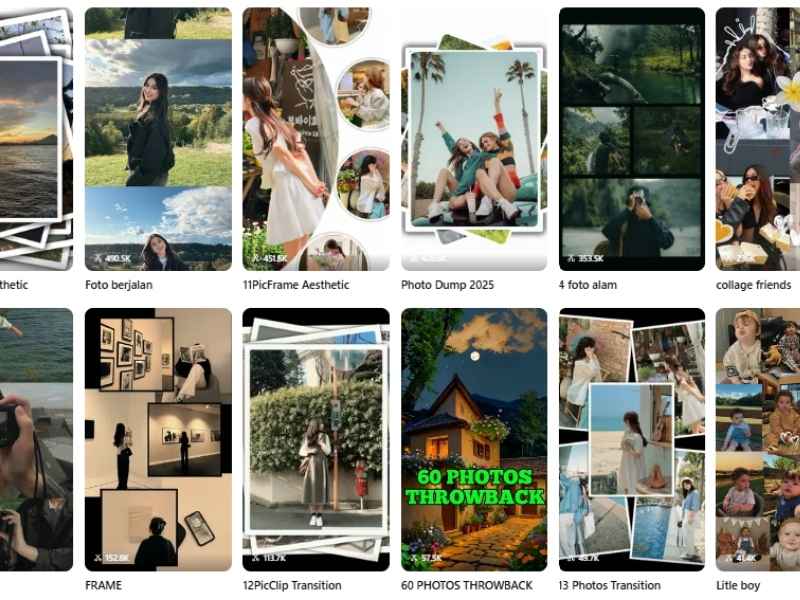
A photo dump template, sometimes labeled a photo slideshow, is built around compiling a curated set of still images into a single fast-paced video, with the template handling timing, transitions, and beat synchronization automatically. This distinguishes it from most other TikTok template categories, which are typically built around continuous video footage, a photo dump is specifically designed to turn a folder of stills into something with genuine motion and pacing, no filming required beyond what's already sitting in a camera roll.
Within CapCut specifically, this template category shows up under a wide range of specific naming variants, "photo dump," "rolling foto," "streched photo," "camera photo dump," and destination or occasion-specific versions like "Wedding Photo Dump" or seasonal photo dumps, each applying broadly the same underlying mechanic to a slightly different visual style or specific image count. CapCut's own photo dump template collection and its photo slide show explore page are both worth browsing directly to see the range currently available.
Beyond the general category, it helps to see a few specific, currently available templates and understand what actually makes each one different, since "photo dump" covers a genuinely wide range of styles once you look past the label.
One of the most heavily used templates in this entire category, with well over 750,000 uses and thousands of likes at the time of writing. Its popularity comes down to genuine simplicity, a clean, general-purpose photo dump structure that doesn't lock you into a specific occasion or aesthetic, making it a reliable default choice regardless of what your specific photos actually show. Find it directly through CapCut's photodumps template page.
Built specifically for the larger end of the format, supporting up to fifty images in a single sequence with high-resolution upload support and customizable layout options. This is the right choice for a genuinely thorough recap, an entire trip, a full season, a long-running project, rather than a tightly focused single-moment highlight. Browse it through CapCut's Photo Dump 50 Photos page.
A smaller, tightly focused template explicitly built around beat synchronization, ideal for a short, punchy recap where every image change is deliberately timed to land on a specific musical accent. This is a strong choice when you want the rhythmic, musical quality of a photo dump to feel genuinely intentional rather than incidental.
A stylized variant that frames each image within a polaroid-style border, adding a nostalgic, tactile quality that a plain, borderless photo dump doesn't have. This suits content specifically leaning into a retro or sentimental mood, memory-focused recaps, anniversary content, throwback posts, more than a fast-paced, high-energy sequence would.
Worth knowing about specifically because it solves the orientation consistency problem directly, rather than needing you to manually crop or pad horizontal images to fit a vertical-first template, this one is purpose-built around horizontal source material from the start. A genuinely useful option if your available photos are mostly landscape orientation rather than portrait.
An intentionally minimal, single-image template that strips color entirely for a dramatic, editorial feel. Part of a broader family of single and low-count templates, including 2 Photos, 5 Photo, and 10 Photo variants, that trade the fuller recap format for something closer to a single striking visual statement, useful when you have one genuinely exceptional image that doesn't need a supporting sequence around it.
Watch on YouTube, How To Make A Photo Dump On CapCut Android Mobile Phone, a current walkthrough of the full mobile workflow this template category depends on.
Most TikTok trends follow a predictable lifecycle, a specific audio track or visual gimmick spikes in popularity for a week or two before the platform's audience moves on to whatever's next. Photo dump templates have avoided this pattern almost entirely, remaining a consistently used format for years rather than a single passing moment, and the reason comes down to a genuine structural advantage the format has over most other trend types.
A photo dump doesn't require filming anything new. Every other major TikTok template category eventually asks something of the creator, record a specific gesture, capture a particular reaction, film a scene matching a specific structure. A photo dump instead works from whatever images already exist, a camera roll, a recent trip, an ordinary week, meaning the barrier to actually producing a piece of content is genuinely lower than almost any other format. This matters enormously for sustained, regular posting, since a creator without the time or energy to film something new on a given day can still put together a photo dump from existing material in a few minutes.
Understanding what's actually happening technically when a photo dump template processes your images helps explain why certain choices produce noticeably stronger results than others. After importing your photos, CapCut arranges them along a timeline where each image's display duration is individually adjustable, a commonly recommended starting point is around four seconds per image, though this varies considerably depending on the specific template and how many images you're including in a fixed total runtime. The template then applies a transition between each consecutive image, without this step the finished result reads as a choppy, disconnected slideshow rather than a smooth, professionally paced sequence.
Music timing plays a genuinely central role in why the best photo dumps feel considered rather than arbitrary, since the strongest versions sync specific image changes to notable beats or accents within the chosen track, turning a simple sequence of stills into something that feels rhythmically alive. CapCut's built-in music library, accessible through the Audio tab, includes tracks specifically tagged and organized for this kind of beat-driven content, though pulling in your own track and manually adjusting image timing to match its specific rhythm produces a more genuinely custom result.
Image count is one of the most consistently cited pieces of guidance across genuinely successful photo dump content, and for good reason, too few images and the sequence feels thin and rushed, too many and individual images lose their impact as viewers can't process each one before the next appears. A range of roughly five to ten images tends to strike the strongest balance for a typical TikTok-length photo dump, though CapCut's own template variety includes options built around considerably larger counts, "16 Photos Transition," "20 Photo Slides," and even "58 photos" style templates exist for creators specifically wanting a longer, more thorough recap format.
The right count ultimately depends on what you're actually trying to communicate. A tight, five to seven image photo dump works well for a focused, single-moment recap, a specific outfit, a single day, a particular event. A larger fifteen to twenty image version suits a broader recap, an entire trip, a full month, a bigger life update, where the larger volume of images genuinely earns its place by covering more ground rather than simply padding out the runtime.
The order images appear in genuinely affects how a photo dump lands with viewers, and treating sequencing as a deliberate creative decision rather than an afterthought tends to separate genuinely engaging photo dumps from forgettable ones. Rather than dropping images in randomly or in simple chronological order, consider building toward something, opening with a genuinely strong, attention-grabbing image rather than your weakest one, and placing your most striking or emotionally significant photo at a point where the music and pacing can give it real weight rather than burying it in the middle of an undifferentiated sequence.
Consistency in image orientation also matters more than it might initially seem. Mixing vertical and horizontal images within the same sequence can create an visually jarring, inconsistent viewing experience as the frame's composition shifts unpredictably from image to image, while a sequence maintaining consistent orientation throughout reads as considerably more polished and intentional. Where you genuinely need to include both orientations, cropping or padding images to a consistent frame before dropping them into the template avoids this specific inconsistency.
Rather than starting from an empty template and improvising, review your camera roll first and shortlist your strongest candidate images, ideally more than you think you'll need so you have room to cut weaker options during editing.
Browse CapCut's photo dump template collection for a ready-built option, or start a new project and build your sequence manually through CapCut's slideshow maker if you want more granular control over timing and transitions.
Add your shortlisted images to your project, then arrange them along the timeline in your intended sequence, adjusting individual display duration as needed, four seconds per image is a reasonable starting point before fine-tuning.
Apply a transition between every consecutive pair of images from CapCut's transition library, this single step is what separates a smooth, professional sequence from a choppy, disconnected one.
Use the Audio tab to add a track, either from CapCut's built-in library or your own upload, then adjust individual image timing so key transitions land on notable beats within the track.
If your photo dump needs supporting context, a location, a date, a short caption, add it sparingly rather than labeling every single image, letting the photos themselves carry most of the visual weight.
Play through the complete result to confirm pacing feels right, checking specifically that no single image lingers too long or gets cut off before it's had a chance to register.
Review your sequence specifically for jarring quality inconsistencies, a low resolution or poorly lit image sitting between two considerably stronger ones stands out in a way that undermines the whole sequence.
Export at your platform's recommended vertical resolution, then choose whether to save with or without CapCut's watermark depending on your subscription tier.
Share your finished photo dump directly to TikTok, or save it for cross-posting to Instagram Reels or YouTube Shorts, both of which share the same vertical format this content is built around.
Mixing dramatically inconsistent image quality. A blurry, poorly lit, or low resolution photo sitting between much stronger images creates a jarring inconsistency that pulls a viewer out of an otherwise smooth sequence.
Including too many images without a clear reason. Unless you're specifically building a larger recap format, cramming in every available photo dilutes the impact of your genuinely strongest images.
Skipping transitions between images. A sequence of stills with no transition reads as an unfinished slideshow rather than a considered, polished piece of content.
Ignoring music and image timing alignment. A photo dump where image changes don't relate at all to the underlying music's rhythm feels arbitrary compared to one where the two are genuinely synchronized.
Over-captioning every single image. Labeling or explaining every photo undermines the format's core appeal, a fast, visual, low-friction glimpse into a moment rather than a narrated slideshow presentation.
Beyond personal content, the photo dump format translates surprisingly well to business use specifically because it solves the same core problem for brands that it solves for individual creators, a low barrier to producing genuinely engaging content from material that already exists. A small business with a folder of product photos, behind-the-scenes shots, or event photography can turn that existing material into a polished, platform-native piece of content without needing to film anything new or hire outside production help.
This makes the format particularly valuable for businesses without a dedicated content production budget, since the actual creative and technical heavy lifting, pacing, transitions, beat synchronization, is handled by the template itself. For music specifically suited to brand and product-focused photo dumps, Artlist and Epidemic Sound both carry properly licensed tracks worth using instead of relying purely on trending audio with a shorter shelf life, and our own free music library is a solid no-cost starting point as well.
Part of why the photo dump category has stayed so durable is how naturally it adapts to specific occasions and content types without needing a fundamentally different approach each time. Travel recaps, wedding highlights, birthday celebrations, seasonal recaps, and even simple "week in review" content all work within the same underlying template mechanic, only the specific images and music selection actually change. CapCut's own library reflects this adaptability directly, with occasion-specific variants like Wedding Photo Dump templates sitting alongside more general options.
This adaptability is worth keeping in mind if you're building a photo dump into a regular content habit rather than a one-off post. Rather than treating each new photo dump as a completely separate creative decision, establishing a consistent personal approach, a preferred image count, a consistent transition style, a recognizable music mood, helps your regular photo dump content build a cohesive identity over time rather than feeling like a disconnected series of unrelated one-off posts.
Watch on YouTube, Creating A Simple Photo Slideshow On CapCut PC, useful if you're building your photo dump on desktop rather than mobile, with images already organized on your computer.
How many photos should a photo dump include?
Roughly five to ten for a focused recap, fifteen to twenty for a broader one.
How long should each photo display?
Around four seconds is a reasonable starting point, adjusted to fit your music and total runtime.
Do I need transitions between photos?
Yes, transitions separate a smooth sequence from a choppy one.
Can businesses use this format effectively?
Yes, it's well suited to turning existing product or event photos into polished content quickly.
Is this format still popular in 2026?
Yes, its low barrier to entry has kept it consistently popular for years rather than a short-lived trend.

.avif)
.avif)
.avif)
.avif)





