.avif)
Freevisuals
Download a 4K stock image of a researcher at a curved HUD display showing live AI neural network data. Available from $9 on Freevisuals.net.
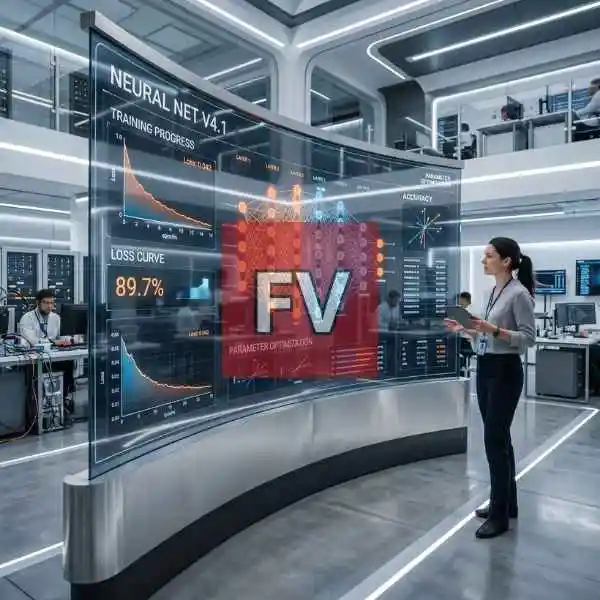
Go Pro To DownloadA researcher stands beside a massive curved glass display in a bright, white-and-gray research lab, watching a live neural network visualization labeled "NEURAL NET V4.1" unfold across the screen. Orange and blue nodes connect in dense clusters, a loss curve slopes downward toward zero, and an accuracy readout sits at 89.7 percent. In the background, other researchers work at their own stations, giving the whole scene the feel of a genuine, active AI lab rather than a staged product shot. This image is part of the Freevisuals Pro library, available through a Single Pass, Monthly or Yearly plan.
This image is a 4K, wide-angle PNG stock photo of a researcher beside a curved glass display showing a live neural network visualization, loss curve and accuracy metrics, available for download as a Freevisuals Pro asset under a Single Pass, Monthly or Yearly plan.
The composition is built around one large curved display rather than a desk full of monitors, which gives the whole scene a clean, boardroom-ready feel instead of the cluttered server-room look most AI stock photography defaults to. The top left panel tracks training progress with a loss value ticking down as epochs increase. Below it, a second loss curve chart runs a similar downward slope next to an accuracy figure sitting at 89.7 percent. The center of the display is dominated by an actual neural network diagram, layered columns of orange and blue nodes connected by hundreds of thin white lines, labeled with layer numbers running left to right. To the right, an accuracy panel and a small table of parameter values round out the display. A researcher in business casual dress stands off to the side holding a tablet, watching the display rather than interacting with it directly, which keeps the focus on the data rather than on a hero pose.
The lighting throughout is bright and even, closer to a modern office or product showroom than the moody, dim server rooms most AI imagery leans on. That choice matters for how this image reads. It positions AI as a clean, professional, corporate tool rather than something mysterious or ominous, which is a very different message than a dark hacker-terminal style shot would send.
The wide aspect ratio makes this a strong fit for website hero banners and presentation slide backgrounds, where a horizontal crop is usually needed rather than a square or vertical one.
If you are building this into a video intro or a title sequence rather than using it as a static image, the display's own glow is already fairly restrained compared to a typical sci-fi hologram shot, so you have more room to push your own glow or bloom effect on the node graph without immediately overexposing it. The bright, neutral lighting also grades cleanly toward either a cooler corporate blue tone or a warmer, more optimistic tone depending on the message you want the surrounding footage to carry.
For a title sequence or explainer video built around this kind of visual, a clean, understated music bed works better than anything overtly dramatic, since the image itself is already doing the work of signaling credibility and progress. Artlist carries a strong range of corporate and tech-focused background tracks that avoid tipping into the generic "inspirational corporate" cliche.
Getting UI text and chart detail this crisp at full resolution usually means starting from a lower-resolution base render and running it through a dedicated upscaling pass rather than generating directly at 4K, since most AI image generators lose fine typography and thin line detail at very high output resolutions. Magnific is commonly used for exactly this step, rebuilding sharp edges on glass surfaces, screen text and reflective lab flooring during the upscale. If you want to generate a similar base scene from your own prompt first, OpenArt AI handles composition-heavy interior and product-style scenes like this one well before the detail pass.
A still image like this one is a strong base layer, but if you want to build an animated version of this kind of futuristic data HUD to sit over your own footage or motion graphics project, the tutorial below covers building sci-fi HUD elements from scratch in After Effects without needing third-party plugins.
Watch on YouTube: Sci-Fi HUD Animation in After Effects, Futuristic Digital Animation, No Plugins
If you want to go further and build a full set of animated HUD elements, including graphs, node clusters and readouts similar to what is shown on the display in this image, the tutorial below walks through a more complete motion graphics HUD build.
Watch on YouTube: How to Create HUD Elements in After Effects, Motion Graphics Tutorial
For anyone assembling a full explainer video around AI or machine learning rather than a single shot, ready-made data visualization and infographic templates can save significant time over animating charts by hand. Envato carries a wide range of dashboard and data HUD After Effects templates that pair naturally with this kind of imagery.
If this particular angle is not quite what you need, Shutterstock and iStock both carry large libraries of AI, data science and corporate tech imagery, useful if you need a different researcher, a vertical crop, or a darker server-room aesthetic instead of this bright lab setting.
As a flat PNG file, this asset drops directly into any editing or design software without a plugin or specific version requirement. It has been used and tested inside the following without issue:
For quick presentation or thumbnail work built around this image, CapCut and Filmora both handle quick text overlays and simple animation on top of a still like this one without needing a full After Effects project.
This image is part of the Freevisuals Pro library. Once downloaded under an active Pro plan, it can be used in commercial and personal video projects, thumbnails, social content, presentation decks and marketing materials. It should not be resold or redistributed as a standalone stock asset, and it should not be uploaded to a competing stock photography marketplace. Full terms are covered in the Terms of Service.
Is this a real AI lab or AI-generated?
This is a fully AI-generated image, built from a detailed text prompt and passed through an upscaling process for detail and resolution. The lab, the researcher and the data on the display are all synthetic rather than photographed from a real facility or real model output.
Can I use this for an AI or machine learning company's marketing?
Yes, this is one of the most common uses for this style of image. It gives an AI product or research company a polished, credible visual without needing to stage a photoshoot in a real lab.
Does this come as a video file as well as a still image?
This particular asset is a static PNG. A moving version of the HUD display can be built using the After Effects tutorials linked on this page, using this still as a lighting and layout reference.
What plan do I need to download this?
Any active Freevisuals Pro plan, including a one-time Single Pass purchase covering this image alone, unlocks the download.
Download free video templates, LUTs, and presets for Premiere Pro, After Effects, DaVinci Resolve, CapCut, and Final Cut Pro.