.avif)
Freevisuals

.jpg)
Free AI storm timelapse prompt pack. 8 image and video prompts to generate a 70-second cinematic wheat field storm sequence using Kling, Runway and OpenArt
Download FREEGo Pro To DownloadDownload NOW!Nature timelapse footage is one of the most consistently watched video formats on YouTube. Study channels use it as background content. Travel creators use it as b-roll. Ambient channels build entire libraries around it. The problem for most creators is that genuine timelapse footage requires either expensive camera equipment left in a field for hours, a drone permit, or a stock library subscription that quickly eats into a channel's revenue.
AI changes that equation completely, but only if you know how to approach it. Generating a single 10-second AI video clip of a wheat field is easy. Building a complete 70-second storm sequence that tells a full emotional story from golden calm through to dramatic downpour and back to warm aftermath is a different challenge entirely, and it is one that no existing prompt pack addresses properly.
This free download does exactly that. It gives you 8 structured image prompts and 8 matching video prompts to generate a complete cinematic storm timelapse sequence using Kling AI, Runway Gen-4, Pika Labs, or any image-to-video tool. One anchor image. Eight variations following a full storm arc. Stitched together, a complete 70-second video with a genuine dramatic arc from beginning to end.
Download the full Storm Timelapse AI Prompt Pack free from Freevisuals here
Nature content has one of the most reliable audience demographics on YouTube. It performs well across age groups, requires no presenter, attracts long watch times because of its ambient quality, and sits well under monetisation because the advertiser category (travel, outdoors, wellness) commands strong CPM rates.
The storm timelapse specifically has an emotional quality that sets it apart from static landscape footage. A storm approaching, breaking, and passing is a complete story with a beginning, a middle, and an end. Viewers feel the tension of the approaching weather, the release of the downpour, and the emotional resolution of the golden aftermath. That arc keeps viewers watching through the full 70 seconds in a way that a static loop of a peaceful field simply does not.
Creating cinematic timelapse animations without expensive cameras, drones, or editing software is now achievable using only free AI tools, with step-by-step prompt workflows turning simple text into smooth, movie-like timelapse sequences that are ready for YouTube upload. The storm prompt pack in this download is built around exactly that principle.
The single biggest challenge with long-form AI video is visual consistency. Generate eight separate clips from eight separate prompts and you will get eight different fields, eight different fence posts, eight different treelines, and eight clips that do not belong to the same video. The anchor-and-variation method solves this directly.
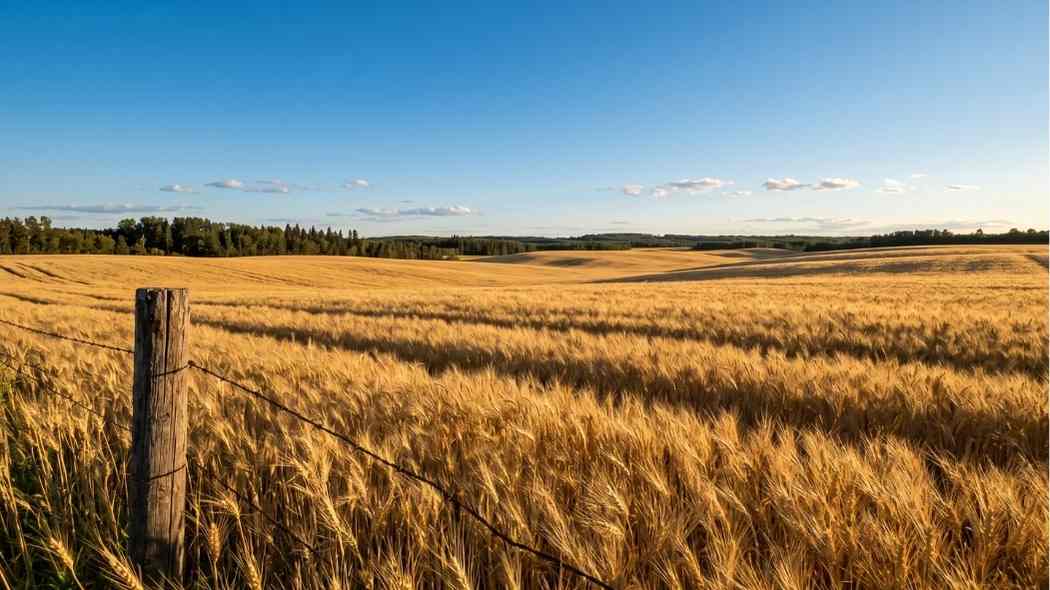
Shot 01 in this pack is the anchor: a wide open wheat field at golden hour, perfectly still, deep amber light, a timber fence post in the left foreground, a treeline along the back of the field. You generate this image first, at the highest quality your tool allows, at 16:9 aspect ratio. Every other shot in the sequence is generated using Image-to-Image mode with Shot 01 uploaded as the reference image.
The similarity or Image Strength slider is the critical control. Set it at 65 to 75 percent. At this setting the field layout, fence post, treeline, and camera position all stay consistent across every shot, but the sky, light, atmosphere, and weather change as instructed by each variation prompt. The result is a sequence where every clip looks like it was filmed from the same locked-off camera position, which is exactly what makes it read as a timelapse rather than a slideshow of unrelated nature images.
Kling AI's image-to-video capability, particularly in its current 2.0 and above versions, handles the First Frame feature in a way that maintains visual consistency across multi-shot sequences, making it the recommended primary tool for animating this sequence. For the image generation step, Midjourney v6.1 produces the most cinematic lighting treatment, particularly for the golden hour shots at either end of the sequence and the eerie green-grey storm light of Shot 04.
Understanding what each shot is doing emotionally is as important as understanding what it should look like visually. Every decision in the prompt, the light treatment, the wind intensity, the sky coverage, is made in service of the emotional role that shot plays in the overall arc.
Shot 01, Golden Calm, is the world before anything happens. The light is warm, the wheat sways gently, the sky is clear. This shot establishes what is going to be lost as the storm arrives and makes the aftermath of Shot 08 feel like a return to something rather than just a change in weather.
Shots 02 and 03, The Horizon Darkens and Sky Divided, are the rising tension. The storm is approaching but has not arrived. The most cinematically interesting quality of these two shots is the contrast between the still-golden foreground and the advancing dark sky, a contrast that is more dramatic and beautiful than either the pre-storm calm or the full storm itself.
Shot 04, Green Light, is where the mood turns genuinely unsettling. The green-grey light that precedes a severe storm is one of the most distinctive natural lighting phenomena in landscape photography, and it reads immediately to any viewer as danger. This shot is where the emotional tone shifts from tension to something closer to dread. The prompt specifies a desaturation of the otherwise warm field colours, leaving only the eerie yellow-green cast from the interaction of storm clouds and remaining daylight.
Shot 05, First Lightning, is the peak of tension before release. The lightning bolt behind the treeline illuminates the storm clouds from within and is accompanied by a subtle camera shake in the video prompt representing thunder. This is the most technically demanding shot in the sequence to generate well, and the download recommends spending additional generation credits here to get it right.
Shot 06, Full Downpour, is the release. Thick diagonal rain sheets across the frame, the field is barely visible, the wheat is completely flattened. This is the most kinetic and visually aggressive shot in the sequence. The editing note in the pack recommends a faster dissolve or hard cut into this shot from Shot 05 to convey the sudden violent arrival of the rain.
Shot 07, The Storm Passes, is the transition back to calm. Ground fog rises from the wet field, the golden light returns on the right horizon, the rain has stopped completely. This shot is doing important emotional work: it is the exhale after the tension of Shots 03 through 06. The wet glistening wheat and rising mist give it a quality of freshness and renewal that makes the final shot feel earned.
Shot 08, Golden Aftermath, is the resolution. A rainbow arcs across the sky, the golden light is even warmer than Shot 01 because of the moisture in the air, the wheat is beginning to recover. This is the most visually emotional shot in the sequence and the one most likely to be used as the thumbnail. The prompt and the video prompt are both designed to maximise the visual impact of the rainbow and the glistening golden light on the wet field.
For image generation, Midjourney v6.1 or v7 produces the most accurate lighting treatment for the golden hour shots and the most convincing storm cloud formations for Shots 03 through 06. Add --ar 16:9 --v 6.1 --style raw --q 2 to the end of every prompt.
OpenArt AI is the strongest alternative for creators not on a Midjourney subscription. Select the SDXL or Realistic Vision model, upload Shot 01 as the reference image, and set Image Strength to 0.65 to 0.75. OpenArt AI handles the golden hour and storm lighting well across all eight prompts and the Image-to-Image consistency is reliable at the recommended similarity range.
For video generation, Kling AI is the recommended primary tool for this specific sequence. Using Kling AI's Start Frame to End Frame animation model produces smooth, movie-like timelapse motion that holds the scene visually stable while introducing natural atmospheric movement. Upload each finished image as the First Frame, paste the corresponding video prompt from the pack, and set motion to Low or Medium. The wheat field movement, cloud drift, and rain effects all generate more convincingly in Kling than in most competing tools.
Runway Gen-4 is the best alternative for the atmospheric shots specifically, Shots 07 and 08, where the rising ground fog and golden light spreading across the wet field require subtle, controlled motion rather than the more aggressive weather motion of the middle shots. Set motion intensity to 2 to 4 out of 10 in Runway for these clips.
Pika Labs handles the rain shots (Shot 06 in particular) well. The rain streak generation in Pika at motion strength 1.0 to 1.5 produces convincing heavy downpour movement without introducing the kind of visual artifacts that some tools generate with fast-moving elements.
For a practical demonstration of how Kling AI handles cinematic nature timelapse sequences from a single image, this tutorial covers the complete workflow clearly: Create Cinematic Timelapses Using AI with Google AI Studio and Kling.
For a deeper look at Kling's image-to-video capabilities and the prompting strategies that work best for nature and atmospheric content, this tutorial is worth watching before you start: Kling 2.0 Tutorial - Best Video Generator with Easy Prompts.
Every video prompt in the pack is written around the principle that the motion should match the emotional role of the shot. Calm shots have slow, barely perceptible movement. Tension shots have building, directional movement. The storm shots have fast, violent movement. The resolution shots return to slow and peaceful.
The golden calm shots (01 and 08) specify wheat swaying in gentle undulating waves, cloud drift so slow it is almost invisible, and no camera movement at all. The camera is locked off because the calm world should feel entirely still, with the gentle wheat movement the only sign of life.
The approaching storm shots (02 and 03) specify the storm clouds visibly advancing across the sky, the light alternating between golden and shadow as the clouds advance, and the wheat beginning to move more energetically in the rising pre-storm wind. The direction of movement is always the same: the storm comes from the right and advances left, which creates a sense of the inevitable and gives the sequence consistent spatial logic.
The peak shots (04 and 05) specify urgent wind movement with the wheat completely flattened, a lightning flash in Shot 05, and a subtle camera shake representing thunder. The thunder shake should be no more than half a second and should happen after the lightning flash, not during it.
The downpour shot (06) is the most motion-intensive clip in the sequence. The video prompt specifies thick diagonal rain streaks driving across the frame from right to left, puddle ripples in the low areas of the field, and fluctuating rain intensity. The camera is locked off because there is enough motion happening in the scene without adding camera movement.
The clearing and aftermath shots (07 and 08) return to slow, controlled motion. Ground fog drifting upward, golden light slowly spreading, a very gentle push forward in Shot 08 as the camera seems to lean toward the rainbow. The deceleration of motion from Shot 06 through to Shot 08 mirrors the emotional deceleration from tension to relief to peace.
A single LUT applied at timeline level will unify the colour palette across all eight clips. The Free Mega Cinematic LUT Pack on Freevisuals includes 22 LUTs in .cube format that work across Premiere Pro, DaVinci Resolve, After Effects, and Final Cut Pro. For this sequence, look for a LUT that has a warm bias in the shadows and a slight desaturation in the midtones, as this enhances the golden hour shots and does not fight the intentional colour temperature shifts across the storm sequence.
Beyond the global LUT, three shots need specific per-clip adjustments that cannot be handled by a timeline-level grade alone.
Shots 04 and 05, the Green Light and First Lightning shots, should have saturation reduced by 15 to 20 percent at the clip level. This enhances the eerie quality of the pre-storm atmosphere, which should look genuinely desaturated and unnatural. A LUT that adds warmth to the shadows will work against this if applied at full strength, so reduce the LUT opacity to around 60 to 70 percent on these two clips specifically.
Shot 08, Golden Aftermath, should have saturation increased by 10 to 15 percent at the clip level. The rainbow needs to read vividly against the departing storm clouds and the wet golden field, and AI-generated rainbow colours are often slightly muted compared to a real photograph. A saturation boost at this specific clip brings the emotional climax of the sequence to its full visual potential.
The Free Smoke and Fog Overlay from Freevisuals works particularly well on Shot 07, the Storm Passes clip. Adding a subtle fog overlay at low opacity over the ground level of the frame reinforces the rising mist effect and gives the clearing storm a depth and atmosphere that is difficult to achieve through generation alone.
This sequence benefits from sound design in a way that the city timelapse does not. A city at any time of day has an implied ambient sound that viewers accept without needing to hear it. A wheat field in a storm has specific, dramatic audio events that viewers expect and that elevate the emotional impact of the visuals enormously when they are present.
The sound design recommended in the download file maps to each shot specifically. Under Shots 01 and 02, a light wind ambience at very low volume. Under Shots 03 and 04, a building wind that increases in intensity. Under Shot 05, a distant thunder rumble that arrives half a second after the lightning flash. Under Shot 06, heavy rain ambience at full intensity. Under Shot 07, fading rain with returning birdsong and the natural quiet of a field after a storm. Under Shot 08, quiet natural ambience, possibly a single bird.
Epidemic Sound has one of the strongest natural ambience and weather sound effects libraries of any royalty-free platform. The weather sound design category includes exactly the progression of elements needed for this sequence, from light wind through to heavy downpour and clearing ambience, all licensable under a single per-channel YouTube registration. Once your channel is registered with Epidemic Sound, every sound effect you use is covered retroactively across all uploads.
For the music track underneath the sound design, Prompt 01 from the Freevisuals AI Background Music Prompt Pack generates a slow-building orchestral tension track with no melody for the first 30 seconds that maps well to the pacing of this sequence. Alternatively, Prompt 10 (Emotional Storytelling) works for a more personal and introspective tone if this footage is being used as the background for a piece of reflective narration.
If you want a professionally licensed orchestral track rather than an AI-generated one, Artlist has a strong collection of cinematic nature and landscape orchestral tracks with downloadable stems. The stems let you remove or reduce specific instruments at different points in the timeline, which is useful for this sequence because you may want to drop the orchestral arrangement almost entirely under Shot 06 to let the rain ambience carry the moment without competition from the music.
A 70-second cinematic storm timelapse has more versatile applications across different content formats than most creators initially consider.
As a standalone ambient YouTube video, it works within a channel library of nature and relaxation content. Paired with a meditation or mindfulness voiceover from ElevenLabs, the full arc from calm through storm to resolution maps naturally onto themes of emotional resilience and acceptance that perform well in the wellness niche.
As b-roll footage within a longer video, individual clips from the sequence can be used as establishing shots, emotional transitions, or narrative metaphors. Channels covering any topic with a dramatic or emotional arc can use the storm progression as a visual metaphor without the footage being recognisably AI-generated.
For short-form repurposing, the lightning shot (Shot 05) and the golden aftermath shot (Shot 08) are individually compelling enough to perform well as standalone Instagram Reels or TikTok clips with the right sound design and text overlay. InVideo handles the reformat from 16:9 to 9:16 cleanly and its caption feature works well for text overlays on these vertical cuts. CapCut is the faster option specifically for TikTok, and its built-in dramatic sound effects library has usable thunder and rain elements that work with the footage.
Creators who edit primarily in Filmora will find the sequence imports cleanly and Filmora's built-in audio ducking handles the transition between the music track and the rain ambience automatically, which is one of the trickier mixing challenges in this particular edit.
Shot 05, First Lightning, is the most technically demanding. Lightning generation in current AI image tools is inconsistent: some generations produce a convincing single bolt behind the treeline and some produce multiple bolts, no bolt, or a bolt in an implausible location. Generate three to five variations of Shot 05 and select the one where a single bolt appears behind the treeline on the right side of the frame without dominating the composition. The bolt should illuminate the clouds from within rather than striking the ground in the foreground.
The shift from the warm amber tones of Shots 01 through 03 to the cold grey-blue of Shots 04 through 06 and back to warm in Shots 07 and 08 is intentional and should be preserved rather than flattened by a uniform grade. Apply your global LUT at reduced opacity (60 to 70 percent) across the cold shots and at full opacity across the warm shots. This preserves the emotional temperature shift while still maintaining a unified overall look.
Yes, provided you are using a paid tier of the generation tool and the tool's terms allow commercial use of outputs. Midjourney paid plans, OpenArt AI paid tiers, Kling AI paid plans, and Runway paid plans all allow commercial use. Verify the specific terms of your subscription before using generated footage in advertising or client work. For a personal or brand YouTube channel, paid tier outputs are generally covered.
Rainbow generation is one of the limitations of current AI image tools. The most common issues are incorrect arc placement, multiple rainbows, or colours that are too saturated or too pale. Generate five or more variations of Shot 08 and select the one with the most natural-looking single arc. In post, if the rainbow looks artificial, reduce its saturation slightly using a selective colour mask in Premiere Pro or DaVinci Resolve to bring it closer to the muted quality of a real atmospheric rainbow. Counterintuitively, a slightly less vivid rainbow often looks more real than a fully saturated one.
If the treeline, fence post, or field layout is shifting noticeably between shots despite the 65 to 75 percent similarity setting, try increasing it slightly to 78 to 80 percent and regenerating the problem shot. The trade-off is that the atmospheric and lighting changes may be less pronounced. Alternatively, accept minor inconsistencies between shots and rely on the cross-dissolve transitions to conceal them. A 1.5 to 2-second dissolve covers a significant amount of spatial inconsistency because viewers are not trying to map precise building or tree positions between shots during a dissolve.
Shot 08, Golden Aftermath, is the strongest thumbnail option because it contains the most visual elements that read at small scale: the vivid rainbow, the golden light on wet wheat, and the contrast between the departing dark clouds and the warm open sky on the right. Shot 05, First Lightning, is the strongest option for content specifically marketed around drama and intensity. At thumbnail scale, the lightning bolt behind the treeline in cold grey light reads as genuinely cinematic and creates strong curiosity about what the video contains.
The storm timelapse pack is the second in a series of structured long-form AI video prompt packs on Freevisuals. Each pack is built around the same anchor-and-variation method and each produces a complete 60 to 80-second video from AI-generated content.
The City at Different Times of Day AI Prompt Pack takes a single city rooftop viewpoint through a full 24-hour cycle, from 3am pre-dawn through golden sunrise, midday, golden sunset, and deep night.
The 10 True Crime Cinematic YouTube Thumbnail AI Image Prompts pack gives you 10 ready-to-use cinematic thumbnail prompts for Midjourney and OpenArt AI covering every major true crime content type.
The 10 Cinematic Background Music Prompts for YouTube pack covers Suno AI, Udio, and ElevenLabs Music with prompts for ten different video content types.
For your editing and colour grading workflow, the Free Mega Cinematic LUT Pack includes 22 LUTs in .cube format for After Effects, Premiere Pro, DaVinci Resolve, and Final Cut Pro.
The Free Smoke and Fog Overlay adds depth to the clearing storm and mist shots in your edit.
The Free After Effects Glitch Transition Presets are useful for the lightning cut between Shots 05 and 06 if you want a more dramatic transition than a standard dissolve.
The Best After Effects Plugins Guide and the After Effects Flicker Expression Guide on Freevisuals cover the compositing tools and techniques that work best alongside AI-generated nature footage.
Download the full Storm Is Coming AI Timelapse Prompt Pack free from Freevisuals
Disclosure: This post contains affiliate links. If you purchase through these links, Freevisuals may earn a small commission at no extra cost to you.
Download free video templates, LUTs, and presets for Premiere Pro, After Effects, DaVinci Resolve, CapCut, and Final Cut Pro.













