.avif)
Freevisuals
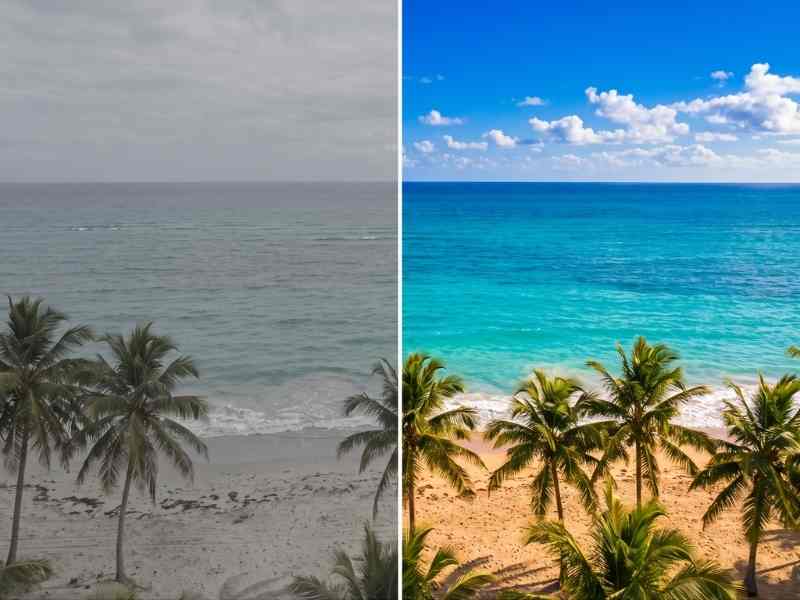
Free tropical beach and ocean .cube LUT for Premiere Pro, DaVinci Resolve, Final Cut Pro and CapCut.
Download FREETropical vacation content lives and dies on one thing above all else, whether that water actually looks as impossibly turquoise and inviting as it did in person. Tropical Beach & Ocean is built to deliver exactly that, boosting the vibrant cyan and turquoise tones of tropical water while keeping sand bright and warm, giving vacation content the vivid, aspirational look this genre depends on.
This shares some saturation philosophy with our Desert Golden Dust LUT, but targets an entirely different color range built around tropical water rather than arid landscapes. If you're building a full vacation or travel series, our best transition templates roundup is worth a look, and for music, Artlist and Epidemic Sound both carry upbeat, tropical-influenced tracks well suited to beach and vacation content.

Format: .cube (33-point 3D LUT), compatible with DaVinci Resolve, Adobe Premiere Pro, Final Cut Pro, and any other software that supports standard .cube LUT files.
Unlike almost any other travel subcategory, tropical beach and ocean content is judged very specifically on how convincingly it captures water color, since that specific turquoise, crystal-clear water is often the entire reason a destination is considered a bucket-list location in the first place. This creates unusually high expectations, viewers who've seen countless polished tropical destination photos and videos have a strong mental benchmark for what "good" tropical water color looks like, and footage that falls short of that benchmark, even if technically accurate to what the camera actually captured, can feel disappointing by comparison.
Tropical Beach & Ocean is built to close this gap between accurate camera capture and the vivid, saturated water color viewers have come to expect from this specific content category. Water's color at any given location depends on a combination of factors, depth, sand color beneath, mineral content, and sky reflection, all of which cameras don't always represent with full vibrancy straight out of the box, which is exactly the gap this LUT's targeted cyan and turquoise enhancement is designed to address.
The core use case this LUT is built for, giving beach and tropical destination footage the vivid, aspirational water color that defines successful content in this specific travel category.
Content covering shallow water activities, snorkeling, paddleboarding, kayaking, benefits from this LUT's enhancement of the visible water color surrounding these activities.
Resorts and hospitality brands producing their own promotional content benefit from footage that presents their tropical setting at its most visually compelling.
Boating and yacht charter content, often shot on open water with extensive ocean visible in frame, benefits significantly from this LUT's water color enhancement.
Content covering multiple tropical destinations within a single trip benefits from applying this LUT consistently, helping create visual continuity across footage shot in different specific locations with naturally varying water conditions.
Download the .cube file from the link above.
Go to File > Preferences > System > General, then click Open LUT Folder. Copy the downloaded .cube file into this folder.
Resolve needs to be restarted, or the LUT list refreshed manually, before the new LUT appears in your browser.
Right-click your clip's node, choose LUT, and select Tropical Beach Ocean from your custom LUT folder.
Add Lumetri Color to your clip, open the Lumetri panel, go to Creative, click Browse under Look, and select the .cube file directly.
Place the .cube file in your custom LUT folder and apply through the Color inspector.
A polarizing filter reduces surface glare on water, revealing more of the actual color and clarity beneath the surface, giving this LUT considerably better source material to enhance.
Unlike many landscape genres that favor golden hour, tropical water color is often most vivid under direct overhead midday sun, when light penetrates most directly into shallow water.
Direct tropical sun reflecting off both sand and water can clip easily, slightly underexposing during filming gives this LUT's highlight management more room to work with.
Compare your graded footage against other successful content from similar tropical destinations to confirm your grade sits comfortably within audience expectations for this specific content category.
Applying this LUT to murky or non-tropical water. This LUT's color treatment is calibrated specifically for naturally clear, blue-green tropical water, applying it to murky or differently colored water bodies can look unnatural.
Overexposing bright sand and water surfaces. These highly reflective surfaces clip easily under strong tropical sun, careful exposure management during filming preserves detail this LUT can then enhance.
Ignoring surface glare that obscures underwater color and clarity. Without a polarizing filter, surface glare can hide much of the vivid color and clarity this LUT is designed to enhance.
Not accounting for how weather affects water color on a given day. Overcast conditions genuinely reduce tropical water's vibrant color compared to bright, sunny conditions, plan filming around favorable weather where possible.
DaVinci Resolve Tutorial: Zoom In And Out (Ken Burns Effect), useful for adding gentle movement to still beach and ocean photography within a video edit.
The specific turquoise and cyan color associated with tropical water isn't uniform across all clear water locations, it results from a specific combination of factors including shallow depth over light-colored sand or coral, which reflects light back up through the water in a way that produces those vivid blue-green tones, combined with generally low levels of suspended sediment or organic material that would otherwise scatter and muddy the color. Deeper water, even in genuinely tropical locations, tends toward a darker, more uniform blue as light has further to travel and less reflective seafloor to bounce off before reaching the camera.
Understanding this helps explain why the same general tropical destination can produce dramatically different water color in different specific locations, a shallow lagoon over white sand will typically show far more vivid turquoise than a nearby deeper channel, even under identical lighting and weather conditions. When scouting locations for tropical water content, prioritizing shallow, light-bottomed areas specifically, rather than assuming any water within a tropical destination will look equally vivid, considerably improves your odds of capturing the specific vibrant color this genre depends on, giving this LUT stronger source material to enhance further.
There's a meaningful difference between enhancing footage to better represent how a location genuinely looks in person under good conditions, and creating an unrealistic expectation that could disappoint visitors who book a trip based on heavily idealized content. Tropical Beach & Ocean is built to restore and enhance color that's genuinely present in well-chosen, well-lit source footage, rather than manufacturing color that doesn't exist in reality, but it's still worth being thoughtful about how aggressively any color enhancement is applied, particularly for destination marketing content where visitor expectations and satisfaction matter directly to a tourism business's reputation.
For creators specifically producing destination marketing content, considering a slightly more restrained application of this LUT's saturation boost, rather than the maximum available intensity, often strikes a better balance between compelling, attractive content and setting visitor expectations that the actual destination can reliably deliver on, which ultimately serves both the marketing goal and long-term visitor satisfaction better than an unsustainably idealized representation would.
Beyond daily weather, tropical water clarity and color can vary meaningfully based on tidal conditions and broader seasonal patterns specific to a given destination. Many tropical locations experience a distinct wet and dry season, with the dry season typically offering clearer water and more consistent sunny conditions ideal for this kind of content, while wet season rainfall can introduce runoff and sediment that temporarily reduces water clarity even in normally pristine locations. Researching the specific seasonal patterns for your destination before planning a shoot helps set realistic expectations and improves your odds of capturing the vivid, clear conditions this LUT is built to enhance.
Tidal timing matters at a more granular level within any given day, low tide often exposes more of the shallow, light-colored seafloor areas that produce the most vivid turquoise color, while high tide can submerge these areas under deeper water that appears more uniformly blue rather than displaying the dramatic color gradients many successful tropical content pieces feature. Checking local tide tables and planning key water shots around low tide windows, where practical and safe to do so, often produces noticeably better source material for this LUT to work with.
Sky color and cloud cover significantly influence how tropical water appears on camera, since water surfaces reflect the sky above them to some degree, meaning a clear blue sky reinforces and complements water's naturally blue-green tones, while heavy cloud cover can introduce a greyish cast that works against the vivid color this LUT aims to enhance. This relationship means that even in locations with genuinely excellent water clarity and color, waiting for favorable sky conditions specifically can meaningfully improve your results beyond what water conditions alone would suggest.
For creators working within a limited shooting window who can't simply wait indefinitely for ideal conditions, prioritizing your most important, hero shots for whatever window of clearest sky and calmest water you do get access to, while treating less critical supporting footage as more flexible around timing, helps ensure your strongest, most important content gets the best possible source conditions for this LUT to enhance.
Keeping a flexible shot list, with your absolute must-have shots clearly distinguished from nice-to-have supporting footage, gives you the practical ability to adapt your shooting priorities in real time as conditions shift throughout a trip, rather than working through a rigid, fixed shooting order regardless of how favorable or unfavorable conditions happen to be at any given moment, ultimately making the most of whatever weather and tidal windows actually present themselves during a limited travel schedule.
This kind of adaptive approach to shooting priorities, combined with a color grading workflow built around this LUT as a consistent base treatment, means your final edit can draw confidently from footage captured across a range of different daily conditions throughout a trip, while still presenting a visually cohesive final result once everything has passed through the same consistent color treatment during post-production, regardless of the specific weather and lighting variations present across the individual days a longer trip inevitably includes and the natural unpredictability that comes with filming in any real-world outdoor environment over an extended period of time.
It's calibrated specifically for naturally clear, blue-green tropical water, applying it to murky or differently colored water can produce unnatural results.
It can enhance whatever color is present, but overcast conditions genuinely reduce tropical water's natural vibrancy, favorable weather during filming produces the best results.
Yes, if possible, a polarizer reduces surface glare and reveals more underwater color and clarity for this LUT to enhance.
Yes, free for both personal and commercial tropical travel and hospitality marketing content.
It's built to keep skin tones warm and flattering, though always check representative footage with people in frame given the intensity of tropical sunlight and how it can vary throughout the day.
Yes, though for footage significantly below the surface, our dedicated Underwater Aquatic LUT is built specifically for that deeper correction need, since light absorption changes considerably once you're submerged rather than shooting at or near the surface.
Affiliate Disclosure: This post may contain affiliate links. If you make a purchase through one of these links, FreeVisuals may earn a commission at no extra cost to you. We only recommend products and platforms we genuinely believe in. Read our full disclosure policy.
Download free video templates, LUTs, and presets for Premiere Pro, After Effects, DaVinci Resolve, CapCut, and Final Cut Pro.
%20Profile%20Pic.jpg)








