.avif)
Freevisuals
AEJuice is best known for the I Want It All Bundle, but the part most editors overlook is how much you can get from AEJuice for free. There are currently 26 free packs available through AEJuice's free plugins page, covering everything from transitions and motion elements to AI-powered voiceover generation, automatic captions, GIF export, and more. None of these require a paid subscription and most work with just the free Pack Manager plugin installed in After Effects or Premiere Pro.
This post breaks down each of the main free AEJuice tools, what they actually do, and which ones are worth installing first. If you want a broader review of AEJuice's paid options, read our full AEJuice review.
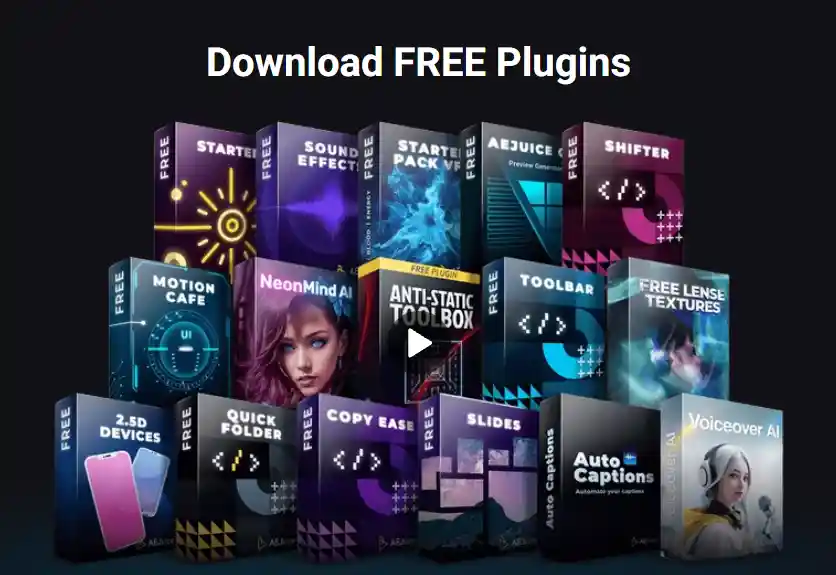
All AEJuice free plugins are installed through the Pack Manager, which is a free plugin itself. Install it once and it handles downloading, installing, and managing every other AEJuice pack from inside After Effects or Premiere Pro. You do not need to download and drag files manually.
To get started:
The Pack Manager auto-installs fonts for text animations, auto-resizes assets to your composition dimensions, and gives you live thumbnail previews before downloading. Once it is set up you do not need to touch it again — just open the panel when you need something.
The Starter Pack is the best place to begin and the most useful single free pack AEJuice offers. It includes over 100 assets covering:
Every asset works with the drag-and-drop workflow inside the Pack Manager. For editors who do not want to spend time building transitions and elements from scratch, the Starter Pack covers the most common use cases across YouTube, social media, and client work. It is not a demo or a teaser — it is a complete, usable set of assets.
The Starter Pack is also compatible with Premiere Pro CC 2022 and later, making it one of the few AEJuice free packs that works across both Adobe editors out of the box.
The free Sound Effects pack includes a library of audio elements that sync with motion graphics, transitions, and UI animations. This covers whooshes, impacts, swooshes, glitches, and interface sounds. These are the kind of sound effects that make motion graphics feel finished rather than silent, and having them integrated into the Pack Manager means you can preview and apply them directly alongside your visual assets without switching to a separate audio library. The Sound Effects pack is also compatible with Premiere Pro.
Auto Captions is one of the more practically useful free tools AEJuice has added in recent years. It generates captions automatically from your audio track inside After Effects, removing the need to manually type or sync subtitles. For content creators producing YouTube videos, Reels, or TikToks where captions are standard, this saves a significant amount of time per video.
The captions are generated as editable text layers inside After Effects, so you have full control over font, size, positioning, and styling. You can apply any of AEJuice's text presets to the caption layers to match your brand style.
Auto Subtitles is a separate tool from Auto Captions with a slightly different output format, better suited to subtitle-style text that runs along the bottom of the frame. If you produce content that needs traditional subtitle formatting rather than stylised caption overlays, Auto Subtitles is the more appropriate tool. Both are free.
Voiceover AI is a text-to-speech tool built directly into After Effects via the Pack Manager. You type your script, choose from over 70 natural-sounding voices, and the tool generates an audio track that can be used as narration for your video. This is particularly useful for faceless YouTube content, explainer videos, and any project where you need voiceover without recording it yourself.
The quality of AI voice generation has improved significantly and Voiceover AI's output is usable in real projects. It is not the highest-quality AI voice tool available — dedicated platforms like ElevenLabs produce more natural results for professional use — but for a free tool integrated directly into your editing software, it covers a lot of use cases without switching applications.
For more on building a faceless YouTube channel using free AI voiceover tools, see our guide on how to start a faceless YouTube channel in 2026.
Exporting a GIF directly from After Effects is not something After Effects does natively, and the traditional workflow required going through Photoshop as an intermediate step. The AEJuice GIF Exporter removes that step entirely. Select any composition, open the GIF Exporter panel, set your quality and loop settings, and render directly to a GIF without leaving After Effects.
The tool gives you control over alpha channels, framerate, output module, loop settings, and render quality. For designers creating animated GIFs for web use, email marketing, or social media, this is one of the most time-saving free tools in the AEJuice library. We have a full step-by-step guide on how to export a GIF from After Effects using the AEJuice plugin.
The Starter Pack VFX is a separate free pack from the original Starter Pack, focused specifically on visual effects elements rather than motion graphics. It includes fire, smoke, explosions, energy bursts, and particle effects that can be composited into live footage or used standalone in motion graphics projects. All elements are pre-rendered with alpha channels so they drop straight onto a layer without needing to be keyed. Useful for action-style YouTube content, gaming channels, and any project that needs VFX without a budget.
AEJuice's AI Video Editor tool is one of their newer free additions. It uses AI to automate parts of the editing process inside your editor, covering tasks like auto-cutting to music beats, suggesting edit points, and applying effects automatically based on your footage. The tool is still developing and works best for simpler edit styles, but for creators who want to speed up a rough cut before refining it manually, it adds a useful layer of automation on top of the Pack Manager workflow.
Beyond the tools covered above, AEJuice's free plugins page includes several more genuinely useful packs that don't get the attention they deserve. Here's what else is actually in there.
Liquid Elements: Over 1,000 frame-by-frame liquid flash FX elements, splatters, drips, and organic transition shapes rendered as genuine hand animated frame sequences rather than simple simulated effects. This is one of AEJuice's oldest and most downloaded free packs, and it shows, the sheer volume gives you real variety rather than a handful of assets you'll see reused across every other editor's videos.
Free VFX Assets: A genuinely substantial pack, over 100 assets spanning 27 distinct effect categories, provided by CG Visuals. This sits alongside the Starter Pack VFX pack covered above but is a separate, additional download, worth grabbing both rather than assuming they overlap.
Free Muzzle Flashes: 300 plus muzzle flash and ballistics elements, provided by Triune Digital. A genuinely specific, niche category, but for gaming content, action edits, and film style projects needing this exact effect, having 300 variations free is a real time saver over sourcing individual flashes elsewhere.
Free Lens Textures: 8 lens texture overlays, also from Triune Digital, for adding dust, scratches, and imperfection texture over footage or graphics for a more organic, less digitally clean look.
Google Material Icons: Over 2,000 icons from Google's own Material Design system, pre-animated and ready to drop into UI focused or tech explainer content. Genuinely useful specifically because Material Design icons are instantly recognizable and consistent, rather than a mismatched grab bag of icon styles.
Anti-Static ToolBox: A set of 25 flexible workflow tools for After Effects, built by the Anti-Static community and made available through AEJuice's Pack Manager. This is aimed more at speeding up your actual editing process than adding visual assets, worth knowing about specifically if you're looking to improve efficiency rather than add more visual elements to your library.
Expressions Pack: A curated set of essential After Effects expressions, useful for editors who want reliable, pre-built expression code without needing to write or debug their own from scratch.
Pexels Videos and Pexels Photos: Direct access to Pexels' 10 million plus stock video and photo libraries from inside the Pack Manager, meaning you can search and pull stock footage or images without leaving After Effects at all. This is a genuinely underrated inclusion, since it removes an entire separate browser tab and download step from your workflow.
NeonMind AI: An AI image and video generation tool built around Stable Diffusion, letting you generate visuals directly inside After Effects from a text prompt. The free version is limited to 512x512 pixel output, a genuine constraint worth knowing before you plan a project around it, but it's a functional way to test AI generation without leaving your timeline.
Shifter, Quick Folders, and Copy Ease: Three smaller workflow plugins worth knowing about together. Shifter lets you shift layer in and out points by an exact frame count or stagger multiple layers by a pattern. Quick Folders gives one click access to your most used project, script, plugin, and render folders. Copy Ease copies and pastes keyframe velocity and speed graph data using simple shortcuts, Shift+C to copy and Shift+V to paste, genuinely useful for anyone doing detailed animation curve work regularly.
Slides, Beginner Collection: An automated slideshow builder that resizes your photos and aligns animation timing to your music automatically, built specifically for editors who need a finished slideshow in under two minutes without manual keyframing.
2.5D Devices Collection: Pseudo-3D mockups of popular phone and tablet models, iPhone 11 Pro Max, iPhone 11, iPhone XR, iPad Pro, and Galaxy A50 among them, with pre-set placeholder dimensions for dropping in your own screen content
These two videos are worth watching before you start downloading to get a clear picture of what the free AEJuice tools look like in a real After Effects workflow:
The Pack Manager is the foundation of every free AEJuice tool on this list, so getting it installed correctly is the first step. This official walkthrough covers installation inside After Effects and Premiere Pro, the standalone version, and manual installation for anyone who runs into issues with the automatic process. Once it is set up, every other free pack on this page downloads directly from inside your editor without any additional steps.
This short guide shows the Pack Manager free workflow in action using one of AEJuice's most popular free packs, Liquid Elements. It covers how to activate the pack inside the Pack Manager, how the drag-and-drop import works inside After Effects, and how the auto-resize handles different composition sizes. A good practical example of what the free tier actually looks like in a real editing session before you start downloading.
If you are building out your free After Effects asset library beyond AEJuice, FreeVisuals has a collection of additional resources worth bookmarking:
AEJuice currently offers 26 free packs through their free plugins page. These range from the Starter Pack and Sound Effects to AI-powered tools like Voiceover AI and Auto Captions.
Most free packs can be downloaded without creating an account. The Pack Manager itself is free and handles all downloads from inside After Effects or Premiere Pro.
The Starter Pack, Sound Effects, and several other free packs are compatible with Premiere Pro CC 2022 and later. Not all free packs are cross-compatible, so check individual pack pages for compatibility details.
Auto Captions generates stylised caption overlays that can be customised to match your brand. Auto Subtitles generates traditional subtitle-format text along the bottom of the frame. Both are free and work from your audio track automatically.
Yes. Free AEJuice assets are licensed for commercial use including client work, YouTube, and social media content. Check AEJuice's licence terms for the specific conditions on individual packs.
For most use cases yes, since it removes the need to go through Photoshop as an intermediate step. The GIF Exporter renders directly from your After Effects composition with full control over quality, framerate, and loop settings in one panel.
Download All Free AEJuice Plugins
All 26 free packs are available through AEJuice's free plugins page. Install the Pack Manager first and everything else downloads from inside After Effects or Premiere Pro.

.avif)
.avif)
.avif)
.avif)





