.avif)
Freevisuals
Social media content used to mean one format, one platform, one workflow. In 2026 it genuinely means video, images, captions, voiceover, and music, often for the same single campaign, across five or six different platforms simultaneously. AI tools have become the only realistic way most creators and small teams keep up with that volume, and a recent industry review just put a spotlight on exactly which tools are actually earning that trust right now. This guide covers what that review found, plus the broader toolkit worth building around it.
CapCut's Seedance 2.0 and GPT Image 2 were named a top choice for social media content creation in a recent Consumer365 review, covered by Yahoo Finance, specifically for combining AI video and image generation in one workflow. This guide covers what that recognition actually means, a full comparison of the AI tools genuinely worth building your 2026 social content stack around, CapCut, InVideo AI, ElevenLabs, OpenArt AI, and Artlist, and honest guidance on which specific tool fits which part of your workflow.
It's worth being transparent about the source here before digging into what it actually found. The recognition covered in this guide originated as a press release from Consumer365, distributed through PR Newswire and picked up by Yahoo Finance's media and advertising hub in July 2026, rather than independent editorial testing. Consumer365 itself discloses it may earn affiliate commissions from tools it reviews, worth knowing as context. That said, the actual substance of what was recognized specifically, CapCut's Seedance 2.0 and GPT Image 2 tools, genuinely reflects real, current capability worth understanding on its own merits regardless of how the recognition was originally distributed.
Seedance 2.0 is CapCut's text to video tool, turning written prompts and simple concepts into motion based first drafts, specifically flagged as useful for social clips, product demos, launch teasers, and campaign concepts. GPT Image 2 is CapCut's prompt based image generation tool, covering social visuals, ad concepts, product mockups, and campaign graphics. The genuine insight behind naming CapCut specifically, rather than a narrower single purpose tool, is that most real campaigns need both video and image assets together, not one format in isolation, and having both inside one platform genuinely reduces the friction of juggling separate subscriptions and separate learning curves.
CapCut's genuine strength, and exactly what the recent Consumer365 recognition highlighted, is covering the two formats most social campaigns actually need together. Seedance 2.0 specifically handles the video side, prompt in a concept, get back a motion based draft you can refine rather than starting from a blank timeline. This genuinely solves a real production bottleneck, many teams have a clear message but still need scene ideas, pacing, and a first draft before real editing time even begins, and Seedance 2.0 gives you something concrete to react to and refine rather than starting from nothing.
GPT Image 2 covers the other half, prompt based image generation for social posts, ad concepts, thumbnails, and campaign graphics. This matters specifically because not every social post is video led, and image needs pile up fast during launches and multi platform campaigns. Having both tools inside the same platform you likely already use for final editing and export, rather than a separate subscription for each format, is genuinely the practical advantage behind CapCut's recognition here.
Beyond these two AI tools specifically, CapCut's broader template library and editing suite round out a genuinely complete short form production pipeline. Our own free CapCut templates collection pairs naturally with Seedance 2.0 and GPT Image 2 output, once you've generated raw video or image assets, a well built template speeds up turning that raw material into a finished, polished post. Get started with CapCut directly through this link.
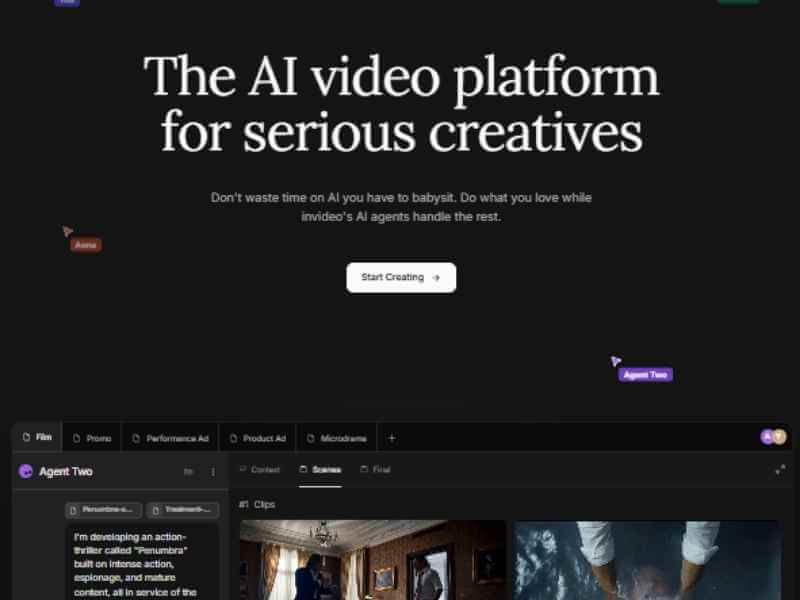
Where CapCut's AI tools generate raw video and image drafts you then assemble, InVideo AI takes a genuinely different approach, handling script, visuals, voiceover, and subtitles together in a single pass. Type a topic and it writes a script, pulls matching visuals from a library of more than 16 million assets, generates voiceover in more than 30 voices or a cloned version of your own, and adds subtitles automatically. For social teams specifically needing a genuinely fast path from concept to a publish ready video without assembling each piece separately, this end to end approach is a real structural advantage over tools that only handle one part of the pipeline.
The Magic Command feature specifically lets you refine that generated video through plain language instructions, change the footage in scene two, make the voiceover more energetic, rather than manually adjusting a timeline, genuinely lowering the skill floor for producing something polished. Start building content with InVideo AI directly through this link.
Voiceover quality genuinely matters more for social content than many teams initially expect, a slightly robotic sounding AI voice can undermine an otherwise strong video, particularly for content leaning on narration to carry the message rather than dialogue or on screen text. ElevenLabs has become close to an industry standard specifically because its voice output genuinely doesn't sound robotic the way many competing tools still do. Beyond a genuinely wide selection of ready made voices, Instant Voice Cloning builds a usable custom voice from as little as 30 seconds of sample audio, letting brands and creators establish a consistent, recognizable voice across their entire content output rather than relying on a generic, shared AI voice indistinguishable from countless other creators using the same tool.
For social teams specifically producing high volumes of short form content, having a consistent voice identity genuinely reinforces brand recognition the same way a consistent visual style does. Build your content's voice through ElevenLabs.
Where CapCut and InVideo AI each work from their own specific model, OpenArt AI takes a genuinely different approach, bundling access to more than 100 premium image and video models, Stable Diffusion XL, Flux, Sora 2, Kling 2.6 among them, under one shared credit pool. This breadth genuinely matters for social teams needing a specific visual style a single model doesn't cover well, rather than being locked into one platform's particular aesthetic, you can match a specific model's strength to a specific campaign's needs.
OpenArt's Character Builder feature deserves particular mention for social content specifically, holding a face or brand mascot consistent across dozens of separate generations, genuinely valuable for a recurring content series or branded character appearing across a whole campaign. Explore OpenArt AI's free tier directly through this link.
For a genuinely practical look at how these tools fit together in a real production pipeline, watch How To Start A Faceless YouTube Channel That Makes Money In 2026. While framed around YouTube specifically, the actual tool combination, AI video generation, voiceover, and music working together, applies directly to building a genuinely efficient social content pipeline across any platform.
A genuinely common mistake among teams moving fast on AI generated content specifically is pairing that content with music pulled from generic, unverified sources, then facing a Content ID claim or demonetization once the content starts performing well. Artlist and Epidemic Sound both solve this through subscription based, genuinely unlimited use licensing, every track cleared for monetized use across every platform without per track licensing headaches, worth pairing with any of the AI video tools covered in this guide specifically since none of them include cleared, commercial safe music as part of their own output.
Solo creators and small businesses genuinely get the most value from CapCut specifically, its all in one approach, editing, AI generation, and templates together, matches a workflow where one person is handling every part of production without dedicated specialists for each format. Marketing teams juggling several simultaneous campaigns benefit more from InVideo AI's end to end pipeline specifically, since script to finished video in one pass genuinely speeds up producing content at volume across multiple concepts simultaneously.
Brands and creators building a genuinely distinctive visual or vocal identity, a recognizable character, a consistent narrator voice, benefit specifically from pairing OpenArt AI's Character Builder with ElevenLabs' voice cloning, together building a genuinely consistent identity across every piece of content regardless of which specific AI model generated the underlying visuals. Teams already deep in a specific platform's tools, already using CapCut for editing, for instance, generally get more value from that platform's own native AI tools first, Seedance 2.0 and GPT Image 2 specifically, before adding an entirely separate tool with its own learning curve and subscription.
Since every tool covered in this guide produces AI generated or AI assisted content, understanding current platform disclosure requirements matters regardless of which specific tool you choose. YouTube's 2026 policy requires disclosure specifically for content that could reasonably be mistaken for genuine, unaltered footage or a real person's likeness, using the altered or synthetic content toggle in YouTube Studio. This doesn't penalize AI voiceover or AI assisted visuals themselves, the policy specifically targets realistic, potentially misleading depictions rather than the underlying use of AI tools. Other platforms are increasingly adopting similar disclosure expectations, worth checking each specific platform's current policy rather than assuming a single blanket approach covers your content everywhere it's published.
Every tool covered in this guide, including the recently recognized CapCut tools specifically, is genuinely built to produce a fast first draft rather than a finished, publish ready final asset. Consumer365's own review explicitly frames this correctly, these tools reduce the friction before production begins, they don't replace strategy, editing, brand review, or creative judgment. Publishing raw, unreviewed AI output directly, without genuine human refinement, editing, and brand alignment, is a genuinely common mistake that both undermines actual content quality and risks running into the low effort AI content policies several platforms have begun actively enforcing.
Treating every tool in this guide as a genuinely fast starting point, not a finished product, and building real review and refinement into your workflow regardless of how quickly the initial draft comes together, is what actually separates content that performs well from content that gets flagged or simply doesn't land with a real audience.
It's genuinely worth understanding a distinction that gets blurred across most coverage of this space, including the recent Consumer365 recognition itself. Generation tools, Seedance 2.0, GPT Image 2, OpenArt AI's model library, create new visual or video content from a text prompt, giving you raw material that didn't exist before you typed your request. Assembly tools, CapCut's core editing suite, InVideo AI's template driven pipeline, take existing material, whether generated by AI or captured on camera, and arrange it into a finished, polished piece with transitions, text, and pacing applied.
The strongest 2026 workflows genuinely combine both categories rather than relying on either alone. Generation tools solve the blank page problem, giving you something concrete to react to rather than staring at an empty timeline, but the actual craft of pacing, timing, and emotional build that makes content genuinely engaging still comes from the assembly and editing stage afterward. Recognizing which category a specific tool falls into, and which part of your own workflow is actually the bottleneck, generation or assembly, helps you invest in the right tool rather than assuming any single AI tool covers the entire creative process end to end.
Beyond individual tool capability, it's worth thinking through how a genuinely sustainable weekly content calendar actually uses this combination of tools in practice. A realistic workflow for a small team or solo creator specifically might start each week by using InVideo AI or CapCut's Seedance 2.0 to generate several rough video concepts based on that week's planned topics, giving you multiple starting drafts to choose from rather than committing fully to one direction before seeing how it actually looks in motion. From there, the strongest draft gets refined through manual editing, adding your own footage, brand elements, and pacing adjustments the AI generation step alone wouldn't have gotten exactly right.
Image needs specifically, thumbnails, cover graphics, supporting visuals for a carousel post, are generally faster to batch separately using GPT Image 2 or OpenArt AI once your core video content for the week is locked, rather than generating images reactively throughout the week as individual needs come up. This kind of batched, planned approach genuinely produces more consistent output than generating content reactively piece by piece, and it's a considerably more sustainable pace than treating every single post as its own separate, from scratch production cycle.
Since building out a genuinely complete toolkit, video generation, image generation, voiceover, and music, means potentially several separate subscriptions running simultaneously, it's worth thinking through the actual combined cost honestly rather than adding tools one at a time without a running total in mind. CapCut's free tier genuinely covers a considerable amount before any paid upgrade is needed, 1080p export with no watermark, making it a reasonable default to build around before adding additional paid tools specifically for gaps CapCut itself doesn't cover, voiceover quality and cloning specifically, where ElevenLabs' more specialized focus genuinely outperforms a general purpose tool's built in voice options.
For teams with a genuinely tight budget specifically, prioritizing spend on whichever single tool addresses your biggest actual bottleneck, rather than spreading a limited budget thin across several tools at their lowest tier each, tends to produce better results. A team whose main constraint is video production volume specifically gets more value from fully committing to InVideo AI's paid tier than splitting that same budget across several tools at a free or minimum paid level where none of them are genuinely solving the core problem completely.
Since a genuinely complete 2026 social content workflow likely involves several different AI tools working together, maintaining a consistent brand identity across all of them specifically requires deliberate effort rather than happening automatically. Establishing a clear, written brand guide, specific colors, tone, voice characteristics, before generating content across multiple tools gives you a genuine reference point to prompt consistently against, rather than each tool's default output drifting toward its own generic style over time.
For voice specifically, using ElevenLabs' cloning feature to establish one consistent narrator voice, then using that exact same voice across content generated through InVideo AI or paired with CapCut's video drafts, genuinely ties otherwise visually varied content together through a consistent audio identity. Similarly, if you've built a consistent character or mascot through OpenArt AI's Character Builder, reusing that same visual reference consistently across GPT Image 2 generated graphics and any video content featuring that character maintains recognition even when the underlying generation tool differs from piece to piece.
Given how quickly this specific category of tool continues evolving, genuinely testing each tool's free tier or trial on your own real content, rather than committing to a paid subscription based purely on a review or comparison guide like this one, remains the most reliable way to confirm actual fit. CapCut's free tier, InVideo AI's watermarked trial, ElevenLabs' free credits, and OpenArt AI's one time trial credits all offer genuine, if limited, ways to test real output quality on your specific content style before paying anything.
Running the same core concept through two or three different tools during their respective free trials specifically, rather than testing each on a completely different piece of content, gives you a genuinely more direct, comparable sense of which tool's actual output quality and workflow feel best suits your specific needs, considerably more useful than comparing marketing claims or feature lists alone.
A frequent mistake involves subscribing to several overlapping AI tools before genuinely understanding which specific part of your workflow each one actually improves, resulting in redundant subscriptions covering the same basic need. Starting with one tool matched to your single biggest current bottleneck, video drafts, image generation, voiceover, specifically, then adding others only once that first tool is genuinely part of your regular workflow, avoids this considerably common, costly overlap. Another common issue involves treating AI generated output as finished content ready to publish directly, skipping the genuine review and refinement step that separates a fast draft from something actually worth an audience's attention.
Ignoring music licensing specifically when pairing AI generated video with audio is a final, genuinely common and entirely avoidable mistake, since none of the video or image generation tools covered in this guide include cleared, commercial safe music as part of their own output.
It's a press release distributed through PR Newswire, and Consumer365 discloses it may earn affiliate commissions from tools it reviews, worth knowing as context alongside the genuine capability of the tools themselves.
InVideo AI, since it handles script, visuals, voiceover, and subtitles together in a single pass rather than requiring you to assemble each piece separately.
Not necessarily, CapCut's Seedance 2.0 and GPT Image 2 cover both formats within one platform specifically, genuinely reducing the need for separate subscriptions.
Yes, provided you follow current platform disclosure requirements and pair any AI generated video with properly licensed music rather than unverified sources.
No, every tool covered in this guide is built to produce a fast first draft, genuine human review and refinement before publishing is what separates content that performs from content that gets flagged as low effort.
The recent recognition of CapCut's Seedance 2.0 and GPT Image 2 genuinely reflects a real shift in how social teams are building their 2026 content workflows, favoring platforms that cover both video and image generation together over juggling separate, single purpose tools. Building a genuinely effective AI powered social media toolkit comes down to matching specific tools to your actual bottlenecks, CapCut for all in one production, InVideo AI for the fastest full pipeline, ElevenLabs for genuinely natural voice, OpenArt AI for model variety, and properly licensed music from Artlist tying it all together safely, rather than assuming any single tool alone covers everything a genuinely complete social content workflow actually needs. Testing each tool's free tier on your own real content, treating every output as a first draft rather than a finished post, and keeping brand consistency deliberate across whichever combination you settle on remain the habits that separate a genuinely sustainable AI powered workflow from one that produces a lot of content nobody actually engages with.
Affiliate Disclosure: This post may contain affiliate links. If you make a purchase through one of these links, FreeVisuals may earn a commission at no extra cost to you. We only recommend products and platforms we genuinely believe in. Read our full disclosure policy.

.avif)
.avif)
.avif)
.avif)





