.avif)
Freevisuals
The YouTube cooking channel space rewards creators who look professional from the first frame. Viewers decide within the first few seconds whether a recipe video is worth watching, and that decision is almost entirely visual before a single word has been spoken or a single ingredient has appeared on screen. Clean typography that labels each ingredient and step clearly, warm colour grading that makes food look genuinely appetising, smooth transitions between shots, and music that holds attention without pulling focus from the content — these are what separate a cooking channel that grows from one that stays small.
This bundle is built around the Crafted Cooking Toolkit template from Artlist, compatible with Premiere Pro, After Effects, Final Cut Pro, and DaVinci Resolve with no plugins required, and pairs it with free and premium FreeVisuals assets to give your YouTube cooking channel a complete, consistent visual identity. Every asset in the bundle is selected specifically for cooking channel content — nothing generic, nothing that needs adapting to fit the format.
Watch the video below to see the Crafted Cooking Toolkit in action before reading through the full bundle:
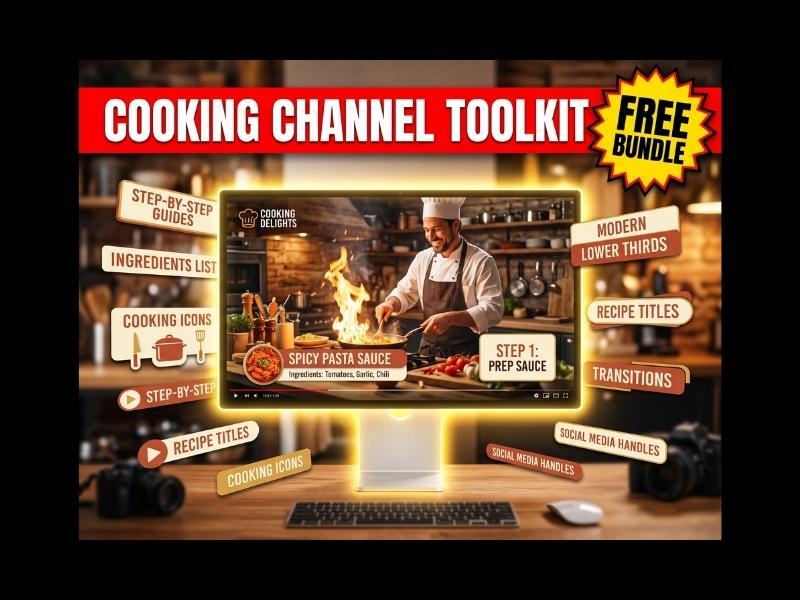
The Crafted Cooking Toolkit is the centrepiece of this bundle. It contains 12 handcrafted motion graphic elements built specifically for YouTube cooking channel content, covering the full range of visual elements a food creator needs to produce a professional-looking episode from opening to closing frame. Compatible with Adobe After Effects 2020, Adobe Premiere Pro 2022, Final Cut Pro X 10.6, and DaVinci Resolve 18. Available in 4K. No plugins required.
The 12 elements are designed to work as a visual system rather than as isolated individual graphics. The typography style, colour palette, and motion timing are consistent across all elements, so an episode built using multiple elements from the toolkit has a unified look throughout. For YouTube cooking channels specifically this matters because channel identity is built on visual consistency — a recipe channel that looks like the same show every episode builds subscriber loyalty in a way that one which varies wildly in presentation never will.
The element types cover the standard structure of a YouTube cooking episode: an opening show title, step-by-step guides, ingredient lower thirds that label what is being added and in what quantity, modern lower thirds for presenter introductions, recipe titles for the dish being prepared, cooking icons for visual interest between steps, transitions between sequences, and social media handles for the closing frame. A complete professional episode can be built using only these 12 elements alongside your own footage with no additional motion graphics work required.
The toolkit is available through Artlist with an Artlist Max subscription, which also gives you access to Artlist's full library of music, sound effects, stock footage, and AI tools. Get 2 months free on any Artlist plan through the FreeVisuals referral link below.
Get the Crafted Cooking Toolkit on Artlist
Colour grading food content for YouTube has one primary goal that differs from almost every other content category: the food needs to look genuinely appetising. Cold desaturated grades that work beautifully for cinematic and moody content will make food look unappetising. Blue-shifted highlights fashionable in travel content will drain warmth from food that should look like it just came out of the oven. Food grading for YouTube is about warmth, saturation in the orange and yellow range, clean whites that suggest freshness and cleanliness, and deep enough shadows to give the food dimension without making it look dark or heavy on a small phone screen.
The two LUTs in this bundle are specifically suited to YouTube food content for different reasons.
Tis is the primary grade for this bundle and the one that does the most work for YouTube cooking content. The Coffee Shop and Cafe Vibes LUT is built around warm muted tones, soft contrast, and the ambient light quality that makes food shot indoors look natural and inviting. The warm base tone is particularly effective on bread, pastry, pasta, and anything with golden or brown tones, which respond to this grade by appearing richer and more textured. Apply at 80-90% intensity as your base grade across all food footage and close-up shots. This is the grade that makes the difference between footage that looks like it was shot casually and footage that looks like it belongs on a professional cooking channel.
Download free: Free LUTs Coffee Shop and Cafe Vibes
.png)
This 22-pack includes grades beyond the warm lifestyle range that are useful for specific shot types within a YouTube cooking episode. The Sunrise grade within the pack works particularly well on hero shots of finished dishes where you want maximum warmth and richness for your thumbnail and end-of-video reveal. The neutral grades are useful for wide kitchen shots where a very warm grade across the full room would look artificial. Apply the Sunrise grade at 50-60% intensity on your finished dish hero shot, blended over the Coffee Shop base grade. For a wider range of professional food grades built specifically for commercial culinary content, the Artlist LUT library is worth exploring as part of your Artlist Max subscription.
Download free: 22 Free Mega Cinematic LUT Pack
YouTube cooking channels that look genuinely cinematic use overlay layers to add the natural atmospheric qualities of a real kitchen environment even in footage that was shot in a clean, well-lit space. Steam rising from a pan, the warm haze of a hot kitchen, the ambient glow of cooking surfaces — these qualities exist in real cooking environments but are rarely captured well by a single camera angle. The three overlays in this bundle address this specifically for YouTube cooking content.
The primary overlay for this bundle. Pink ember particles on a Screen blending mode at 20-25% opacity create a subtle warmth and organic movement in the frame that reads as the natural heat quality of a working kitchen. Apply across your full timeline so the ember quality is present throughout the episode rather than appearing only at specific moments. This overlay works particularly well over the Crafted Cooking Toolkit ingredient lower thirds, where the warm particle movement makes the static graphic elements feel like they are sitting inside the footage rather than placed on top of it. The visual result is that your YouTube cooking channel graphics look integrated with your footage rather than templated.
Download free: Free Pink Fire Embers Overlay
Steam and smoke are natural parts of the cooking process and two of the most visually interesting elements in food video. The Smoky Swirling overlay gives you that quality in a consistent, controllable form that you can apply regardless of whether your footage actually captured visible steam. Apply on a Screen blending mode at 15-20% opacity over close-up shots of hot food, pans on heat, and dishes fresh from the oven. Over wider kitchen shots reduce to 8-10% opacity. For YouTube cooking channels that want to look like a proper food production rather than a home video, this overlay is one of the most effective tools in the bundle for closing that gap.
Download free: Smoky Swirling Overlays for Edits
A more diffuse atmospheric overlay than the Smoky Swirling pack, this one creates a general ambient haze suited for transition frames and opening shots where you want to establish a warm kitchen atmosphere before cutting to the recipe. Apply at 10-15% opacity on Screen for an almost invisible effect that simply adds depth to the frame. This overlay pairs particularly well with the opening title element of the Crafted Cooking Toolkit, softening the entry of the title card so it appears through a warm haze rather than appearing on a hard cut. On YouTube, the opening five seconds of your video are critical for retention — an atmospheric entry that builds into your title card performs better than an abrupt cold open.
Download free: Smoke and Fog Overlay
Most YouTube cooking creators do not have enough of their own footage to fill a complete episode without gaps between recipe steps, establishing shots, and B-roll cutaways. Stock footage in this bundle was selected because each clip has the visual qualities that the cooking toolkit and warm colour grade are built to complement. All three clips look like they belong in the same production world as the Crafted Cooking Toolkit graphics when the Coffee Shop LUT is applied at matching intensity.
Premium stock footage of fresh croissants in a basket, shot in warm natural light with close-up framing and shallow depth of field. The warm golden tones of fresh pastry respond particularly well to the Coffee Shop LUT, making this clip look like it was shot in the same session as your own footage even when it was not. Use as an establishing shot at the opening of a baking episode, as a hero shot before the recipe title card appears, or as a closing frame after the finished dish reveal. On YouTube, the thumbnail is often a close-up of the finished dish — this kind of footage gives you a strong thumbnail candidate that looks professionally produced regardless of your own camera setup.
Get premium: Fresh Croissants Basket Food Video
.jpg)
Professional restaurant kitchen footage showing chefs and kitchen staff preparing and garnishing dishes. This is the type of B-roll that immediately signals production quality to a YouTube viewer — the combination of chef whites, professional surfaces, and deliberate skilled food preparation raises the perceived production value of any cooking content it appears in. For recipe channels and culinary brand videos where credibility and expertise are part of the message, this footage bridges the gap between a home kitchen shoot and professional production quality. Apply the Coffee Shop LUT at 70% intensity and the Smoky Swirling overlay at 12% before cutting this footage into your timeline. For a wider library of professional culinary stock footage, Artlist's stock footage library covers professional kitchen and food content under Artlist Max.
Get premium: Cooking Food For Restaurant Video
High-contrast nighttime food market footage with warm artificial lighting, crowd movement, and the energy of real-world food preparation. This clip is particularly valuable for YouTube content about street food, international cuisine, or any cooking channel that wants to connect its recipes to a broader food culture rather than presenting cooking purely as a domestic activity. The warm artificial lighting responds well to the Coffee Shop LUT, and the ambient movement in the background provides natural depth that the overlays complement at low opacity.
Download free: Asian Street Food Vendor Lady at Night Market
Your YouTube thumbnail is the single most important factor in whether someone clicks on your cooking video. For food content, the thumbnail image needs to make the dish look as good as possible at a small size on a phone screen — which means high contrast, warm tones, and a clear subject with no visual clutter. The three food stock images below are free to download, all genuinely food-focused, and each one is strong enough to serve as a thumbnail background or title card image after applying the Coffee Shop LUT at 60% intensity.
A bright naturally lit food photography shot of a fresh garden salad in a rustic kitchen setting. The natural light, wooden surfaces, and fresh greens respond well to the Coffee Shop LUT by warming the ambient light while keeping the greens vibrant rather than yellowed. Use as a YouTube thumbnail background for salad, vegetarian, or healthy eating content, or as a title card image behind the opening title element of the Crafted Cooking Toolkit. The rustic kitchen setting gives the image a homemade authenticity that consistently performs well for recipe channel thumbnails where the audience wants to feel the content is achievable in their own kitchen.
Download free: Fresh Garden Salad in Rustic Kitchen Ambiance
A high-contrast close-up of a stacked gourmet burger with strong natural light creating depth and texture in the subject. Burger content performs consistently well as a YouTube thumbnail subject because the format is visually interesting at small sizes, universally recognisable, and implies the kind of indulgent content that drives click-through rates on food channels. Apply the Coffee Shop LUT at 70% intensity and add a subtle film grain texture on Screen blending mode at 15% opacity for a finish that matches the visual quality of this bundle's other assets. Use as a thumbnail for burger, sandwich, or street food content, or as a B-roll insert within the episode before a recipe step lower third appears.
Download free: Gourmet Burger Stack Free Stock Image
A bright vibrant pasta dish shot with fresh herbs and natural ingredients. Pasta is one of the most consistently performed content niches in food YouTube, and a well-shot pasta image makes an immediately compelling thumbnail even at small sizes on mobile. The warm tones of the pasta and the fresh green of the basil create a natural complementary contrast that the Coffee Shop LUT enhances by deepening the warmth without washing out the greens. Use as a YouTube thumbnail for pasta, Italian cuisine, or any recipe content, or as a title card background behind the Crafted Cooking Toolkit opening title element. Pair with the bold recipe title typography from the toolkit for a thumbnail that looks like it belongs on a professional cooking channel rather than a personal YouTube account.
Download free: Basil Pasta Primavera Free Stock Image
Music selection for YouTube cooking channels requires more thought than most creators give it. YouTube's extended cooking sequences — the preparation sections, the cooking action, the plating — are often 60 to 90 seconds of footage where the presenter is not speaking and the music is carrying the viewer's attention entirely on its own. A track that is too busy or has too prominent a hook will distract from the recipe. A track that is too minimal will make the video feel underproduced. Both result in viewers dropping off before the recipe is complete, which hurts your watch time metrics and your channel's algorithmic performance.
A warm relaxed acoustic track with a gentle rhythm and clean instrumentation that sits comfortably underneath cooking footage without competing with it. The tempo is slow enough to feel unhurried and natural but consistent enough to maintain forward momentum through the recipe steps. This track is particularly effective during preparation sequences — chopping, measuring, mixing — where the gentle rhythm provides a sense of productive calm that matches the on-screen activity. The acoustic instrumentation also supports the homemade and artisanal quality that most recipe channels want to communicate to their YouTube audience. Apply at 70-80% of your master volume to leave room for ambient kitchen sounds in your footage.
Download free: Free Afternoon Coffee Free Music
An upbeat, clean instrumental track suited to cooking content that wants a slightly more energetic and contemporary feel than the Afternoon Coffee track provides. This works particularly well for YouTube Shorts cooking content, recipe compilation videos, and any episode where the pace of editing is faster than a traditional step-by-step tutorial. The positive, forward-moving quality of the track suits content about quick meals, easy recipes, and cooking-for-beginners content where the message is that cooking is accessible and enjoyable rather than laborious or complex.
Download free: Corporate Motivational Advertising Free Music
A laid-back rock-pop track with a smooth groove and mellow instrumentation. Where the free tracks work for traditional recipe content and quick tutorials, Play It Cool suits cooking content with a more contemporary personality — food creator channels, restaurant review videos, street food content, and any cooking channel where the presenter's character is as important as the recipe itself. The track has enough character to carry the edit during static cooking sequences but not so much that it overwhelms the recipe steps when the presenter is speaking. For unlimited access to Artlist's full music library covering acoustic, upbeat, corporate, and ambient tracks for YouTube cooking content, get 2 months free via the FreeVisuals link: Get 2 Months Free on Artlist.
Get premium: Play It Cool Premium Music Track
.jpg)
Sound effects in YouTube cooking content are not about adding drama or impact. They are about making the editing feel intentional. The Crafted Cooking Toolkit provides the visual structure of your episode — sound design makes that structure audible. When a recipe step lower third appears, a subtle audio indicator tells the viewer a new section is starting without them having to consciously register the graphic. When the finished dish is revealed, a single well-placed sound effect punctuates the moment and gives it the weight it deserves.
A clean light swoosh for transitions between recipe steps where you want a subtle audio cue without the weight of a full impact sound. In YouTube cooking content structured around numbered recipe steps, a consistent light swoosh at each step transition creates an audio rhythm that helps the viewer follow the recipe structure without consciously registering the sound design. Place the swoosh timed to the entry of each Crafted Cooking Toolkit step number or ingredient lower third. Keep the volume at 40-50% of your master volume so it reads as part of the edit's texture. For a professional SFX library covering kitchen ambience and culinary-specific audio, Artlist's SFX library includes dedicated food and cooking sound categories.
Download free: Swoosh Transition Movement Sound Effect
A deep clean impact for your most significant cut in the episode. In YouTube cooking content, the moment that earns this treatment is the finished dish reveal — the cut from cooking action to the completed plate. Use this impact on that single cut and nothing else. Placing a heavy impact on every cut loses the emphasis quality entirely. Reserve it for the one moment where you want the viewer to stop and register what they are looking at, which on a cooking channel is almost always the moment the finished food appears on screen for the first time.
Get premium: Impact Premium Sound Effect
Here is the complete workflow for building a YouTube cooking episode using every asset in this bundle. This assumes you have your own footage of the recipe being prepared and the finished dish, and that you are editing in Premiere Pro, After Effects, Final Cut Pro, or DaVinci Resolve.
Step 1: Colour grade all footage. Apply the Free LUTs Coffee Shop and Cafe Vibes across all clips at 80% intensity. Make shot-specific adjustments so close-up food shots are warmer than wide kitchen shots. Apply the 22 Free Mega Cinematic LUT Pack Sunrise grade at 50% intensity on your hero dish reveal shot, blended over the Coffee Shop base.
Step 2: Add overlay layers. Place the Smoky Swirling overlay on a Screen blending mode track at 15% opacity across the full timeline. Add the Pink Fire Embers overlay on a second Screen track at 20% opacity across the full timeline. For your opening shot only, add the Smoke and Fog overlay at 10% opacity on Screen to create a warm atmospheric entry into the episode.
Step 3: Build the episode structure with the Crafted Cooking Toolkit. Download the toolkit from Artlist and place each of the 12 elements at the appropriate point in your timeline. Opening title at the start. Ingredient lower thirds at each new ingredient introduction. Step numbers at the beginning of each recipe step. Cooking icons between steps for visual variety. Social media handles and channel branding on the closing frame.
Step 4: Cut in stock footage. Place the Fresh Croissants footage as your opening establishing shot before the title card. Cut the Asian Street Food footage into any section where you need a B-roll cutaway and your own footage has a gap. Use the Cooking Food for Restaurant footage at any point where you want to raise the perceived production quality. Apply the Coffee Shop LUT at matching intensity to all stock footage so it sits visually consistent with your own material.
Step 5: Add music. Place either the Free Afternoon Coffee track or the Play It Cool track under your full timeline. Fade in at the opening, bring down slightly under any sections where you are speaking directly to camera, and return to full volume during cooking action sequences. End with a clean fade out over your closing frame and social media handles element.
Step 6: Sound design the cuts. Place the Swoosh Transition sound effect at each recipe step lower third entry point. Place the Impact Premium sound effect on the finished dish reveal cut only. Keep all sound effect volumes well below your music and ambient audio levels so they function as texture rather than foreground events.
Hero Template
Colour Grade (LUTs)
Overlays
Stock Footage
Stock Images
Music
Sound Effects
The Crafted Cooking Toolkit is compatible with Adobe After Effects 2020 and later, Adobe Premiere Pro 2022 and later, Final Cut Pro X 10.6, and DaVinci Resolve 18. It is available in 4K and requires no plugins. A video tutorial is included with the template download.
Yes. The template is available through Artlist and requires an active subscription to download. The Artlist Max plan gives you access to the template alongside Artlist's full library of music, sound effects, stock footage, and AI tools. Get 2 months free via the FreeVisuals link: Get 2 Months Free on Artlist.
All three overlay assets in this bundle use Screen blending mode. Apply each overlay on a video track above your footage, set the blend mode to Screen, and adjust opacity to the levels recommended above. Smoky Swirling at 15%, Pink Fire Embers at 20-25%, Smoke and Fog at 10-15%.
Yes. All free assets from FreeVisuals are cleared for personal and commercial use including client work, monetised YouTube videos, social media advertising, and brand content. The Crafted Cooking Toolkit and premium music tracks from Artlist are covered by the Artlist commercial licence. Check Artlist's licence terms for broadcast use conditions.
The toolkit contains 12 handcrafted motion graphic elements covering the full visual structure of a YouTube cooking episode. All 12 elements share a consistent visual style so they work together as a unified design system throughout the episode.
The Crafted Cooking Toolkit and the warm colour grade in this bundle suit recipe tutorial channels, culinary lifestyle vlogs, restaurant review content, food brand videos, and any cooking content where a professional but approachable visual quality is the goal. For additional free templates and assets for your cooking channel, browse our free DaVinci Resolve templates and free Premiere Pro templates collections.
Yes. All 12 elements in the Crafted Cooking Toolkit are fully customisable inside your editing software. You can change the colour palette to match your channel's brand colours, swap the fonts, and adjust timing to suit your specific episode pacing. The toolkit provides the structure and motion design — you bring the branding.
Get the Crafted Cooking Toolkit for Your YouTube Channel
Start with the free FreeVisuals assets and get the Crafted Cooking Toolkit template plus unlimited Artlist music, footage, and tools with 2 months free on any Artlist plan.
Get the Crafted Cooking Toolkit on Artlist
.avif)
.avif)
.avif)
.avif)





