.avif)
Freevisuals

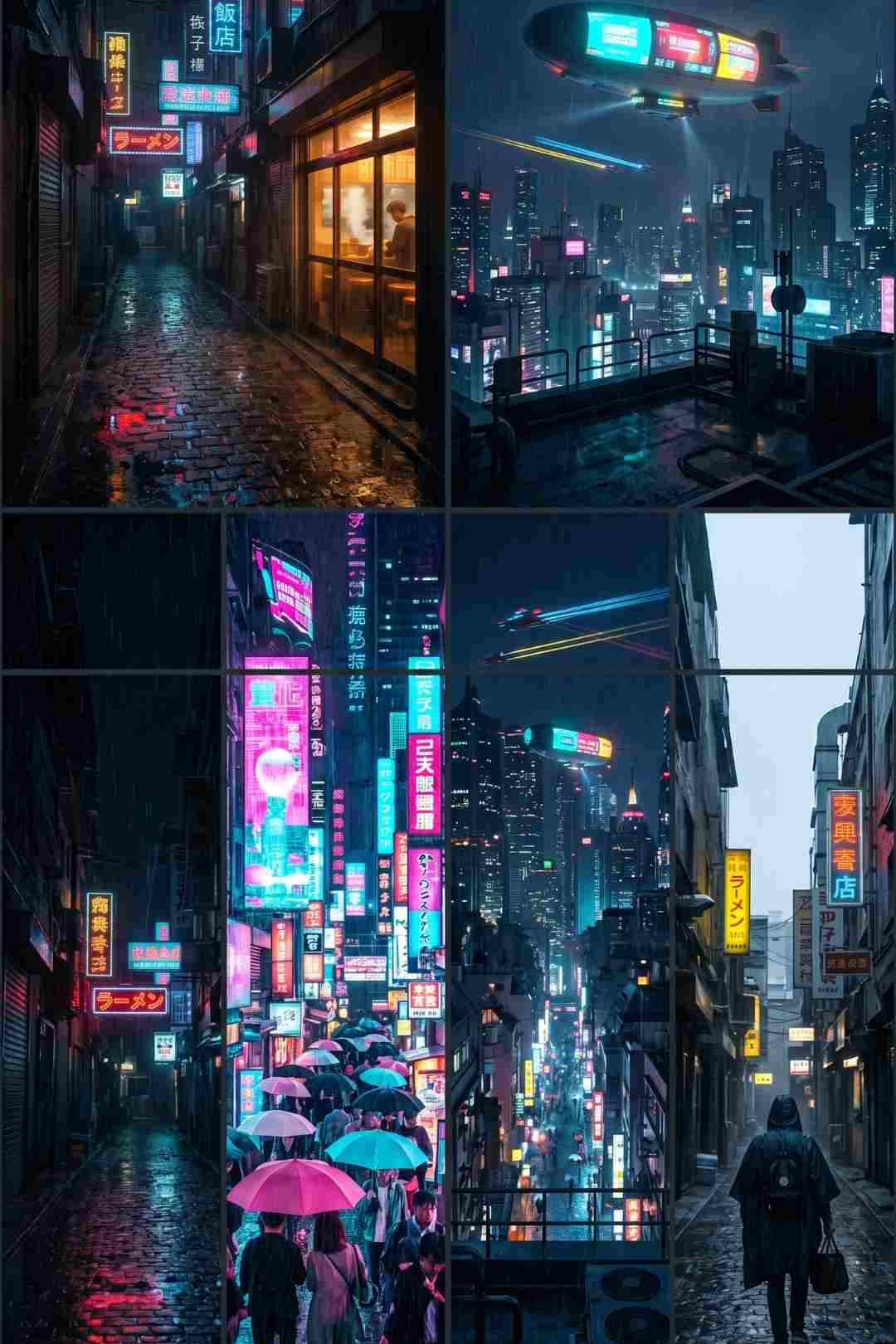
Free AI cyberpunk city rain video prompt pack. 8 image and video prompts for a 69-second neon city sequence. Works with Midjourney v7, Kling AI and OpenArt
Download FREEGo Pro To DownloadDownload NOW!Cyberpunk visuals are everywhere in 2026. Gaming channels use them for montages. Synthwave and lofi music channels use them as ambient loops. Sci-fi short film creators use them for narrative content. Tech aesthetic channels build their entire visual identity around neon-soaked rain-drenched streets. The problem is that real cyberpunk footage does not exist. Tokyo in the rain at night is the closest thing to it but you still cannot film flying vehicles, glowing advertising blimps, or holographic displays cycling across building faces.
AI generation is the only tool that can produce genuine cyberpunk footage, and the neon-lit, rain-covered, wet-surface aesthetic is one of the areas where current generation models are strongest. The combination of reflective surfaces, atmospheric rain, neon colour separation, and deep shadows plays directly to what models like Midjourney v7 and Kling AI do best.
This free download gives you 8 image prompts and 8 matching video prompts to generate a complete 69-second cinematic cyberpunk city sequence. A rain-soaked back alley. A crowded neon commercial district. A rooftop view over a megacity. A chase through neon alleys. A neon reflection in a rain puddle. A warm noodle bar interior. Fog rolling through neon streets. And the pale dawn breaking over the city as the night ends. Every shot in the sequence is designed to produce the best possible output from the tools you are already using.
Download the full Cyberpunk City Rain AI Video Prompt Pack free from Freevisuals here
Most visual aesthetics serve one or two YouTube content categories. Nature footage works for ambient channels and travel vlogs. Historical ruins work for history and documentary channels. Cozy interior scenes work for lo-fi and study channels.
Cyberpunk is different. One of the most explosive trends of 2026 is the viral faceless music channel, and cyberpunk visuals are the most frequently requested aesthetic for that format. Gaming channels covering titles in the genre use cyberpunk footage for thumbnails, intros, and b-roll. Synthwave, darksynth, and electronic music channels use it as background loop content. Sci-fi short film creators building narrative AI video content need exactly this visual vocabulary. Tech review channels building an aesthetic brand identity use neon-lit cityscapes as their signature visual. And the ambient loop market, already served by the Cozy Bookshop pack in this series, has a dark urban cyberpunk audience that is completely separate from the cozy warm interior audience.
A single pack with eight well-constructed cyberpunk city prompts serves all of these simultaneously.
The ancient civilisations pack used a fictional site to make the footage broadly usable across different historical content. The same principle applies here. The megacity in this pack is not Tokyo, not Hong Kong, not any real city. It draws on the visual vocabulary of all of them - the narrow rain-soaked alleys of east Asian night markets, the neon density of Kowloon, the elevated expressways and vending machines of Shibuya at 2am - without depicting any of them specifically.
This matters because real-city footage creates specific geographic associations that limit where you can use it. A clearly-Tokyo cyberpunk sequence works for Japan content. A fictional megacity sequence works for any sci-fi narrative, any gaming content, any electronic music video, any tech aesthetic channel regardless of geographic association.
The prompts in this pack specify a near-future megacity aesthetic rather than any specific real location. This is intentional.
Midjourney v7 is the strongest image generation tool for this specific aesthetic. The combination of neon reflections in water, atmospheric depth of field, and the Blade Runner 2049 style cinematic photography that the prompts reference sit at the centre of Midjourney's training data strength. Add --ar 16:9 --v 7 --style raw --q 2 to every prompt and generate at least three variations of each shot before selecting.
OpenArt AI on the SDXL or Realistic Vision model is the recommended alternative. The cyberpunk aesthetic generates strongly on both models. Set Image Strength to 0.55 to 0.65 for variations. The similarity slider is lower here than in any previous pack because the shots in this sequence show different streets and environments while maintaining the visual style - the variation is deliberate and the AI needs room to develop different locations while staying in the same aesthetic world.
Magnific is essential for this pack. Neon sign text, wet cobblestone texture, rain-streaked glass surfaces, and the fine detail of water reflections are all areas where Magnific's enhancement pass transforms an image from AI-generated into something that could pass for a film still. The puddle reflection shot (Shot 05) in particular benefits more dramatically from Magnific than almost any image type in the entire Freevisuals series. Run every key shot through Magnific before animating.
For video animation, Kling AI handles rain motion and neon reflections particularly well and is the recommended primary tool for Shots 01, 02, 05, and 06. Google Veo 3 is the best choice for Shot 03 (rooftop citywide view) and Shot 08 (dawn breaking) where the quality ceiling matters most. Runway Gen-4 at motion intensity 4 to 5 out of 10 is the best option for Shot 07 (fog rolling through streets) where the atmospheric movement needs precise control.
For a comprehensive comparison of AI video generators including Kling 2.6, Veo 3.1, and Midjourney tested against identical prompts - directly relevant to choosing the right tool for each shot in this pack: Best AI Video Generator in 2026? Veo 3.1, Kling 2.6, Grok, Midjourney.
For a deep practical guide to Kling AI's capabilities for cinematic video generation including the specific settings that produce the best motion quality for atmospheric and rain scenes: Finally Kling Achieved the Impossible: Ultimate Prompt Guide.
The anchor image and the emotional foundation of the sequence. A narrow alley at 2am, neon signs in red and blue, a warm amber ramen shop window, rain falling steadily, puddles on uneven ground reflecting every light source above. This shot establishes the full palette of the sequence: the contrast between warm amber practical light sources and cold blue-pink neon, the wet reflective surfaces, and the deep shadows between the neon pools.
The detail that makes this shot distinctive is the hanging lanterns dripping with rain. That specific element connects the cyberpunk futureworld to the human history underneath it and gives the alley a sense of layered time that purely futuristic elements alone cannot achieve.
Generate this image at the highest resolution available and run it through Magnific before using it as the reference image for all variations. The neon sign detail, the rain-texture on the ground, and the light bloom around the ramen shop window all improve dramatically after a Magnific pass.
The density contrast. After the quiet back alley of Shot 01, the commercial district hits like a sensory overload. Towering buildings blazing with neon advertising, holographic display panels casting shifting coloured light, the street level busy with people moving through the rain. This is the shot that establishes the scale and intensity of the world the earlier alley exists within.
The key video prompt instruction for this shot is the cycling holographic advertising displays. This motion element is one of the things that immediately distinguishes generated cyberpunk footage from stock footage of real cities. A holographic display cycling through advertisements in shifting colours does not exist in real cities but is immediately read by any viewer as the defining visual shorthand of the genre.
The scale shot. The moment the viewer understands just how large and dense this world is. The city stretching to the horizon in all directions, flying vehicle light trails moving between skyscrapers, the advertising blimp floating at mid-city height, the atmospheric haze above the city softening the furthest buildings into pure light.
This is the shot where the 24fps cinematic frame rate matters most. A 30fps rooftop cityscape looks like documentary footage. A 24fps version with slight atmospheric diffusion looks like cinema. Use 24fps for this shot regardless of what you use for the rest of the sequence.
The kinetic break in the atmospheric sequence. A low dynamic camera angle, the wet ground rushing past, rain streaking horizontally in the motion, a silhouetted figure backlit by neon at the end of the alley. This shot is not designed for ambient loops. It is designed for gaming highlight reels, short film narrative sequences, and any content that needs a moment of physical urgency.
The transition from Shot 03 to Shot 04 uses a hard cut or very short dissolve rather than the standard cross-dissolve. That transition choice is the most important editorial decision in the sequence. The sudden jump from the vast slow rooftop view to the tight kinetic chase creates a dramatic gear shift that makes both shots more effective.
The most abstract and visually distinctive shot in the pack. The camera looks down at a large puddle and the entire image is the reflected neon city in the water surface, distorted continuously by rain drops hitting the edges and creating expanding ripple rings.
This shot is the most improved by Magnific enhancement of any in the series. The fine texture of the wet pavement edge around the puddle and the crisp reflections of neon in the water surface are precisely the kind of detail that the enhancement pass adds most convincingly. Generate five or more versions of this and select the one where the reflected neon colours are most vivid and separated.
The emotional pivot point of the sequence. After the overwhelming scale and energy of Shots 02 through 05, this shot brings the viewer inside, into warmth, into a human moment. A single figure eating alone at a counter, steam rising from the bowl, seen from outside through rain-streaked glass. The warm amber and red of the interior visible through the cold rain-covered window.
This shot deliberately echoes the cozy bookshop sequence from the earlier Freevisuals pack but in a cyberpunk register. The same warm-versus-cold exterior contrast, the same sense of a sanctuary in a harsh world. Viewers who respond strongly to cozy ambient content respond even more strongly to this shot because it satisfies both the cyberpunk visual appetite and the cozy emotional need simultaneously.
The transition shot. Low-lying fog at 3 to 4am rolling through the streets at knee-to-waist height, the neon signs reduced to soft coloured halos above the fog layer, the wet cobblestones barely visible beneath the mist. This is the most atmospheric shot in the sequence and the one that works best as a standalone ambient loop clip.
The key video prompt element for this shot is the fog rolling from one side to the other. Static fog looks like a render artefact. Moving fog looks like a real atmospheric phenomenon. Generate this with Runway Gen-4 at motion intensity 4 to 5 specifically for the fog movement quality.
The resolution. The pale grey-blue of dawn beginning to compete with the neon, the rain reduced to a light drizzle, the wet street reflecting both fading neon and pale sky simultaneously. A lone figure walks slowly through the frame and continues. The city coming down from the night.
The parallel between Shot 01 and Shot 08 is intentional: both are quiet moments in narrow streets, both have rain and wet reflections, both have the same camera perspective. But the emotional quality is completely different. Shot 01 is the city settling into a night of intensity. Shot 08 is the city exhausted after it. That arc, established entirely through atmosphere and light with no explicit narrative, is what makes this a story rather than a collection of pretty images.
The cyberpunk aesthetic has the most specific and demanding colour grade requirements of any sequence in the Freevisuals prompt series. Getting it right makes the footage look like Blade Runner 2049. Getting it wrong makes it look like an over-filtered Instagram photo.
The three defining qualities of the grade are crushed blacks, saturated neon, and the teal-orange split. Crush the blacks hard with no shadow lift. The deepest shadows should be pure black with no visible detail. This is the opposite of the documentary grade where you always want shadow detail. In cyberpunk, the absence of shadow detail is what creates the high-contrast neon-versus-darkness atmosphere. Push the neon colours to maximum saturation while simultaneously desaturating the mids and slightly pulling the mids toward teal. This creates the signature blue-teal shadow and warm highlight split that defines the aesthetic.
The Free Mega Cinematic LUT Pack on Freevisuals provides a base grade. Apply it at around 70 percent opacity and then manually push the teal-orange split using the colour wheels in DaVinci Resolve or the Lumetri controls in Premiere Pro. Increase the cyan and blue in the shadows, push the orange and amber in the highlights.
Shot 06 (Noodle Bar) is the one exception to this grade. For this shot specifically, pull the teal out of the shadows and increase the amber warmth to protect the cozy interior quality that makes the shot emotionally effective. The contrast between this shot's warm grade and every other shot's cold grade is part of what makes it stand out as the human moment in the sequence.
Synthwave, darksynth, and dark ambient electronic music are the natural accompaniments to this visual sequence. The distinction between the three matters: synthwave (retrowave influence, melodic, positive nostalgic) works for the commercial district and rooftop shots. Darksynth (heavier, more aggressive, industrial elements) works for the chase shot. Dark ambient electronic (atmospheric, textural, minimal melody) works for the fog and dawn shots.
If you are building the full 69-second sequence as a single video, use one track that transitions through all three of these registers over its duration. The lo-fi and jazz prompts from the earlier Freevisuals music pack do not suit this aesthetic. For this sequence specifically, generate from Suno or Udio using prompts specifying "dark synthwave, 90 BPM, minor key, synthesiser pads, gated reverb drums, no vocals, cyberpunk aesthetic."
For a professionally licensed synthwave and dark electronic track with clear commercial YouTube licensing, Artlist has a dedicated synthwave and retrowave category. Epidemic Sound has a strong dark electronic and cyber category with the per-channel YouTube registration covering all uploads retroactively.
For ambient channel creators, this sequence works as a looping video with a subset of the shots. Remove the commercial district (Shot 02) and the chase (Shot 04) from the sequence for the ambient version. The remaining six shots - back alley, rooftop, puddle reflection, noodle bar, fog streets, and dawn - form a perfectly atmospheric loop without the high-energy interruptions.
For the loop point, cross-fade from Shot 08 (Dawn Breaking) back to Shot 01 (Back Alley) over 4 seconds. The dawn exterior of Shot 08 and the rain alley of Shot 01 dissolve cleanly because both have the same wet-surface and atmospheric quality. Add a slight fade to black mid-dissolve if the direct cross-fade feels too abrupt.
InVideo handles the reformat to 9:16 for Shorts and Reels efficiently. CapCut is the faster option for TikTok with its dark aesthetic filter presets complementing the existing grade.
For voiceover narration over this sequence for a sci-fi or cyberpunk narrative, ElevenLabs produces the most convincing near-future narrator voice quality. The slight processed and intimate quality of the ElevenLabs voice styles suits the cyberpunk noir register well.
Several other packs in the Freevisuals series pair directly with this one.
The Sci-Fi Space Station Sound Effects Pack provides the UI clicks, holographic interface sounds, and futuristic mechanical effects that add an audio layer to the cyberpunk visual. The station ambient hum at -30dB underneath a synthwave track adds a subconscious futuristic texture.
The Outdoor Nature Documentary Sound Effects Pack contains heavy rain on surfaces (Prompt 08) that works perfectly as the ambient rain layer underneath the cyberpunk soundtrack.
The Free After Effects Glitch Transition Presets are ideal for the transition between Shot 03 and Shot 04 (rooftop to chase) where a glitch cut amplifies the kinetic gear shift.
The Free Smoke and Fog Overlay adds additional atmospheric depth to Shot 07 (fog streets) and Shot 08 (dawn) when composited over the generated footage in After Effects.
Filmora handles the full sequence editing and the LUT import cleanly, with its colour grading tools capable of achieving the teal-orange split the cyberpunk grade requires.
Shot 05, the neon reflection in the puddle, generates the most consistently impressive results of any shot type in the pack. The combination of the reflected neon city visible in the water surface and the expanding ring distortions from rain drops is something that current AI generation models handle extremely well. Every generation produces a visually striking result even before Magnific enhancement. After Magnific the results are consistently at the level of professional photography.
Two interventions: first, add the phrase "extremely vivid and saturated neon colours, high contrast, deep blacks" to every prompt you generate for this sequence. Second, after generation and before animation, run every image through Magnific with the enhancement set to increase colour vibrancy. The combination of prompt specification and enhancement produces neon colours that hold their saturation through the video generation and grading process.
Yes and it is one of the strongest standalone Short candidates in this pack. The dynamic low angle, horizontal rain streaks, and the silhouetted figure at the end of the alley are immediately attention-grabbing at the scroll-stopping scale of mobile video. With a text overlay like "What are you running from?" or "POV: The city at 1am" the clip performs well as a Shorts hook. CapCut handles the vertical reformat and text overlay most efficiently for TikTok specifically.
Flying vehicles are one of the harder elements for current AI generation to produce convincingly as foreground elements. The prompts in this pack specify them as light trails in the middle and far distance rather than close foreground elements for exactly this reason. At distance, flying vehicles are convincingly rendered as moving points of light. As close foreground elements the AI generates inconsistent results. If your generations show unconvincing close foreground vehicles, regenerate with the instruction "flying vehicles visible only as distant light trails between buildings, not close or detailed."
The fictional megacity approach means this footage is not appropriate as primary visual content for a channel that covers real-world cities or current events. It is appropriate as atmospheric b-roll for any content with a near-future, technological, or speculative theme. For a faceless channel covering AI technology, cybersecurity, cryptocurrency, or any topic with a tech-forward aesthetic, this cyberpunk city footage provides a compelling and original visual backdrop that stock libraries cannot provide.
DaVinci Resolve is the strongest tool for the cyberpunk teal-orange grade because of its node-based colour workflow. Create a node for the global LUT application, a second node for the teal-orange split using the colour wheels, and a third node for the black crush. This three-node stack applied at the timeline level affects all clips consistently while still allowing per-clip adjustments. In Premiere Pro use three stacked Lumetri Color effects in the same sequence. In Filmora use the LUT import combined with the colour wheel in the advanced colour grading panel.
The cyberpunk city rain pack is the most visually dynamic release in the Freevisuals AI prompt series and the one that serves the broadest range of YouTube content types simultaneously.
The Ancient Civilisations AI Video Prompt Pack is the tonal opposite - a historical rise and fall sequence that serves history channels, documentary creators, and educational faceless channels.
The City at Different Times of Day AI Prompt Pack covers the same urban setting but in a photorealistic modern-day rather than cyberpunk aesthetic, serving travel and ambient urban content.
The Cozy Bookshop Through the Seasons AI Prompt Pack serves the warm interior ambient audience that is the counterpoint to the dark cyberpunk audience.
The Storm Is Coming Nature Timelapse AI Prompt Pack covers dramatic weather content for nature and ambient outdoor channels.
The Sci-Fi Space Station Sound Effects Prompts provide the futuristic audio layer that pairs with this visual sequence.
For editing, grading, and visual effects tools, the Free Mega Cinematic LUT Pack, the Free After Effects Glitch Transition Presets, and the Free Smoke and Fog Overlay all work directly alongside this sequence.
For image generation OpenArt AI and for enhancement Magnific - the two tools that bookend the image production workflow for every pack in this series.
Download the full Cyberpunk City Rain AI Video Prompt Pack free from Freevisuals
Disclosure: This post contains affiliate links. If you purchase through these links, Freevisuals may earn a small commission at no extra cost to you.

Download free video templates, LUTs, and presets for Premiere Pro, After Effects, DaVinci Resolve, CapCut, and Final Cut Pro.












