.avif)
Freevisuals
Professional AI image prompts cover six layers: subject and action with specific detail rather than category descriptions, environment and setting with precise time of day and weather conditions, lighting with direction and colour temperature specified, mood and atmosphere described through visual qualities not feelings, technical style with camera model and lens references, and negative prompts excluding generic elements like cartoon and flat lighting. For video prompts, the key difference is describing motion rather than the scene: specify what moves, what stays still, and at what pace. The anchor-and-variation method produces consistent multi-image sequences by generating one reference image first and using Image-to-Image mode at 60 to 78 percent similarity for all variations. Free tested prompt packs covering image, video, music, and sound effects are available at freevisuals.net/ai-prompt-library.
Most creators who try AI image and video generation for the first time get results that are fine but not great. The images look competent. The videos look generated. Something is off but they cannot pinpoint what. They try again with a slightly different prompt and get something slightly different but still not quite right. After a few attempts they either settle for mediocre results or give up on the tool entirely.
The problem is almost never the tool. It is the prompt. Every major AI image and video generator available in 2026 is capable of producing genuinely cinematic, professional-quality output. The gap between what most creators get and what is actually possible comes down entirely to how the prompt is written.
This guide covers everything you need to know to get from generic AI outputs to results that look like they belong in a film, a documentary, or a professional YouTube channel. Every principle here applies across Midjourney, OpenArt AI, DALL-E 3, Adobe Firefly, Kling AI, Runway Gen-4, Google Veo 3, and any other generation tool you use.
If you want to skip straight to tested, production-ready prompts, the Freevisuals AI Prompt Library has free downloads across image, video, music, and sound effects categories. Every prompt in the library has been tested and refined to produce the best possible results from current tools.
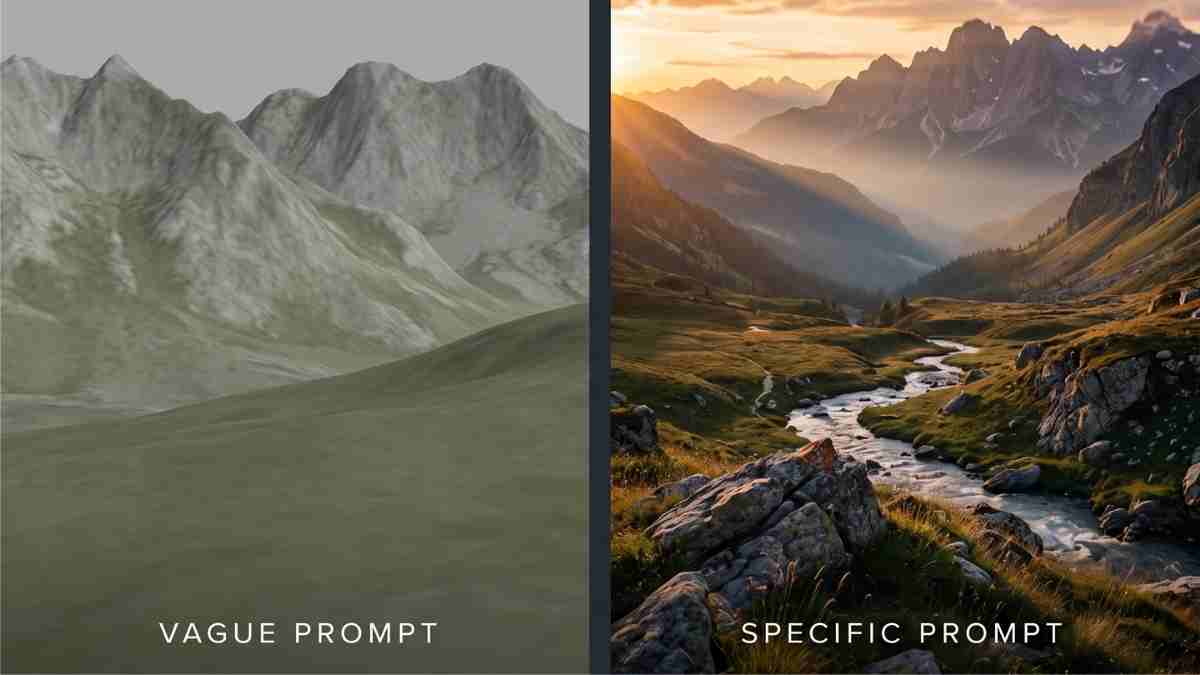
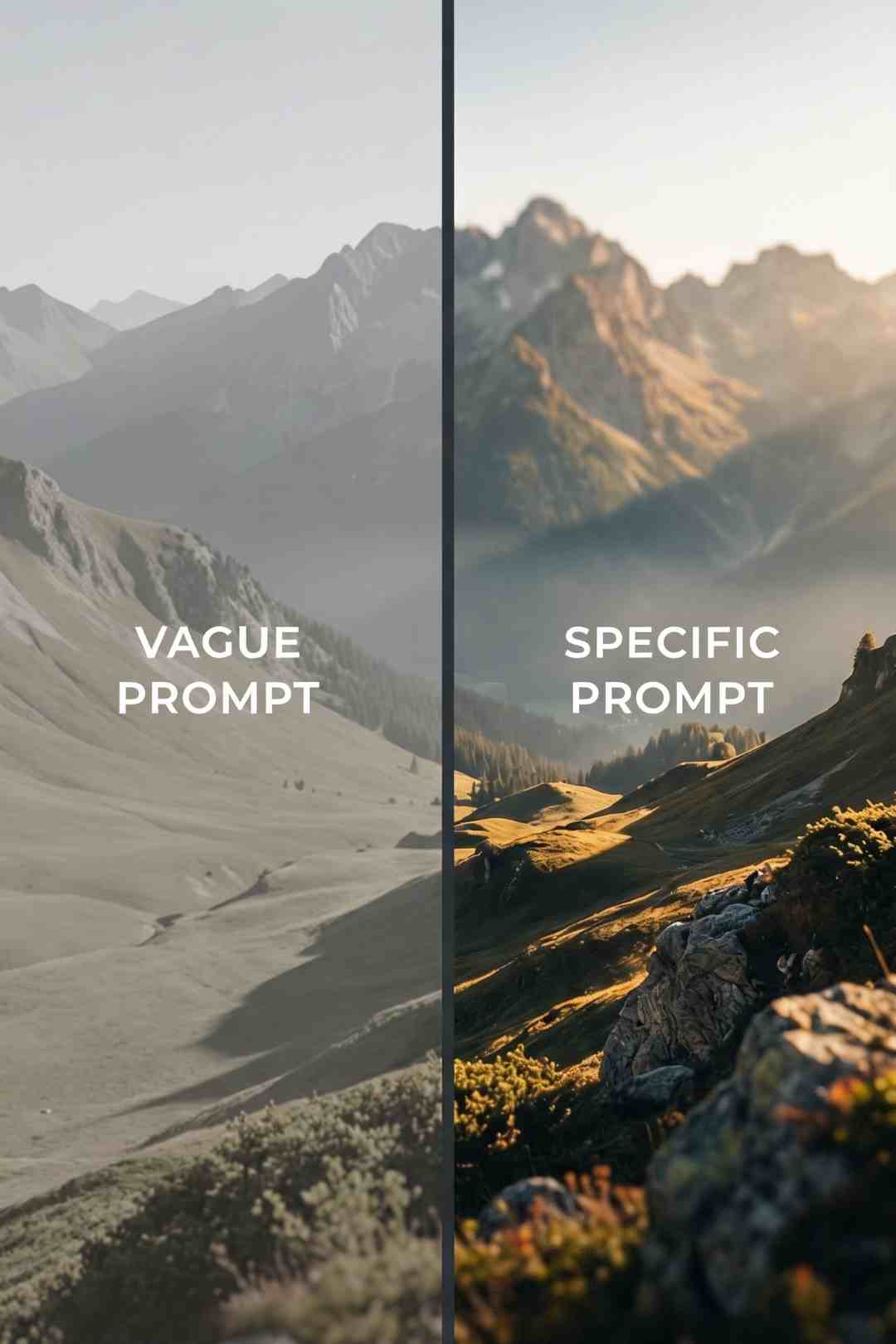
The single most common mistake in AI prompting is being too short and too vague. A prompt like "a mountain at sunset" will produce a mountain at sunset. It will also produce a mountain at sunset for every other person who types those words. The output will be technically correct, visually competent, and completely generic.
The AI tools available in 2026 are not guessing what you want. They are interpolating from the statistical centre of all the training data that matches your description. A vague prompt produces the average of everything the model has seen that matches those words. The average of everything is by definition generic.
Professional prompt writers do the opposite. They push away from the average by being specific. Every word that adds specific detail pulls the generation away from the generic centre and toward something original. The more specific your prompt, the more unique and purposeful your output.
This does not mean longer is always better. A prompt that is long but vague is just vague with more words. The goal is specific detail, not word count.
Every strong AI image prompt covers six elements. You do not need all six in every prompt, but understanding each one and choosing deliberately which to include gives you control over the output that random prompting does not.
What is in the image and what is it doing. This is the only layer most creators include, and on its own it is not enough. "A lone figure on a mountain summit" is a subject. "A lone figure standing completely still at the highest point of a rocky mountain summit, facing east, both hands at their sides, a small pack set down beside them" is a subject with enough specific detail to guide the generation toward something purposeful.
The key principle here is to describe what you actually see in your mind. Do not describe categories. Describe specific things. Not "a person" but "a lone figure in dark mountain gear." Not "a city" but "a dense grid of illuminated skyscrapers with flying vehicle light trails between them." The specificity is what separates your output from everyone else's.
Where is this happening and what does that environment look and feel like. The physical environment is one of the most powerful creative levers in image prompting because it establishes the entire visual world around the subject. Time of day, weather, season, geography, and the specific physical details of the location all belong here.
"At golden hour" is a setting. "Late afternoon golden hour with the sun approximately 10 degrees above the horizon casting long horizontal shadows across the entire landscape and amber light washing across every surface" is a setting that guides the lighting, shadow direction, colour temperature, and overall atmosphere simultaneously.
For the Freevisuals video prompt packs the setting layer is often the most detailed element in each prompt. The Ancient Civilisations Video Prompt Pack specifies not just "an ancient temple" but the time period, the construction materials, the architectural style, the population of the plaza, and the atmospheric conditions simultaneously.
Lighting is the single most important visual element in professional photography and filmmaking, and it is consistently the most underdescribed element in AI image prompts. Most creators mention light direction or time of day but do not specify the quality, colour temperature, intensity, or the specific way light falls on different elements in the scene.
Good lighting descriptors to use: the direction (harsh side lighting from the left, single overhead light, backlight from below), the quality (hard directional light creating sharp shadows, soft diffused light with no visible shadows, rim lighting creating a halo effect), the colour temperature (warm amber 3200K, cold blue daylight, the green-grey quality of pre-storm light), and specific sources (a single bare tungsten bulb, a ramen shop window glowing amber, neon signs in red and blue).
The difference between a prompt with specific lighting and one without is immediately visible in the output. Lighting specificity is the fastest single upgrade most creators can make to their prompt quality.
This is the emotional register of the image. What does it feel like to be in this scene. This is not about describing feelings directly ("it feels lonely") but about describing the visual and atmospheric qualities that create that feeling ("the plaza is completely empty, no footprints anywhere, the last visitor has been gone for years, the only movement is a single bird landing on the stone").
Mood descriptors work by giving the AI model emotional context that guides its choices on the many variables it has discretion over. When you specify "profoundly still and ancient, a world that has been waiting for a thousand years," the model adjusts composition, texture, light quality, and detail level in ways that serve that emotional register.
For reference, look at how the prompts in the Cozy Bookshop Through the Seasons Pack specify mood: "deeply warm and cozy atmosphere," "the contrast between the warm glowing interior and the cold wet street outside is the central visual quality." These phrases do not describe specific pixels. They describe the emotional experience the image should produce.
This is where you specify the visual language of the image. Camera type, lens focal length, aperture, shooting style, film stock, and technical quality descriptors all belong here. These elements have a large impact on output quality because they tell the model to reference specific bodies of photographic work rather than the generic AI image aesthetic.
The most reliable technical references are specific camera and lens combinations (Arri Alexa 65 with a 35mm lens, Leica Q3, Phase One IQ4), shooting styles (handheld documentary aesthetic, locked-off tripod landscape photography, drone aerial perspective), and quality descriptors (photorealistic, 8K, film grain, extreme detail, shallow depth of field with the midground sharp and background in bokeh).
The phrase "photorealistic" is worth including in almost every prompt where you want the output to look like a photograph rather than an illustration. The phrase "shot on [camera model]" consistently improves output quality because it associates the generation with the specific visual characteristics of professional camera systems.
Most AI image tools support negative prompts or exclusion instructions. These tell the model what not to generate. For cinematic and professional work, a consistent set of negative prompt terms is worth having ready to paste. The most useful negative prompt elements for creator content: cartoon, CGI obvious, anime, illustration, flat lighting, stock photo style, people facing directly into camera when you want a more cinematic framing, watermarks, text overlays, logos.
For tools that support weighted negative prompts (Stable Diffusion, OpenArt AI, Leonardo AI), the syntax varies by tool but the principle is the same. Exclude the generic elements that pull your output back toward the average.
Creating a single great image is one thing. Creating eight images that all look like they belong together in the same visual world is significantly harder and is the skill that separates creators who get great individual outputs from creators who can build a complete video sequence or channel identity.
The anchor-and-variation method is the solution. Generate one anchor image first, the foundational shot that establishes every key visual element: the environment, the lighting palette, the camera angle, the key objects and characters. Then use that anchor as a reference in your tool's Image-to-Image mode for every subsequent variation.
Image-to-Image mode is available in OpenArt AI, Midjourney (using the image URL in your prompt), Adobe Firefly (Reference Image), Leonardo AI (Image Guidance), and DALL-E 3 (edit mode). The similarity or Image Strength slider is the key control. It determines how closely the variation follows the reference. The optimal range varies by content type:
For interior scenes like the bookshop (where a moved bookcase is immediately obvious): 70 to 78 percent similarity. For outdoor landscape scenes (where minor shifts are masked by natural variation): 60 to 70 percent. For historical architectural scenes (where structural changes need room to develop): 55 to 65 percent.
Every complete video prompt pack in the Freevisuals AI Prompt Library is built around this method. The Mountain Summit at Dawn Complete Bundle, the City Timelapse Pack, and the Storm Timelapse Pack all use Shot 01 as the anchor for every subsequent variation.
For a complete beginner guide to Midjourney parameters including aspect ratio, version selection, and style controls: Get BETTER Midjourney Results: 4 Parameters to Master First.
For the latest Midjourney v8 tips including HD mode, style references, and prompting improvements in the newest version: 10 Midjourney V8 Tips for BETTER Results.
Magnific is the most important tool in the AI content creation workflow that most creators have not yet added to their process. It goes beyond upscaling by adding genuine detail to images based on the content of the scene. The leather texture on a hiking glove, the grain texture on an ancient stone relief, the individual leaf detail in a jungle canopy, the neon sign text on a wet city street. These details are added in a Magnific enhancement pass and they make the crucial difference when the image is subsequently used as the input frame for video generation.
A video generated from a Magnific-enhanced image looks significantly more film-quality than the same video generated from the same image without enhancement. The reason is that AI video generation tools animate the information that exists in the input image. More detail in the input frame means more convincing motion in the output clip.
The practical workflow is: generate in Midjourney or OpenArt AI, download the best generation, run it through Magnific, and use the enhanced image as the input for your video generation tool and as the reference image for Image-to-Image variations. Every subsequent step in the workflow benefits from the quality uplift in the enhanced anchor.
Video prompts require a different approach from image prompts because video has a time dimension that images do not. An image prompt describes a state. A video prompt describes a change.
The most common mistake in video prompting is describing the scene rather than the motion. A video prompt that says "a mountain at golden hour with neon clouds and dramatic light" is an image prompt. The AI video tool will generate something that looks like the image but with random or mechanical motion added. A video prompt that says "the golden light on the mountain face very slowly deepens and warms over the clip, the shadow of the summit on the facing peak moves almost imperceptibly, a brief bird sweeps through the upper right of the frame at the 6-second mark, camera locked off completely" is a video prompt. It specifies what changes, what stays still, and at what pace.
The three motion control principles for cinematic AI video are: be specific about what moves, be explicit about what does not move, and specify motion pace. These three elements together are what separates cinematic AI video from robotic AI video.
Every video clip has a small number of intended motion elements and a large number of elements that should stay still. Name the specific motion elements and describe them precisely. Not "the fire flickers" but "the fireplace flames move in a slow natural pattern, the warm amber light from the fire causing very subtle variation across the bookshelves in the background." Not "the crowd moves" but "figures in the commercial street move with natural human energy, neon umbrellas bobbing and weaving, the holographic advertising displays on the building faces cycle through their animations."
For a complete guide to timestamp prompting across Runway, Veo, Sora, and Kling for narrative control over AI video: Timestamp Prompts: Narrative Control for AI Video. This technique is one of the most powerful currently available for controlling what happens at specific moments in a generated clip.
For Kling AI specifically, the beginner prompt guide for 2026 covers the complete syntax and structure for getting the best results from Kling's current models: Kling AI Prompt Guide for Beginners (2026 Tutorial).
The camera behaviour instruction is the most important single element in a cinematic video prompt and the most often omitted. Without explicit camera instructions, AI video generators will introduce movement by default because movement makes the clip look more dynamic in isolation. But for most cinematic and ambient content, camera movement competes with the scene rather than serving it.
For locked ambient content: "camera completely locked off, no movement." For slow cinematic push: "very slow camera push forward at the pace of a person breathing, barely perceptible over 8 seconds." For dynamic content: "low dynamic angle suggesting pursuit, the camera moves forward through the alley at chase pace."
The cozy ambient packs in the Freevisuals library use the strictest camera locking of any video type: "the camera is locked off completely, all motion comes from within the scene." The cyberpunk chase shot uses the most dynamic camera specification. The right camera instruction depends entirely on the emotional purpose of the clip.
The pace of motion in AI video is one of the most important qualitative differences between amateur and professional output. Most default AI video motion is either too fast (mechanical, unconvincing) or too random (movement for movement's sake).
For atmospheric and ambient content, almost all motion should be at or below the threshold of conscious perception. The viewer should not notice specific things moving. They should feel that the scene is alive. Describe motion in terms of what would be barely visible on second viewing: "the mist drifts almost imperceptibly from left to right," "the shadows lengthen by a degree that only a still image comparison would reveal," "the rain drops hit the puddle edge creating small circular ripples that expand and fade."
For energetic content, specificity of motion pace still matters. "The crowd moves with natural human energy" is better than "the crowd moves." "The chase moves at a pace that closes the gap between the pursuer and the silhouetted figure by approximately 5 metres over 8 seconds" is better than "the chase moves fast."
Different tools have different strengths and require different prompting approaches.
Midjourney v7 responds most reliably to photographic style references (camera model, lens, shooting approach) and mood language. Add --ar 16:9 --v 7 --style raw --q 2 to every landscape and cinematic prompt. The --style raw parameter reduces Midjourney's own aesthetic interpretation and gives your prompt more direct control over the output.
OpenArt AI has a cleaner Image-to-Image implementation than most alternatives and works well for the anchor-and-variation workflow. The SDXL model on negative prompt weight 1.5 to 2.0 is the most reliable setting for photorealistic cinematic content. The Realistic Vision model is the best choice for human figures and interior scenes.
Kling AI's image-to-video handles atmospheric motion and natural environments exceptionally well. The motion brush feature, which lets you paint over specific areas of the input frame and assign motion only to those regions, is the most powerful camera control currently available in any consumer video generation tool. For scenes where you want fireplace flicker but nothing else to move, the motion brush eliminates the unwanted motion that text prompts alone cannot always prevent.
Runway Gen-4 is the strongest tool for fog, atmospheric conditions, and controlled camera movement. The motion intensity slider from 1 to 10 is highly responsive. Cinematic ambient content should be at 1 to 3. Dynamic content at 4 to 6. Anything above 6 produces motion that is too aggressive for most content types.
For colour grading and enhancing generated footage after animation, the Free Mega Cinematic LUT Pack on Freevisuals provides 22 LUTs in .cube format compatible with Premiere Pro, After Effects, DaVinci Resolve, and Final Cut Pro. Applying a consistent LUT across all clips in a sequence is one of the fastest ways to create visual coherence across an AI-generated video sequence.
Professional prompt writers do not expect to nail a prompt on the first generation. They treat the first generation as diagnostic information about what the prompt communicated and what it did not.
The practical iteration process is: generate, identify the single biggest gap between the output and your intention, and address that gap specifically in the next prompt iteration. Do not rewrite the entire prompt each time. Diagnose the specific element that missed and add or modify the language targeting that element.
If the lighting is wrong, add a more specific lighting description. If the camera angle is not what you intended, add explicit camera position language. If the mood is too dramatic or not dramatic enough, add or modify the atmospheric descriptors. Each generation teaches you something specific about what that tool responds to.
Keep a personal prompt library of your best-performing prompt fragments. Lighting descriptions that work. Camera angle phrases that produce the framing you want. Mood language that consistently produces the emotional register you need. Building a library of proven phrase-level elements is faster and more reliable than trying to write complete new prompts for every project.
The Freevisuals AI Prompt Library is built on exactly this principle. Every prompt in the library represents the result of multiple iteration cycles, keeping what works and discarding what does not.
A YouTube thumbnail image prompt and a video scene image prompt require different approaches even though both use the same tools.
Thumbnail prompts need to work at a very small size. A thumbnail is displayed at 1280x720 but viewed on screens where it occupies roughly 200 to 300 pixels of screen space. Everything that matters in the image needs to read at that size. This means fewer elements, higher contrast between the focal point and the background, and a single dominant visual. The 10 True Crime Thumbnail Prompts and the Dramatic Finance Thumbnail Prompts are built around this principle. Every prompt in those packs specifies a clear single focal point, high contrast, and nothing that competes with the main visual element at thumbnail scale.
Scene prompts for video can and should be more complex. The viewer is watching at full screen for 8 to 10 seconds. Detail rewards engagement. Multiple elements can coexist. The environment can be rich and layered because the viewer has time to explore it.
The thumbnail-to-scene distinction also affects lighting specification. Thumbnails need harder, more dramatic lighting with deeper shadows because softer lighting reads as flat at small sizes. Scene images benefit from more naturalistic lighting that rewards close inspection.
For generating thumbnails with OpenArt AI, generate at 1280x720 directly if the tool supports that resolution, or generate at a higher resolution and crop. The aspect ratio should always match the YouTube thumbnail standard of 16:9.
The output looks like AI. The most common cause is using adjectives that describe quality rather than specificity. "Beautiful," "stunning," "amazing," and "epic" do not add visual information. Replace them with specific descriptors of what beautiful or stunning actually looks like in the specific scene. Instead of "a beautiful sunset," describe the specific colours, light quality, shadow direction, and atmospheric conditions of the sunset you have in mind.
The figure looks wrong. Human figures are the hardest element for AI image generation to handle consistently. The most reliable approach is to keep figures small in the frame, viewed from behind where possible, and to avoid prompting for facial expressions or specific gestures. The Freevisuals video prompt packs consistently use a lone figure from behind specifically because this approach generates more consistently than frontal portrait or expression-based figure prompts.
The video clip has random unwanted motion. Add explicit "camera locked off, no movement" language and specify exactly which elements should be still. For Kling AI, use the motion brush to paint motion only onto the elements you want to move.
The colours look saturated and artificial. Add "slightly desaturated" or "naturalistic colour rendering" to your prompt. Most AI image tools have a slight tendency to oversaturate by default, especially in golden hour and neon scenes. The fix is explicit desaturation language combined with specific colour temperature descriptors rather than general brightness or warmth instructions.
The Image-to-Image variations are drifting too far from the anchor. Increase the similarity or Image Strength slider. If you are already at the maximum, add more specific landmark details to your variation prompt that reference specific elements from the anchor image by description: "the same timber fence post in the left foreground," "the same rooftop HVAC unit visible in the foreground," "the same narrow alley with the ramen shop window on the left."
Midjourney v7 and v8 produce the highest overall quality for cinematic photorealistic content, particularly for landscapes, architectural scenes, and atmospheric environments. OpenArt AI on the SDXL or Realistic Vision model is the strongest free alternative and has the most reliable Image-to-Image implementation for the anchor-and-variation workflow. Adobe Firefly is the best choice when commercial licensing clarity is the priority.
Use the anchor-and-variation method. Generate one reference image first, specify every key visual element in that anchor prompt, and then use Image-to-Image mode for every subsequent variation at 60 to 78 percent similarity depending on how much variation you need. Add specific landmark details to each variation prompt that reference identifiable elements from the anchor.
There is no universal length. The right length is however many words it takes to be specific about the six layers: subject and action, environment and setting, lighting, mood, technical style, and any necessary exclusions. Most strong cinematic image prompts are between 100 and 200 words. Shorter prompts can produce great results when every word is specific. Longer prompts are only useful if the additional words add specific visual information rather than repeating or embellishing what is already specified.
A good AI video prompt describes motion. A bad one describes the scene. If your video prompt reads like an image prompt with no reference to what changes over time, the AI tool will produce a clip where motion appears randomly rather than purposefully. Every video prompt should specify at minimum: what specific elements move, what the camera does (or that it is locked off), and at what pace the motion occurs.
Yes, consistently. The most impactful negative prompt terms for cinematic content are: cartoon, CGI obvious, anime, flat lighting, stock photo aesthetic, and watermarks. For human figure content: distorted hands, extra limbs, and unnaturally large eyes. For landscape content: telephone poles, power lines, and aircraft. For architectural content: modern elements when shooting historical scenes. Including a consistent negative prompt as part of your standard workflow is worth the extra 10 seconds it takes to paste.
The 10 True Crime Thumbnail Prompts and the 10 Finance YouTube Thumbnail Prompts are the easiest starting points because they produce single images that are immediately usable rather than requiring an assembly workflow. For video, the Cozy Bookshop Pack is the most straightforward because the locked-off camera requirement and subtle motion specifications are more forgiving of tool variation than the more dynamic scene packs.
All of the prompt packs referenced in this guide are available as free downloads from the Freevisuals AI Prompt Library. The library covers image prompts for YouTube thumbnails, complete video sequences with image and video prompt pairs, music generation prompts for Suno and Google Flow Music, and sound effects prompts for ElevenLabs SFX v2.
The thumbnail packs include the True Crime Thumbnail Pack, the Finance YouTube Thumbnail Pack, and the Wealth Story Thumbnail Bundle.
The video sequence packs include the City Timelapse Pack, the Storm Timelapse Pack, the Cozy Bookshop Pack, and the Ancient Civilisations Pack.
The complete production bundle, covering images, video, sound effects, and music in a single download, is the Mountain Summit at Dawn Bundle.
For music generation prompts: Cyberpunk Dark Electronic Music Prompts, Cozy Ambient Music Prompts, and 10 Cinematic Music Prompts.
For sound effects prompts: Urban City Street SFX, Horror Investigation SFX, and Nature Documentary SFX.
Browse the complete library at freevisuals.net/ai-prompt-library.
For image generation and the anchor-and-variation workflow, OpenArt AI is the recommended starting tool. For image enhancement before animation, Magnific is the step that makes the biggest quality difference. For licensed music to accompany your generated visuals, Artlist and Epidemic Sound are the two most practical options for YouTube creators. For sound effects generation, ElevenLabs SFX v2 is the recommended tool for all the sound effect packs in the Freevisuals library.
Disclosure: This post contains affiliate links. If you purchase through these links, Freevisuals may earn a small commission at no extra cost to you.
.avif)
.avif)
.avif)
.avif)